Editing a data structure
Advanced editing of a data structure
Mapping a data structure in a database
The created data structure is directly mapped to the Microsoft SQL Server database. Each structure is equivalent to a table in the database, and each field in the structure is a field in the database table. The fields from the structure are directly reflected in the form of fields in the database table, while the relations are mapped in the database in the form of appropriate foreign keys. In addition to business fields, tables automatically create additional fields in which information about the application from which a given object comes and the database identifier of this object is saved.
The names under which the fields from the data structure will be saved in the database are configurable.
Changes of field properties
Changing the properties of a field stored in a data structure (e.g. changing the name or type of a field) is equivalent to creating a new field in a database. The field that previously existed in the database will not be deleted. You will not be able to access the data stored in such a field. It is not possible to change the field type itself. The change will be possible if the field name is also changed. A new field with the new type and name will be created.
Removing fields
To delete a field:
- select the item,
- select Delete from the context menu.
Deleting a field removes it from a data structure tree. This is not the same as deleting the corresponding field in a database.
Copying /pasting fields, descriptions
Fields to a data structure can be added in bulk, for example from an Excel sheet. You can copy directly to the field's data structure, then change their name and type, and paste the description of the fields.
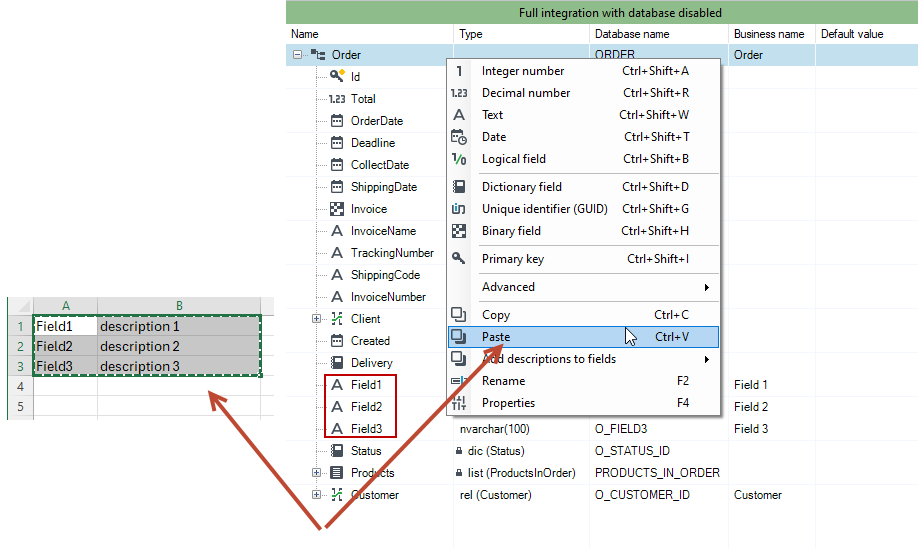
For this purpose:
- Choose the cells to copy in the Excel sheet.
- Go to the data structure and paste the fields.
- Check the cells with the description to copy in the Excel sheet.
- Go to the data structure, right-click and paste the description into the fields by selecting one of the options for assigning comments to existing fields.
- Descriptions will be pasted to the corresponding fields.
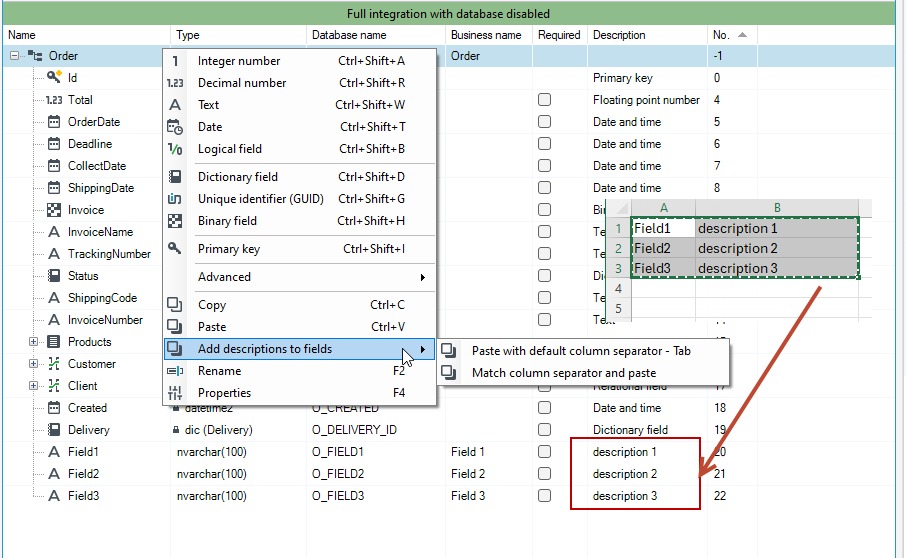
If you are pasting only one column of the table, i.e. the field name, then it is always pasted as a text field. However, if you paste the table with columns corresponding to the columns in the table: Name, Type, Required, Description, then everything will be pasted into the structure along with the appropriate field types.
If you want to paste fields of the correct type, enter the type used in the data structure in the second column of the Excel sheet—for example, nvarchar for text, decimal for fixed-point numbers, and so on. If a type is not recognized, the field will be assigned the text type. Also, remember to name the fields correctly. If you paste field names containing disallowed characters, you will need to adjust them later in the data structure.