Properties of data structure and its objects
Data structure properties
Both the properties of individual fields and the data structure itself are available in the Properties panel. Right-click a given field or the entire structure and select the Properties tab from the context menu. You can also choose to display the Properties tab from the bottom panel. Click the icon 
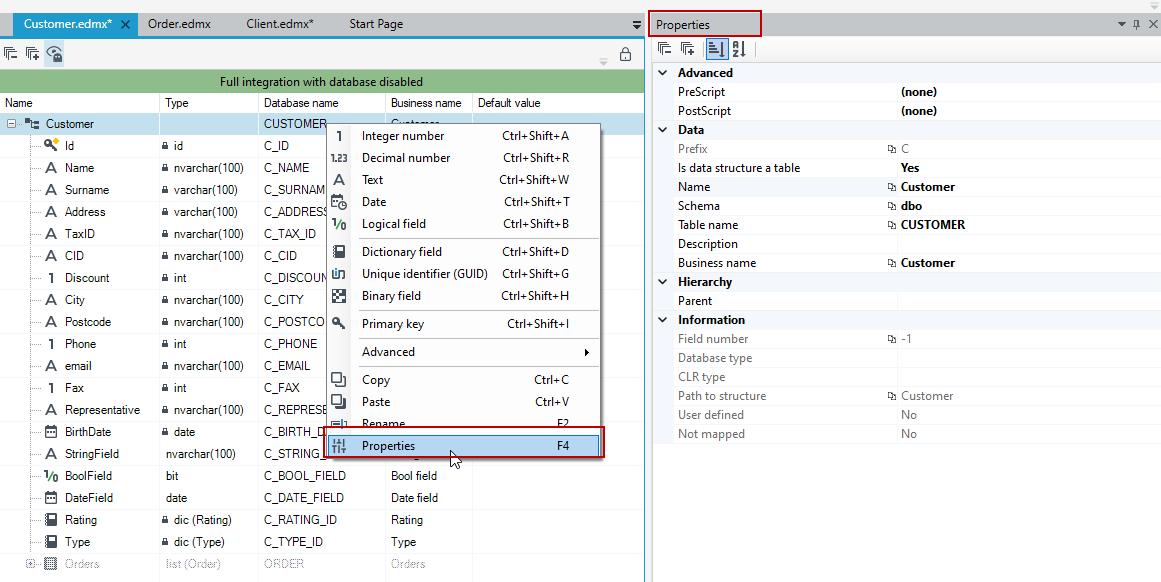
The Data section contains general structure properties:
- Name - name of a data structure (by default, the name is provided when creating the structure). Changing the name of a saved data structure results in saving a new table in the database (the situation is possible only when the new name has not been used previously by another structure).
- Table name - name of the table in a database.
- Description - additional information about a data structure.
- Prefix - you can define a prefix that will apply to all fields in the table.
- Is the structure a table - click on the field and select Yes or No from the drop-down field. The field determines whether the structure in the database is defined as a table or a synonym / view.
- Schema - name of the schema in the database.
- Business name - An additional description of the structure or the structure field that allows you to enter business information about the field resulting from the analysis.
Hierarchy
- Parent – In this field you can select a structure from the version server. The function is to designate the parent structure - the parent. Thanks to it, when you modify or add a subordinate structure - a child, the data reading data will also be deposited in the records of the parent structure in the
dbo.AUD_OBJECT_ACCESS_LOG table - Structure with primary key – Structure with primary key.
- Property with relations – Property with relations.
Information - this section contains information about the structure or object of the data structure without the ability to edit it.
- Field number – Field order in structure.
- Field type
- Database type
- CLR type – Data type in runtime environment.
- Path to structure
- User defined – Indicates whether the field is added directly in the C# code.
- Not mapped – Indicates whether the object is mapped to the database.
The Advanced section includes properties for mapping the data structure in a database.
Only available for the root in the structure tree. There are two options inside:
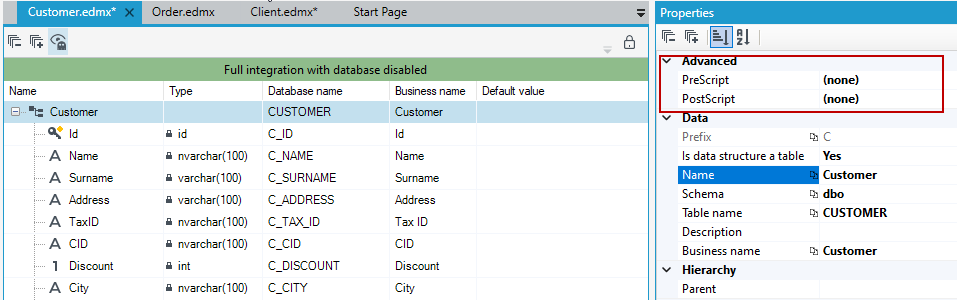
With their help, you can "inject" appropriate SQL scripts into the database, for example, to remove an index on the database before some operation.
For example:
Using the Prescript and Postscript properties, you can specify the uniqueness of a single column without additional conditions.
- In the Prescript field, place the deletion (if it previously existed) of the index denoting the uniqueness of the selected columns.
- In the Postscript field, place the creation of an index.
- We define these operations in T-SQL (https://learn.microsoft.com/en-us/sql/t-sql/statements/create-index-transact-sql?view=sql-server-ver16), using the names of tables and columns in the database.
Replace the bold fragments with the appropriate ones for the table and column of interest:
PreScript:
IF EXISTS (SELECT \* FROM sys.indexes WHERE name = 'UX\_DOWOLNA\_UNIKALNA\_NAZWA\_INDEKSU'
AND object\_id = OBJECT\_ID(N'dbo.NAZWA\_TABELI'))
DROP INDEX [UX\_DOWOLNA\_UNIKALNA\_NAZWA\_INDEKSU] ON [dbo].[NAZWA\_TABELI]
PostScript:
CREATE UNIQUE INDEX [UX\_DOWOLNA\_ UNIKALNA\_NAZWA\_INDEKSU] ON [dbo].[NAZWA\_TABELI] ([NAZWA\_KOLUMNY])
Properties of fields in the data structure
All fields in the data structure have a set of properties that are common to each of them:
- Name - field name in the data structure,
- Database field name - name of the database column that corresponds to the field in the structure,
- Description - additional information about the field in the data structure.
- Business name - An additional description of the structure or the structure field that allows you to enter business information about the field resulting from the analysis.
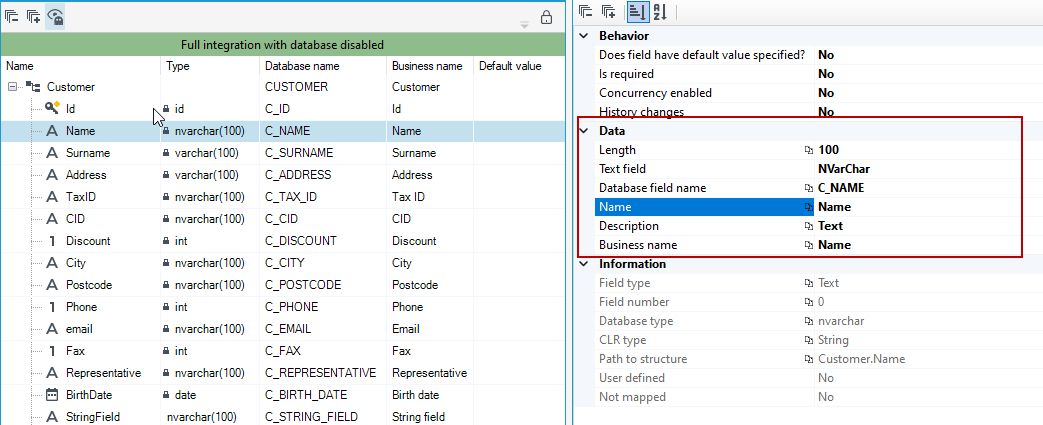
The Behavior section also occurs for most fields defined in the data structure:
- Is required – Defines if the field is required.
- Does the field have default value specified? – select Yes if you want to enter a default value in the field below.
- Default value - enter default value.
- Concurrency enabled – By enabling this function, if two different users attempt to write the same record, the data write for one user will be rejected and a message will be displayed about the attempt to overwrite outdated data. The function requires the Modified datefield added to the data structure for proper operation.
- History changes – Enables history of changes that will be stored in a separate table. For more on using the history of change see History changes.
Each field type in a data structure has an additional set of properties specific to a given data type. The various properties are described in the chapter Data structure objects.