Dictionaries in database
The dictionaries are stored in the database in four tables:
DIC_ATTRIB– contains dictionary attributes.DIC_ITEM– table containing definitions of dictionary objects.DIC_LOCALIZATION– contains localized information about objects.DIC_REFERENCE– table containing definitions of views.
DIC_ATTRIB
| Column | Properties | Description |
|---|---|---|
DIA_ID | PK, uniqueidentifier, not null | ID assigned during attribute creation |
DIA_DICSTR_ID | PK, FK, uniqueidentifier, not null | Structure ID |
DIA_PARENT_ID | FK, uniqueidentifier, not null | Parent element ID |
DIA_TYPE_ID | FK, uniqueidentifier, not null | Type definition element ID |
DIA_DICSTR_TYPE_ID | FK, uniqueidentifier, not null | Structure ID containing elements that are types |
DIA_VAL_AS_STR | nvarchar(max), null | Attribute value as a string |
DIA_VAL_NUM | numeric(19,4), null | Attribute value of type decimal |
DIA_VAL_STR | nvarchar(max), null | Attribute value of type string |
DIA_VAL_DAT | datetime, null | Attribute value of type DateTime |
DIA_VAL_GUID | uniqueidentifier, null | Attribute value of type GUID |
DIA_VAL_DICSTR_ID | FK, uniqueidentifier, null | Structure ID containing elements |
DIA_VAL_DICOBJ_ID | FK, uniqueidentifier, null | Selected element ID |
DIA_VAL_BLOB | varbinary(max), null | Attribute value of type Binary |
DIA_VALID_FROM | datetime, not null | Attribute validity FROM (default in archITekt Studio - 1900-01-01) |
DIA_VALID_TO | datetime, not null | Attribute validity TO (default in archITekt Studio - 2099-12-31) |
DIA_ACTIVE | bit, not null | Is the attribute active |
DIA_INDEX | bit, not null | Attribute index |
DIC_ITEM
| Column | Properties | Description |
|---|---|---|
DII_ID | PK, uniqueidentifier, not null | Dictionary object ID |
DII_DICSTR_ID | PK, uniqueidentifier, not null | Structure ID to which the dictionary object belongs |
DII_NAME | nvarchar(max), not null | Name |
DII_DESCRIPTION | nvarchar(max), not null | Description |
DII_TYPE | char(1), not null | Object type. Available types: C – category, I – element, V – view |
DII_PARENT_ID | FK, uniqueidentifier, null | Parent object ID |
DII_DICSTR_PARENT_ID | FK, uniqueidentifier, null | Parent structure ID |
DII_VALID_FROM | datetime, not null | Defines the validity of the dictionary object FROM (default in archITekt Studio - 1900-01-01) |
DII_VALID_TO | datetime, not null | Defines the validity of the dictionary object TO (default in archITekt Studio - 2099-12-31) |
DII_ACTIVE | bit, not null | Is the dictionary object active |
DII_INDEX | bit, not null | Index |
DIC_LOCALIZATION
| Column | Properties | Description |
|---|---|---|
DIL_DICSTR_ID | FK, uniqueidentifier, not null | Structure ID |
DIL_DICT_OBJECT_ID | PK, FK, uniqueidentifier, not null | Dictionary object ID |
DIL_LANGUAGE | PK, varchar(10), not null | Language |
DIL_NAME | varchar(256), not null | Name in the given language |
DIL_DESCRIPTION | varchar(256), not null | Description in the given language |
DIC_REFERENCE
| Column | Properties | Description |
|---|---|---|
DIR_ID | PK, uniqueidentifier, not null | ID |
DIR_VIEW_ID | FK, uniqueidentifier, not null | View ID |
DIR_DICSTR_VIEW_ID | FK, uniqueidentifier, not null | Structure ID that contains the view |
DIR_OBJECT_ID | FK, uniqueidentifier, not null | Element ID that belongs to the view |
DIR_DICSTR_OBJECT_ID | FK, uniqueidentifier, not null | Structure ID that contains the element belonging to the view |
DIR_INDEX | int, not null | Index |
SQL Views
SQL views were created to simplify the use of dictionaries. The view extracts structured data from the database without requiring knowledge of the relationships between database tables within the dictionaries. There is no need to write a script to retrieve category elements along with their attributes.
Example of a dictionary with a category having an SQL view:
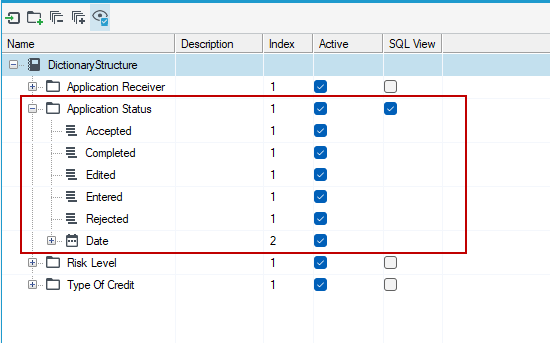
To retrieve elements of the "Application Status" category along with their attributes using the SQL view, you need to execute the following query:
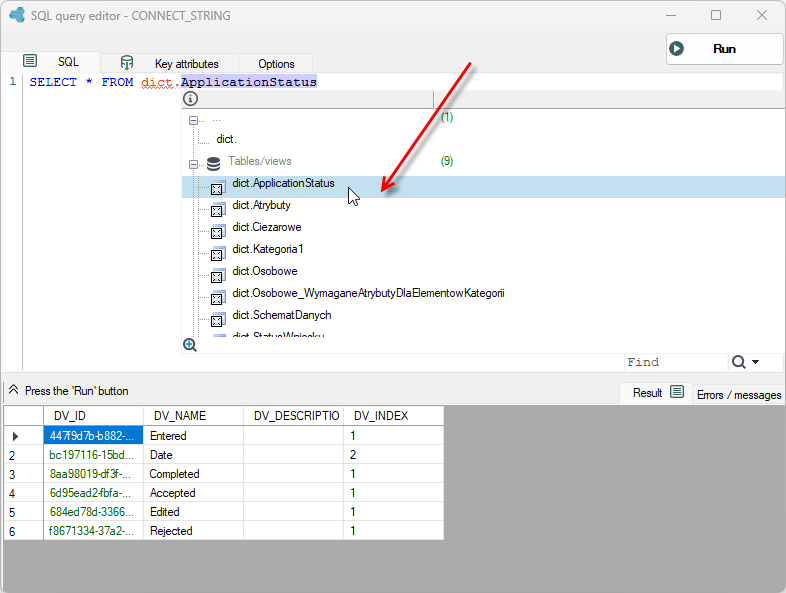
SELECT * FROM [dict].[ApplicationStatus]
The query will return the following data. You can use syntax suggestion and press CTRL+Space to search for a specific dictionary category.