Work environment
Work environment of a Dictionaries is based on common and consistent assumptions. It mainly consists of a tree-grid, which presents basic information useful from a dictionary point of view.
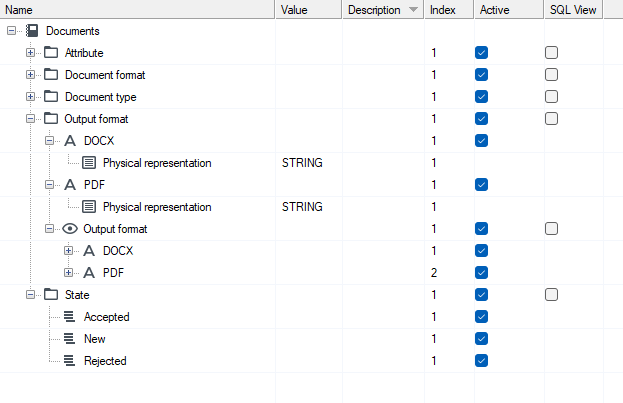
Information visible in the tree of the dictionary structure
- Name - in this column there is a tree structure which includes all categories and elements of the dictionary structure. The name of the dictionary objects can contain any characters (letters, numbers, spaces, special characters).
- Value - the expected value is entered or selected in this column in structure elements or attributes.
- Description - a field where you can enter a business description of an element of the dictionary structure.
- Index - by default, the elements of the structure inside categories, etc. are sorted alphabetically. In this column, by entering the consecutive numbers of selected elements, you can change and adjust the sorting to your business requirements. If you use a drag & drop option and you move items, then the item index is automatically changed and the order is established.
- Active - a field where we define whether a given element is active or not. Inactive items are not displayed on the GUI items for the end user.
- SQL view - the designer can choose whether a view in the database with elements of this category should be created automatically for a given category. This makes it easier to create SQL queries referring to the selected dictionary categories. For more information, see: Database Mapping > SQL Views.
Properties of a dictionary structure
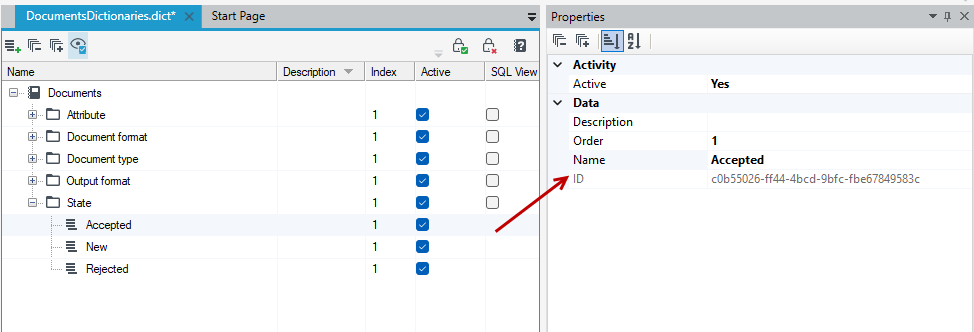
As with a data structure and other archITekt elements, a Properties panel is also available for dictionaries, in which the specific data for a given element is collected. A Properties panel shows the details of the selected element of the dictionary structure. For more information on Properties panel, see: Properties Panel.
The most important property of a given element is its ID - a unique identifier of a dictionary objects, generated automatically.
Work area
As in the case of other modules, a workspace is the central part of the window where the dictionary structure tree is located. Depending on the selection of a given element, be it a category or attributes, the possible actions are available on the top bar:
 show only active items
 create a new dictionary view
 create a new dictionary category
 create a new dictionary item
 collapse / expand node
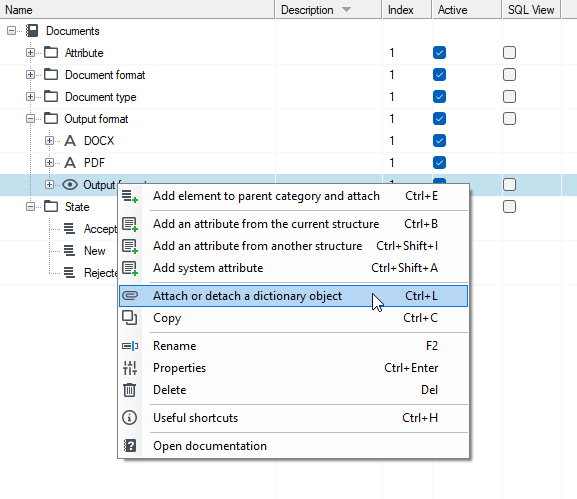
Options specific to a given dictionary object are available in the context menu. Here, too, the scope of available functionalities depends on a given element. For example, only a view has the option to attach or detach a dictionary object.