Other settings
You can open the VSoft archITekt Launcher settings window by clicking the gear icon (Settings) in the top-right corner of the application.
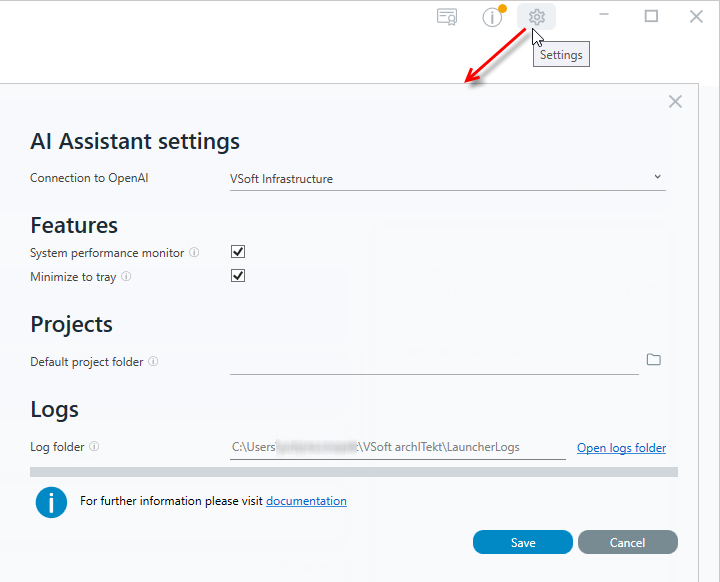
Connection to OpenAI
Here you specify how AI Assistant connects to OpenAI models - via VSoft (default option) or using your own OpenAI account. For a detailed description of this section, see AI Assistant configuration.
Features
Minimize to tray When this option is enabled, minimizing the Launcher window hides it in the system notification area (tray) instead of the Windows taskbar.
System performance monitor Enables the system performance monitor, which collects and displays information about computer resource usage while the application and its running components are working.
Projects
Default project folder The default path suggested when creating new developer projects. You can specify your own location by typing it in directly or by selecting a folder using the button next to the field.
Logs
Log folder The path to the folder where VSoft archITekt Launcher application logs are stored. This field is informational only - the log folder location cannot be changed. Clicking the Open logs folder link opens this folder directly in File Explorer.
At the bottom of the settings window there is a documentation link that takes you directly to the VSoft archITekt documentation.