Adding fields/records
You can add new fields and records to the data schema tree.
- Right-click on the tree and from the context menu select Add and then the field/record you want to add.
- If the field you are adding is to have Annotation: expression, constant or is to be required, select one of the options beforehand (Attach an expression/constant, Field or record will be mandatory), and then select the item you want to add.
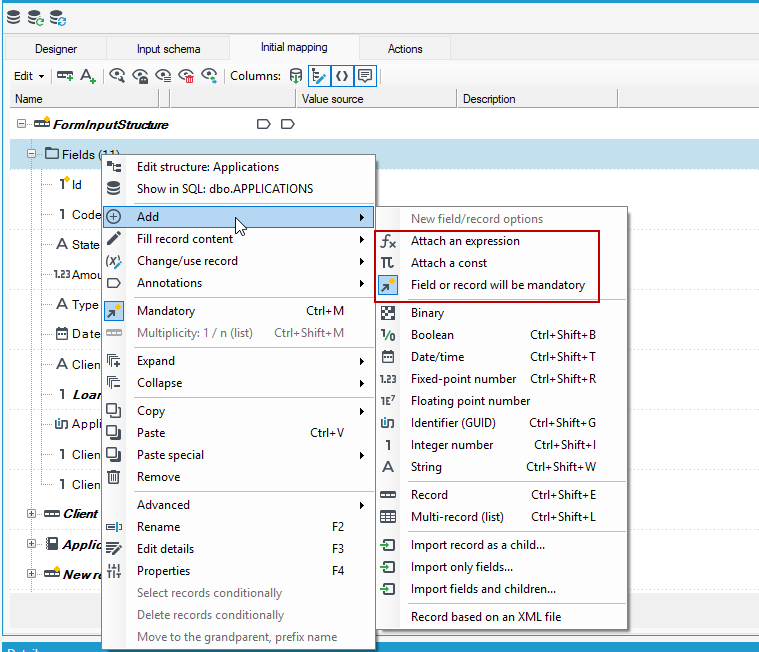
There are several types of basic fields that you can add to the data schema (possible database representations are given in parentheses):
- String - its length may be limited or unlimited (length=0).
- Integer number - denotes a natural number with or without sign, used for notation of identifiers (int, bigint) and integers (byte, short, int, long, etc.). In the type options you can specify the byte length (1, 2, 4 or 8 bytes) and the signability (signed/unsigned).
- Fixed-point number - each number that has a fixed number of digits around zero, used for identifiers (int, bigint), amounts (Numeric, decimal, Money), etc. It should not be confused with rarely used floating-point numbers.
- Date and time - in the options you can specify whether it is the date and time (default) or only the date part.
- GUID (uniqueidentifier) - usually a dictionary or other globally unique value,
- Boolean (true/false).
- Floating-point number (double, IEEE 754).
- Binary data.
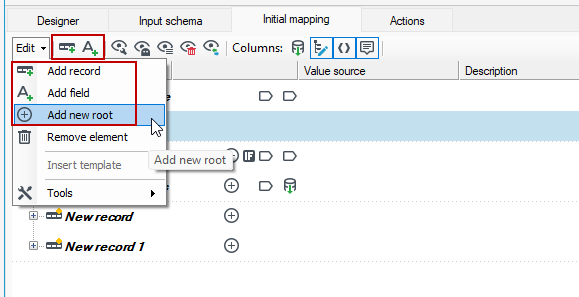
In addition, you can also add a new record, a string type field and a multiple record using the context menu or the icons on the top bar or by expanding the Edit menu.
danger
Adding a new root to a data schema is only possible from the Edit menu.