Dictionary
Annotation Dictionary - allows you to retrieve data from a dictionary. When using a dictionary, the value of the element will be swapped. Dictionaries and corresponding mappings are configurable.
Dictionary is used for remembering a small number of flat records and especially mapping certain arguments to other ones, for example.
- a short name and a description,
- an input code and an output code,
- complete table which describes names, codes, types and descriptions of a large data structure.
In the Dictionary annotation we can set the following:
- Dictionary name and a pair of the key>value mapping columns.
For example:
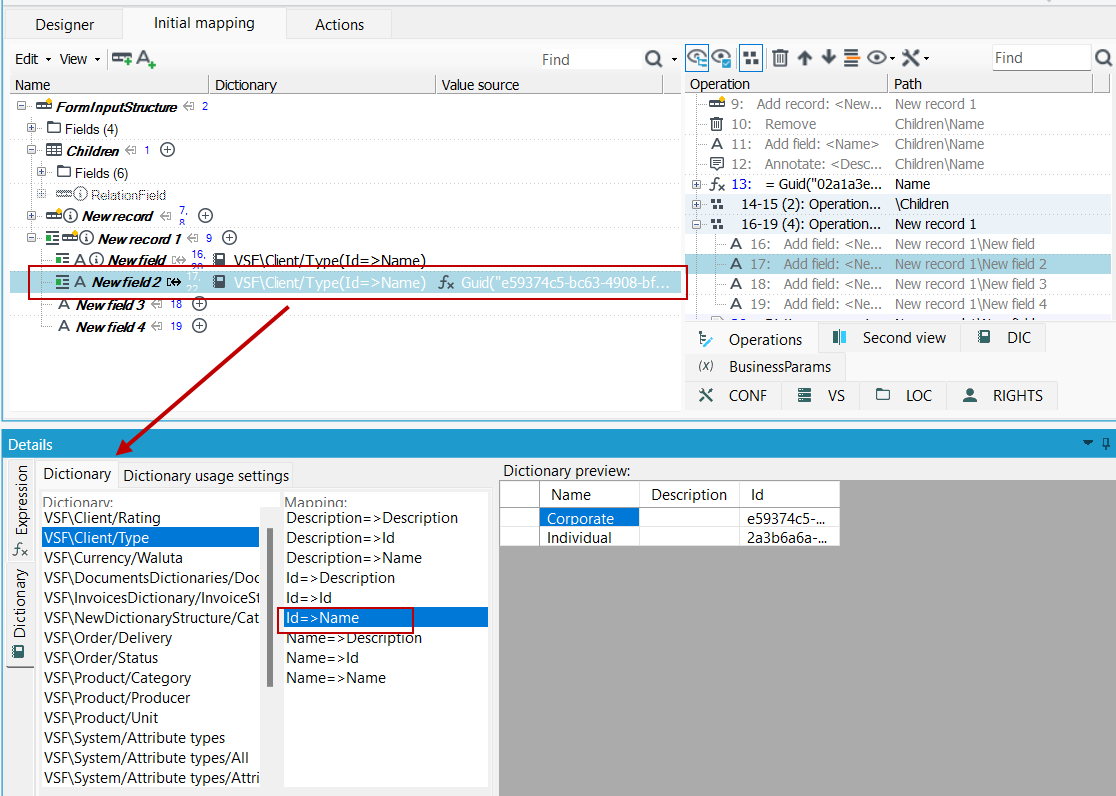
If you want the Type field to present a dictionary value from the Name column (Corporate or Individual) then select the assignment in the Mapping tab: Id=>Name.
Before using the Dictionary annotation, the Dictionary Guid value must be retrieved.
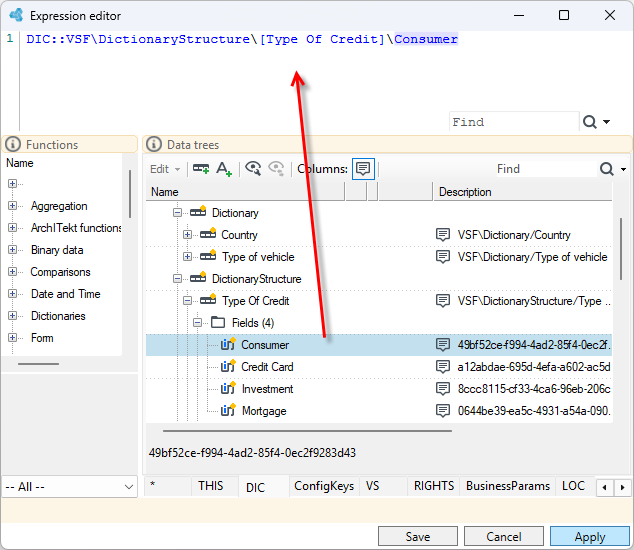
- Add the Expression annotation to the field and go to the expression editor.
- Navigate to the DIC tree. All dictionaries defined in archITekt Studio are available here.
- Drag a dictionary value into the editor.
- In the data schema, add the Dictionary annotation to the field.
- In the Details panel, select the Id=>Name assignment for the selected dictionary value.
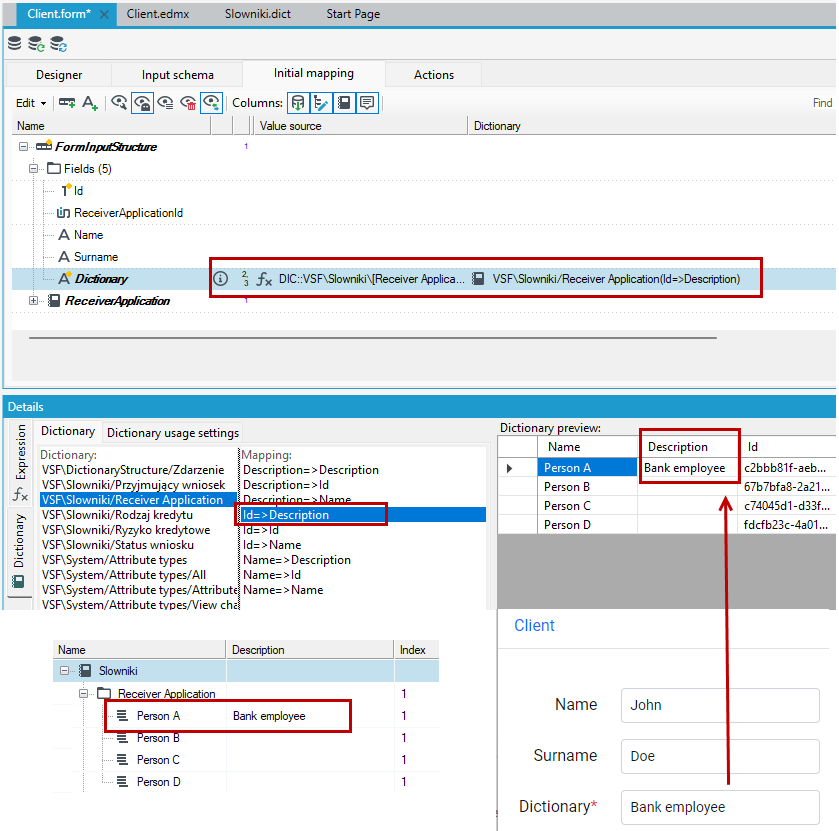
If you want to display the description of a dictionary item, select the Id=>Description mapping.
You can also use built-in functions for retrieving dictionary elements like DicItemName() and DicItemDescription() in the expression editor after adding the Expression annotation first. For more see: Expressions>Dictionary functions.
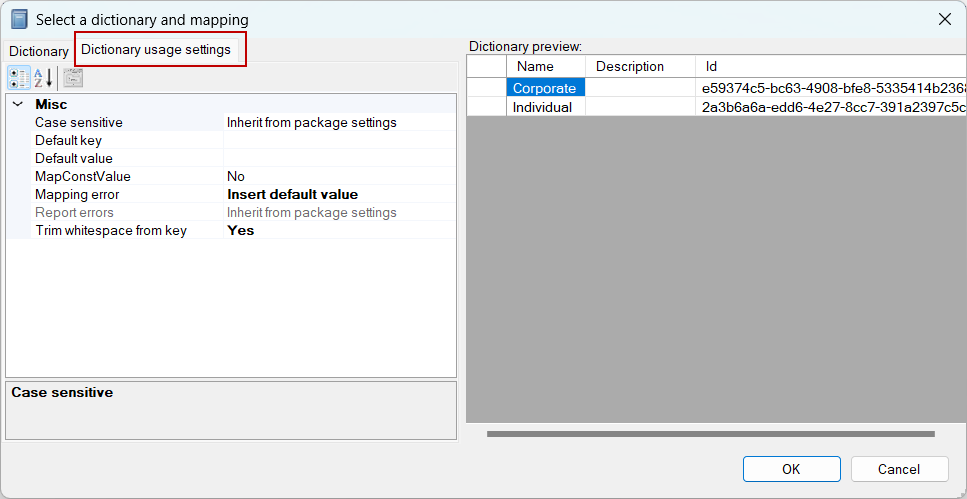
On the Dictionary usage settings tab the following elements may be set:
- Mapping error - what should be done if the key has not been found while mapping? Possible solutions are:
- Insert default value - write data which occurs in the Default value or Default key configuration field to a field which the mapping concerns.
Write default value. If it is not specified, write the value for the default key. If it does not exist, write an input key.
- Insert empty value - writes an empty value to a field as a mapping result. Additionally, reports information about failed mapping by a dictionary to the Errors record, depending on the Report errors option.
- Abort processing - aborts package activity, places a record with an invalid mapping by a dictionary to error output.
- Skip record – skips the main processing record and places it on the error output; additionally places information about failed mapping in the error collection (in the Errors record)
- Default value and default key – used with the Write default data setting.
- Trim whitespace from the key – Should the field value have the “white” space removed from the beginning and the end before performing mapping by a dictionary? The Yes/No standard options may be selected. There is also the Inherit from package settings option which means getting values from the package global settings (available to edit in the Properties panel for the entire package).
- Report errors – should information (in the 'Errors' technical record) warning about key mismatch be attached to a record? It is often unnecessary and it may have a considerable impact on the package operation speed. The option may be set only if the option Insert empty value has been selected in the Mapping error field. As far as this option is concerned, the most important thing is optimization. If no key often occurs and the reported errors are not used anywhere, enabling the option may considerably accelerate package activity. Similarly to the Trim whitespace from the key option, this option inherits its settings from the package global options by default.
- Case sensitive – should case be taken into account when comparing letters (should the ‘a’ letter be the same as the ‘A’ letter) while searching for a key in a dictionary?
See also
Entity Framework data model query operation