Element mass renaming
When copying a data structure from external sources, for example, from an Excel file, etc., the copied fields may need to be adjusted to those already existing in the data schema of the type to rename them or add/remove a prefix, change the case, etc. In such a case, the option that allows mass renaming for fields is helpful.
- Select multiple items to change (Ctrl+click), and then press F2 or select the Rename option from the context menu.
- After performing the action, the following window will be displayed.
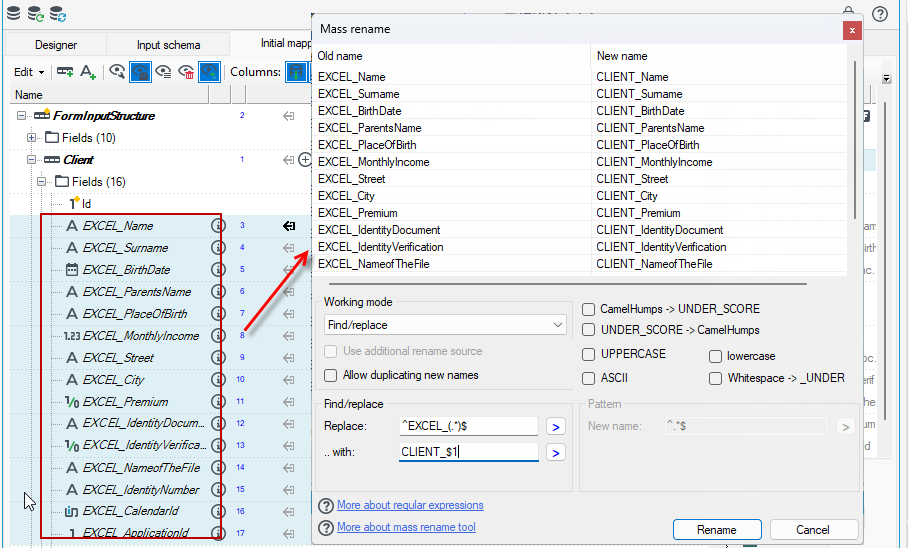
The left panel contains the names of the selected elements; the right one displays the names adjusted by a mechanism made of a regular expression (matched to input names) and an output template (where it is possible to refer to an input matching).
- Pressing the button Rename results in adding a list of the Rename operations with appropriate old and new names to a Map in place at the moment of performing the renaming operation.
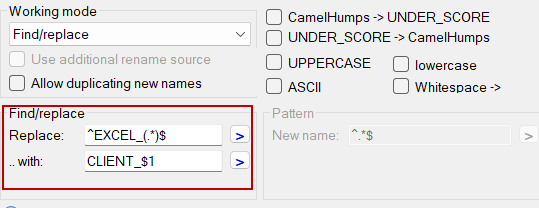
An example on the figure shows a common situation of changing the field list prefix. A searched pattern: ^EXCEL\_(.*)$
^= the beginning of the stringEXCEL_(.*)= any string in a group (brackets) to which it will be possible to refer later$= the end of the string, not necessary in this particular case as.*in the previous element will match everything to the end
An output template: CLIENT_$1:
CLIENT_$1= a content of the first group matched
The effect of the mechanism has been shown in the second column.