Special cases: no value vs. empty value
There are three kinds of field values which the VTS iTS platform distinguishes:
common non-empty values:
- numbers, strings, such as „The quick brown fox”, (2008/07/01 12:13:45),
- null values – possible for all field types, when a field is non-mandatory,
- special empty values which are not null – empty string, empty byte array (binary data), empty list, special Guid {00000000-0000-0000-0000-000000000000}.
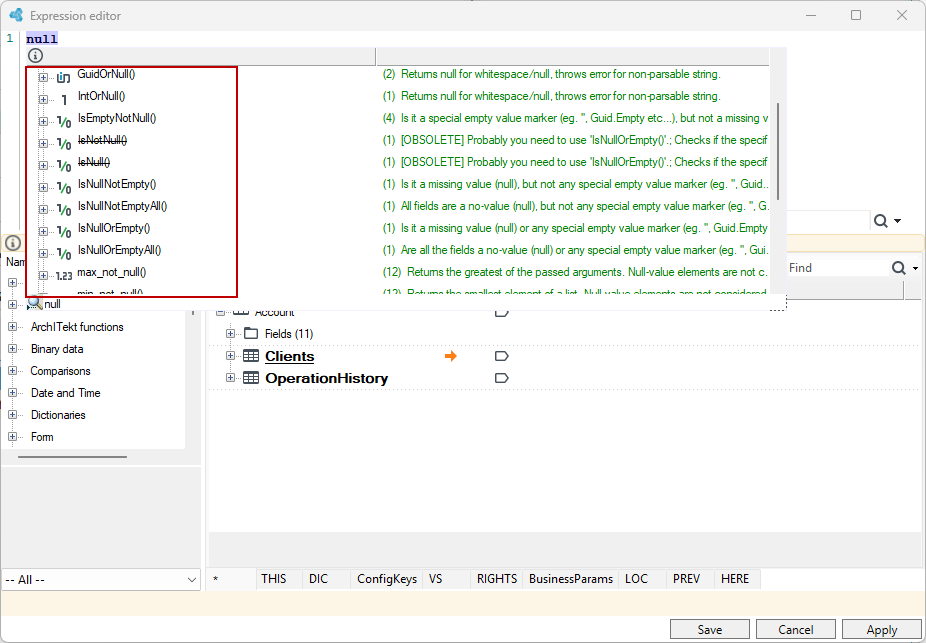
There are three functions which are used for distinguishing between these kinds of values: IsNullOrEmpty, IsNullNotEmpty, IsEmptyNotNull, which always return a specific Boolean result (true or false) and never return null. The last function is only available for some data types for which an empty value is defined: String, Guid, Binary and List.
The following table shows the values of these function for all cases of input data.
| Value of “a” Function | Regular non-empty value, e.g. „Fox” | No value – null | Empty value, e.g. „” |
|---|---|---|---|
IsNullOrEmpty (a) | False | True | True |
IsNullNotEmpty (a) | False | True | False |
IsEmptyNotNull (a) | False | False or COMPILATION ERROR for the „null” constant and types which do not define empty value. | True |
IsNull() and IsNotNull
The IsNull() and IsNotNull functions were commonly used in previous versions of the platform. Functions operated in the same way as they do today but they are marked "Obsolete” now, due to some problems concerning validations they performe. Now they are shown as strikethrough when used in prediction and using them is reported with a message in the expression design mode. We do not plan to remove them as it would be necessary to perform migration.
Null value is interpreted as in SQL which means an unknown value. Especially, comparison operators act as in SQL. Each function (or operator) call which is not prepared for an empty value is automatically changed into an empty result for an input empty value. The following are the results of arithmetic operations performed on null values. The a_null string means that the a_null variable of some specific type has no value, to distinguish it from the constant "null" literal which is handled in a special way in some places, i.e. comparisons.
| Expression | Result and comment |
|---|---|
2 + a_null | a_null |
Substring(a_null, 0, 5) | a_null |
2 == a_null | a_null |
2 > a_null | a_null |
2 >= a_null | a_null |
a_null == a_null | depends on type – See the section below about string type |
a_null = a_null | a_null - <> and > operators are not specified for strings |
a_null >= a_null | a_null |
Such arithmetic may be surprising at first, therefore the design environment shows information (underline + tooltip) whenever the above-mentioned functions are used for non-mandatory values where null may be the result.
Comparisons of non-mandatory values in C#
Presented results of comparisons of > and < of at least one null will always be False in C#, even for a_null>= a_null although a_null == a_null will return True. As we can see, the following identity is not true:
a>=b iff a>b | a==b
The same happens for the <= operator.
String type
Handling the string type value is an exception to the simple "business-oriented" model modeled on SQL a'la Oracle and is similar to MS SQL Server which means it is possible to distinguish between an empty value and no value (null). As for strings, it can only be noticed by the == and != operators. It is a difficult-to-change feature which comes from earlier versions. For other types, the above-mentioned functions which distinguish between three kinds of value should be used.
The table below shows the results for different validations of the string value (denoted by A), particularly the last column shows an exception described above.
| Value of A | Length(A) | A is_empty | IsNull(A) | A==null |
|---|---|---|---|---|
| null No value | 0 Number, not null, always mandatory | True | True | True .. not „null” |
| „” Empty string | 0 | True | True | False .. not „null” |
| „the quick brown fox” | 19 | False | False | False |
As can be seen, the Length(a) function always returns a specific number, never null value. All string-related functions act in the same way in this matter.
Boolean logic for null value
In the system which allows for null values a question emerges of how Boolean operators should behave and what results they should return. Several solutions to this problem may be found among programming languages.
The following intuitive solutions which try to return as much Boolean information for incomplete input data as possible, and which evaluate expressions from left to right can be found in the platform.
In the examples below:
a_trueis True,a_nullhas no value (null),f_null()– function (or expression) which returns Boolean null value.
| Expression | Result |
|---|---|
a_true && a_null | null |
| `a_true | |
a_false && a_null | False |
| `a_false | |
a_null && a_true | null |
| `a_null | |
a_null && a_false | False |
| ` a_null |
Boolean values which are the results of the described operators are mandatory only if all arguments are mandatory.
While calculating Boolean operator value, similarly to ternary operator and omitting null value operator (?? and ???), expression elements are evaluated only if their value will contribute to the result. If a_null is replaced by f_null() in the examples above, we may ask a question if this function will be called or not:
| Expression | Result | f_null() call? |
|---|---|---|
a_true && f_null | null | |
| `a_true | f_null ` | |
a_false && f_null | False | No |
| `a_false | f_null` | |
f_null && a_true | null | |
| `f_null | a_true` | |
f_null && a_false | False | Yes – evaluating from left to right |
| `f_null | a_false` |
What happens if operator's left side is null:
| Expression | Result | f_null() call? |
|---|---|---|
a_null && f_null() | null | No |
| `a_null | f_null()` |
Empty values logic in C# is forbidden! Compiler reports an error concerning the lack of appropriate operators for Nullable<bool>