Expressions
See the video illustrating the below issues:
Expressions
Expressions are also called formulas, and they are simply small pieces of code allowing us to calculate new values. They use functions to operate on data - like in spreadsheets.
To build an expression it is best to us a nice auto-completion feature triggered by Ctrl+Space keystroke.
Expressions are used everywhere in the platform – for plain arithmetic's, dynamic properties, conditions, filtering local data joins and even record creation.
Expressions consist of three parts:
- data in form of paths and constants,
- functions - you can use both plain .NET functions and easily add your own,
- grammatical notations that make it possible to efficiently build business-level solutions without getting into some programming language details.
Expressions always return values of some type. Most often it is a Boolean condition for validations or classifiers. It may be also simple scalar for computed data field, so numbers, dates, binary streams, etc. In more complex cases it may also be a list or even a full sub tree, or a path in a tree.
The most common use of expressions:
- One way to use an expression is to add an Expression annotation from the context menu. You can add such an annotation both on the data schemas on the form in Initial Mappings and in the Data processing component.
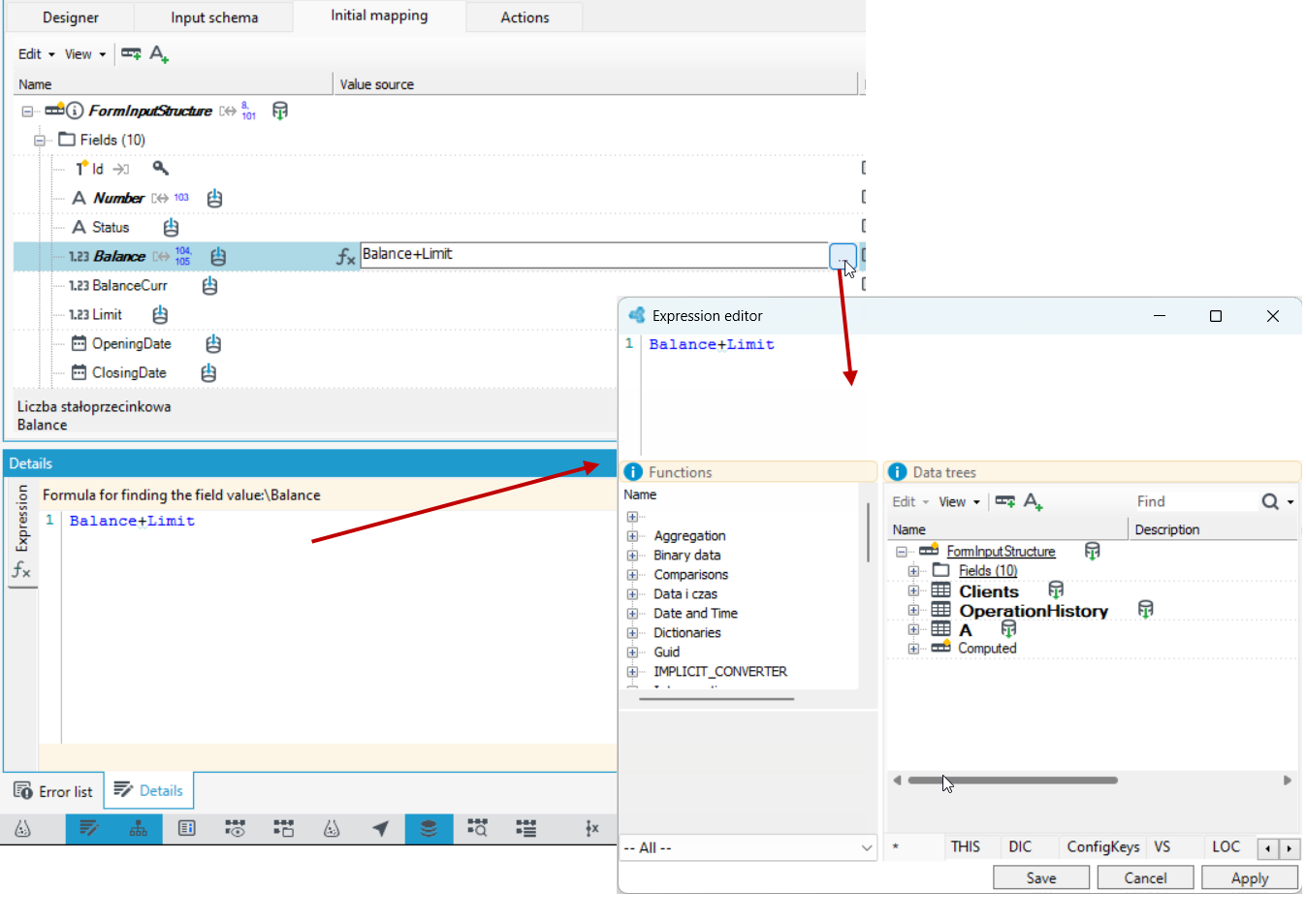
- You can define the expression in the Details panel or select the button
 and go to the dedicated expression editor.
- In various places of the platform on the Properties panel, you can choose Defining method of a property through Expression.
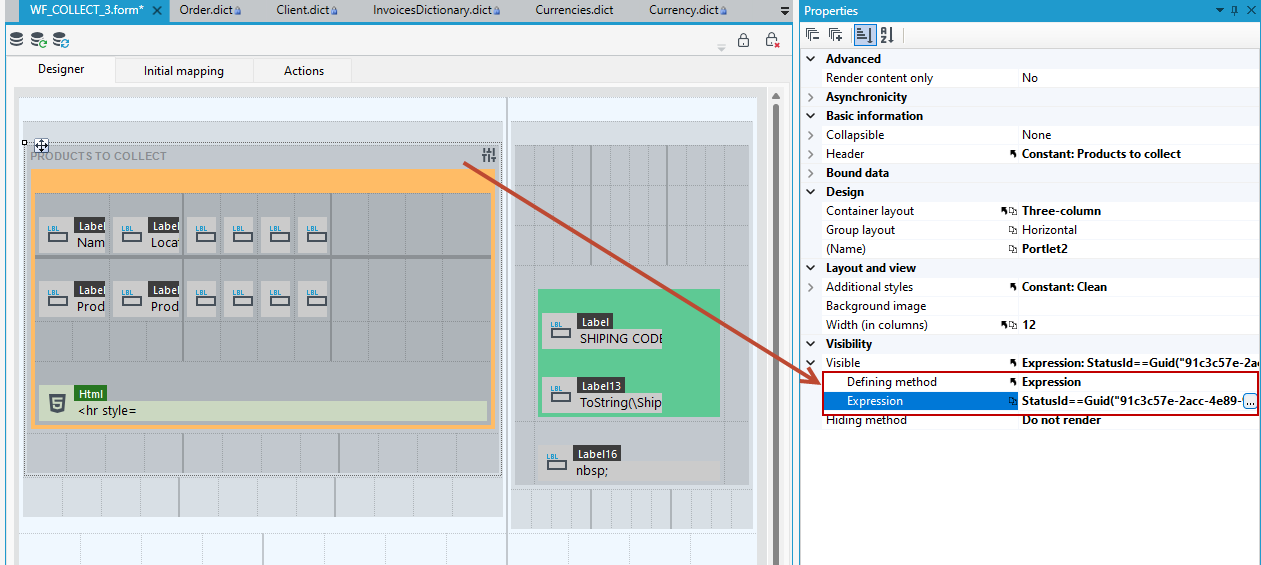
- In the above case, the visibility of the Products to collect container is determined based on the expression:
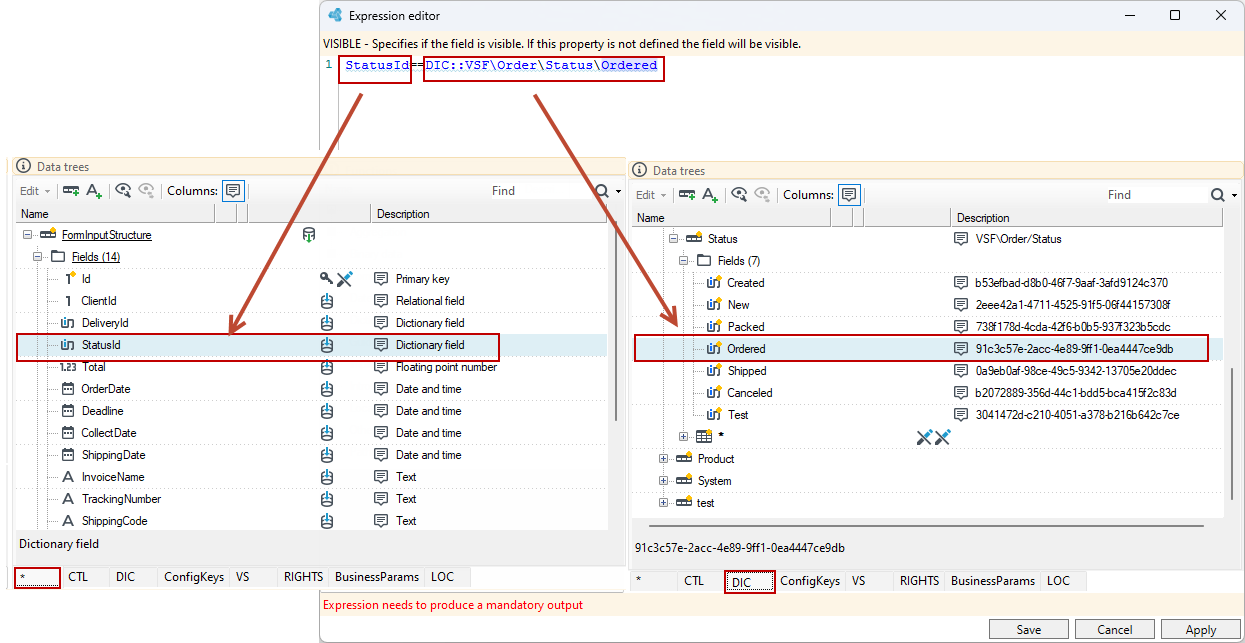
StatusId==DIC::VSF\Order\Status\Orderedwhere the order status is checked against the dictionary value. This means that the container will be visible on the website only if the order is in the status Ordered.
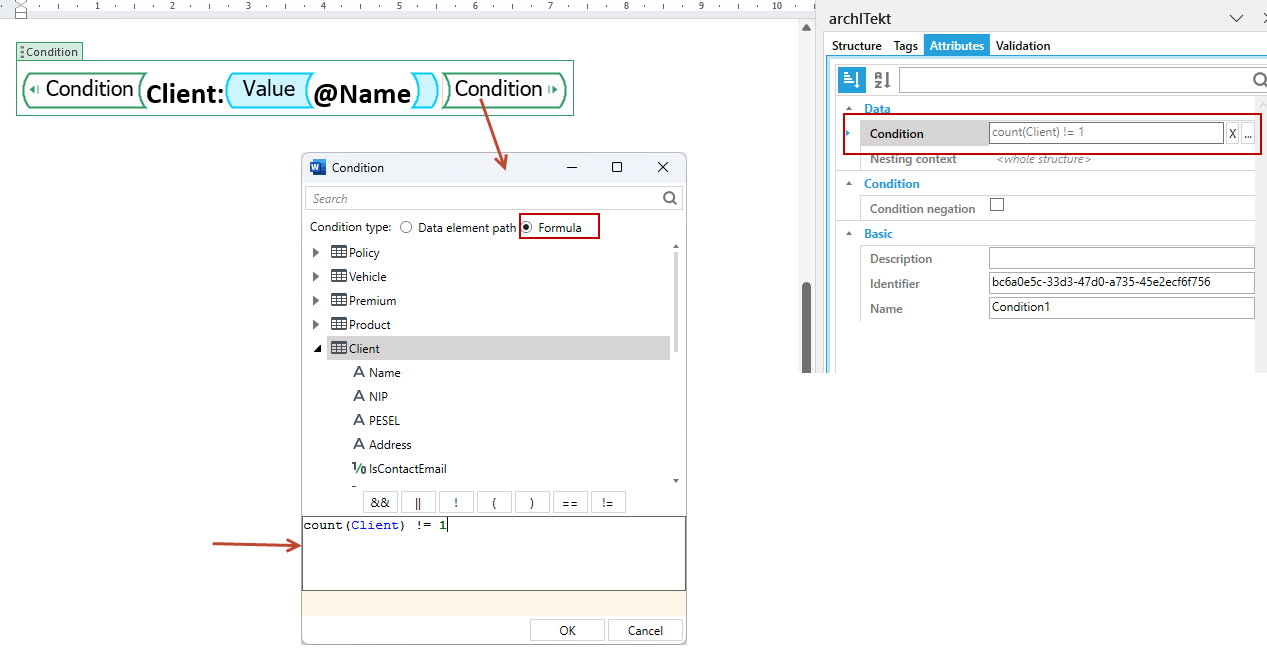
- In document generation, expression logic is used to define a condition in a formula.
Expression editor
The editor of the programming language used in the data processing functionality and also in the Initial mappings on the forms has a built-in expression prompting option.
There are two types of editors:
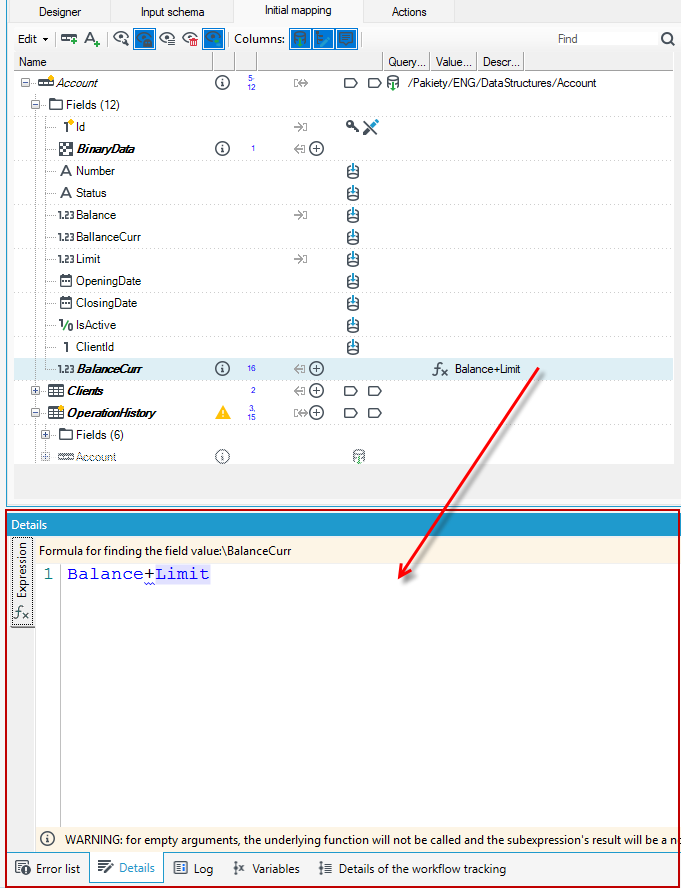
- Simple - is available on the Details panel after first applying the Expression annotation to the field. For more about the Details panel see: Panel Details.
- Advanced - the move to the editor is possible by selecting the button next to the field to which the Expression annotation has been added.
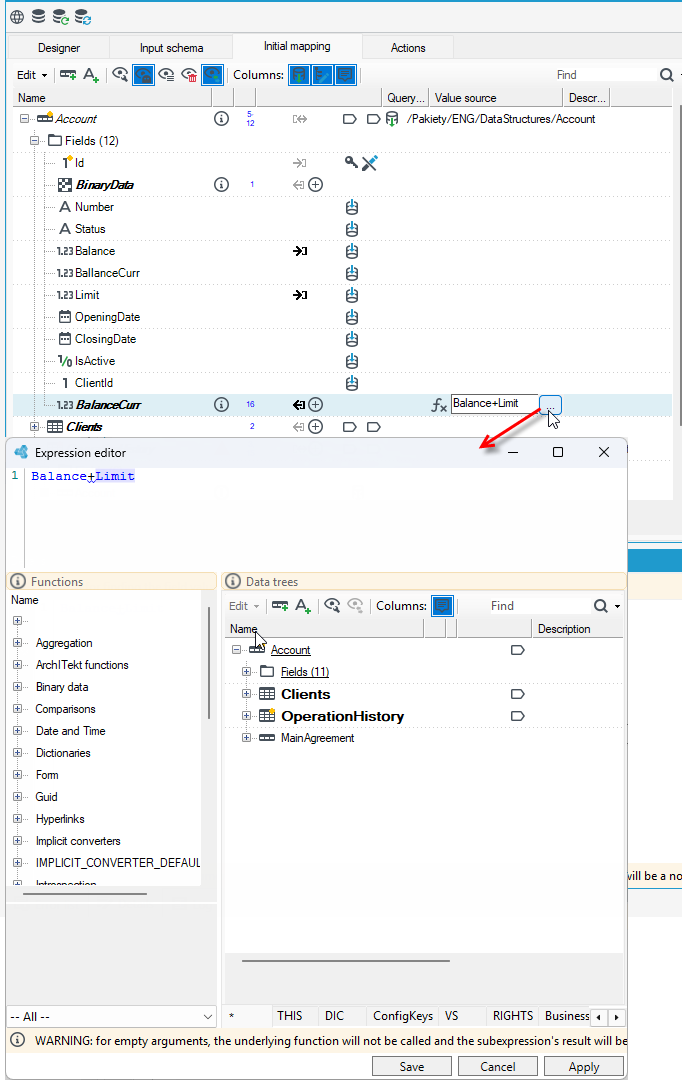
The kind of the editor (simple or advanced) that is displayed depends on the place in the System.
The expression editor contains the list of expressions which may be used in the current context.
Syntax prediction may be enabled by the keyboard shortcut Ctrl+Space.
Enter is used for selection confirmation.
While defining the expression using the programming language you may refer to elements of the currently transformed record tree. Such references use paths to selected elements. There are two kinds of paths:
- a relative path,
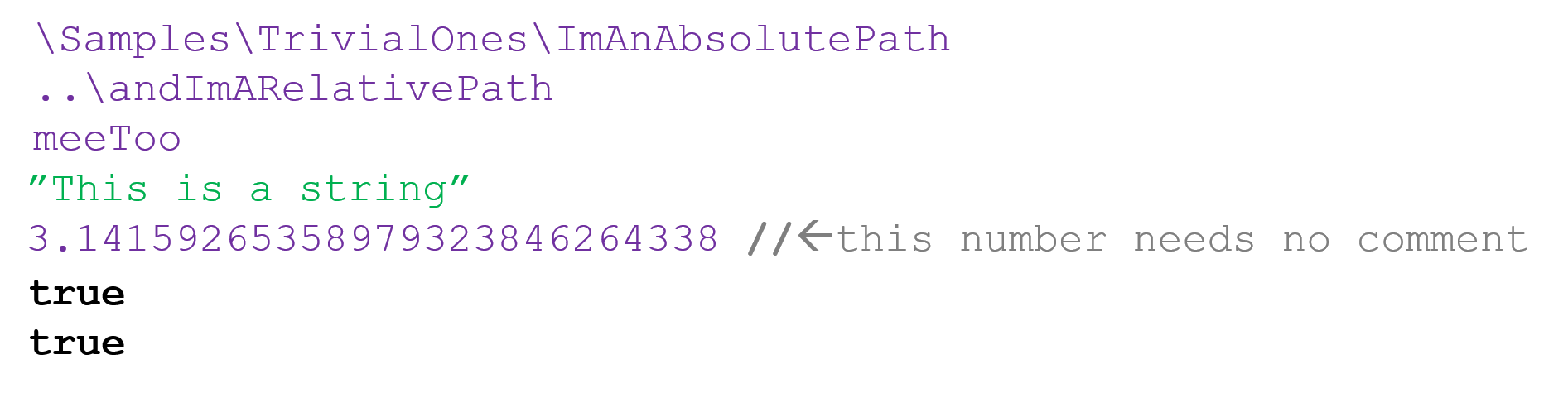
- an absolute path - an expression starts with the character
\
The character \ is used for separating successive elements in paths. For more on the paths, see Data.
Paths are resolved to full record or field references. A starting point of relative paths depends on the situation. Absolute paths start at the record root.
The kinds of saved paths may be replaced with each other but it is sometimes connected with losing some information. Let's consider the example shown in the figures: there is an Account record and a Clients multiple record under it. When trying to resolve a relative path starting from a specific client record (e.g. in order to determine the value of a field as a function of another field of the same record), it is immediately clear which client it concerns. An attempt to change the path to an absolute one will probably report an error saying that many input values are missing in an aggregate function (e.g. a sum function) expression.
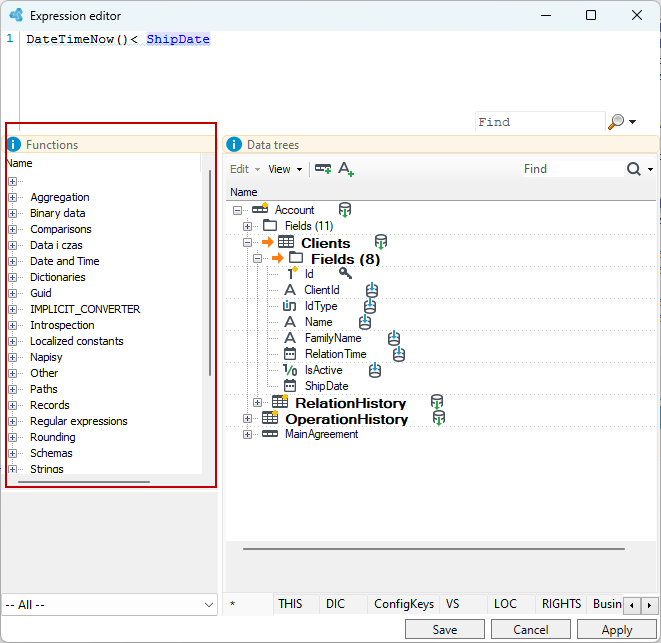
Data
Expressions usually reference data using paths, that walk us through trees:
- In the following example, we have a sample data structure pictured here – an account with a list of connected clients, connected in turn to relations history records. There is also some main agreement record and whole operation history.
- The clients record is a so-called multi-record. It means, that it is a list, it may contain more than one client in instance data. No yellow star means it is also non-mandatory, so there might be no client at all.
- RelationHistory and OperationHistory are also lists, but they will always contain at least one record. This distinction greatly simplifies further operations on data and null handling.
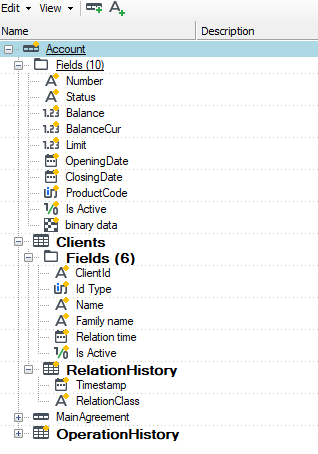
This is the structure that is defined in a block from the processing package. An analogous structure can be defined on the Initial mapping tab on forms by Query data Model operation or with the SQL query operation. For more on initial mappings and the form, see Initial mapping.
The appearance of the structure such as bold, italic additional icons may vary depending on which block in the processing package we operate or in the Initial mapping on the form. However, the functional scope of using expressions stays the same. Below is an example of a form data model from the Initial mapping tab.
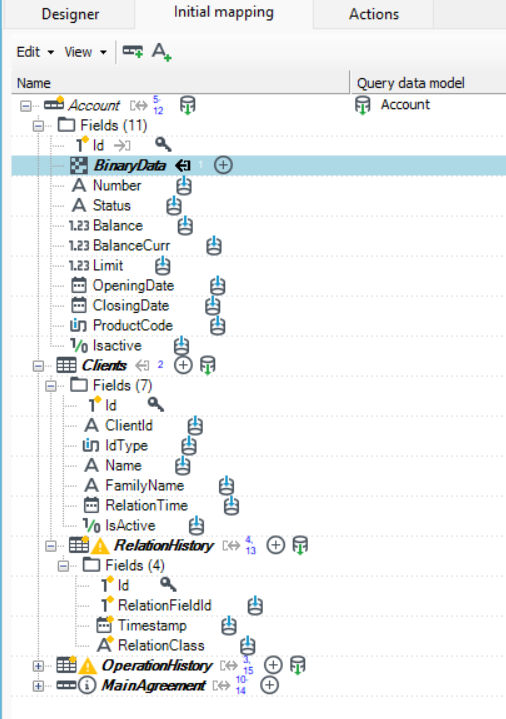
One must be aware of the current starting location for a path - it does not need to be the root. Usually, our starting point comes from where we creating the expression, as part of, for example, an operation to set the value of a field.
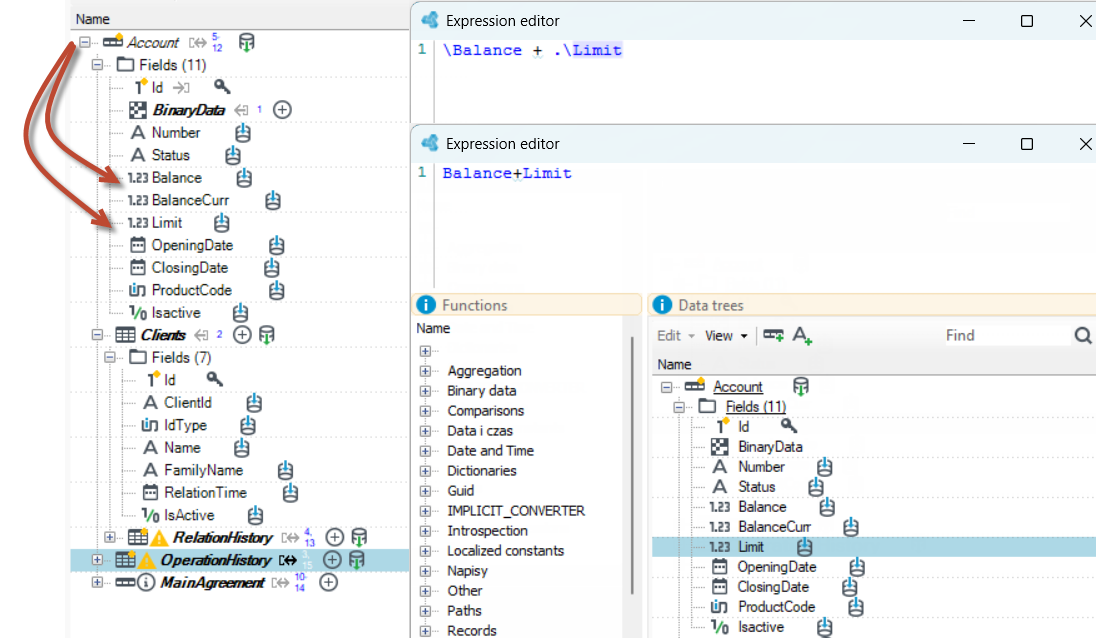
Example:
These two expressions are equivalent if are being calculated from the root record. Single dot explicitly means current point. The appearance of the paths is exemplified by the paths in the windows file system.
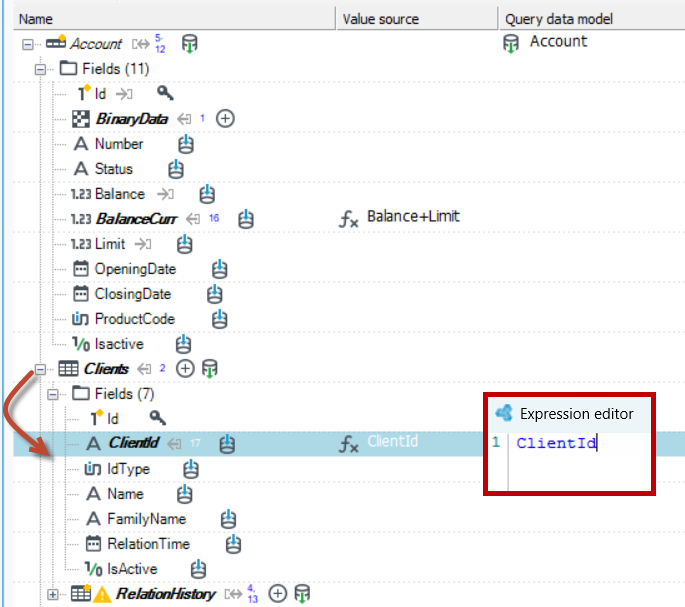
In the following example we start the path solving from the client record, one of the elements of the client list. Here we only have the name of the local ClientId field.
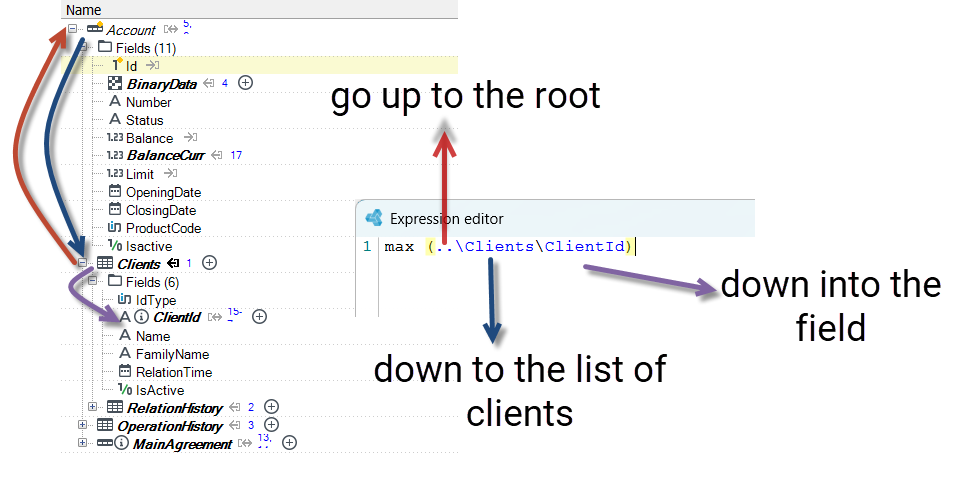
In case we wanted to calculate the max ID of all connected clients:
- we must go up one level to
.. the rootaccount using double dot,
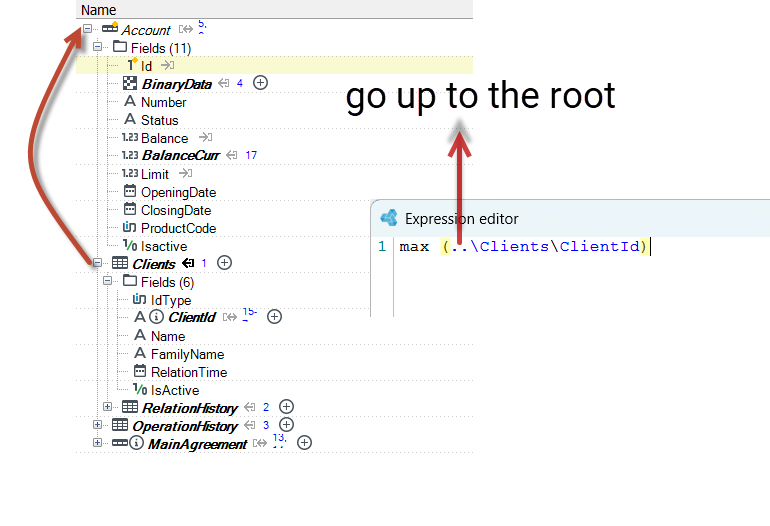
- then down to the list of clients,
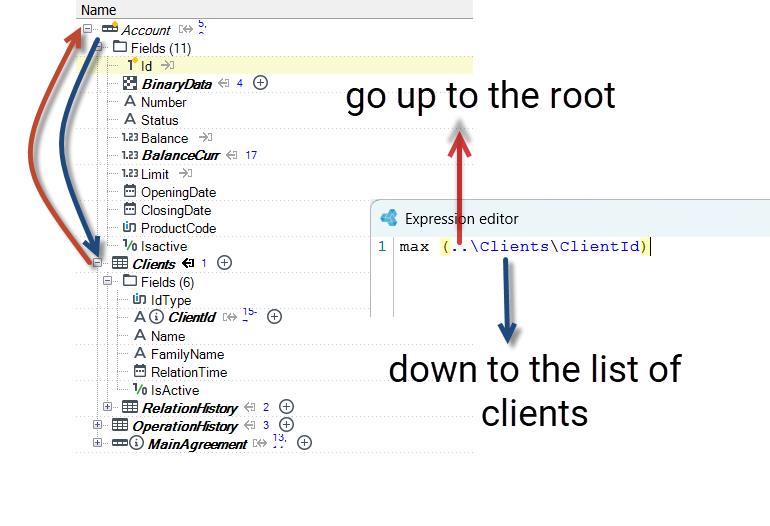
- and then down to a field. This yields us a list of numbers, which is then aggregated with the max function. In this case we could use an absolute path instead of going up and down, but in more complex scenarios expressions should be built to work well regardless of the exact location of the record, work in templates and so on.
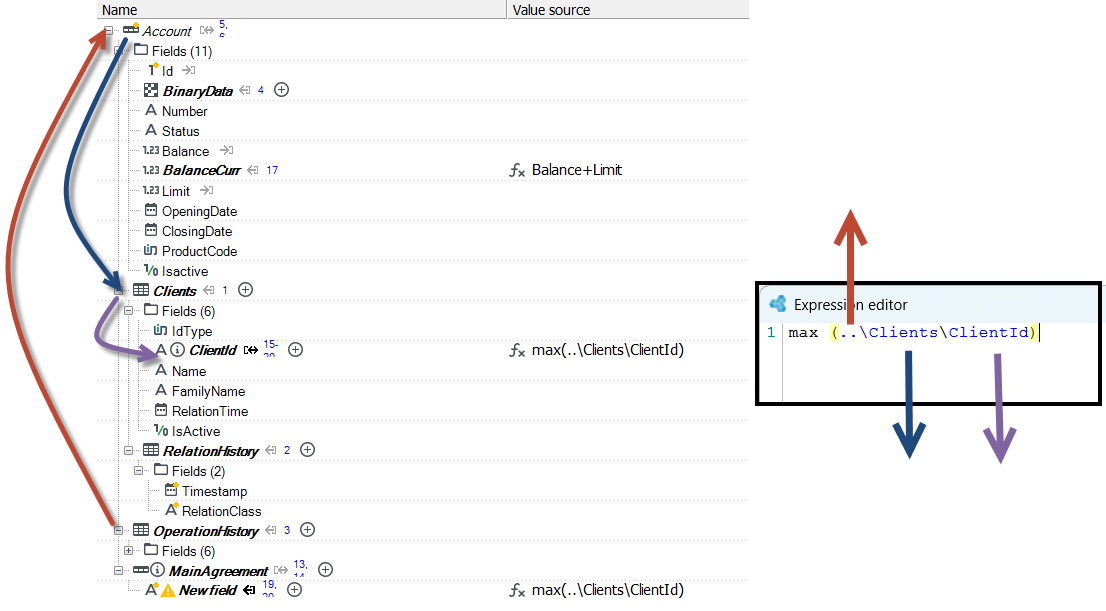
Below is how to use the same expression, but starting from a different place in the structure.
- In this example we start not from the client, but from the Main Agreement record. Path is the same, result is the same.
- As we`re starting not from a client, but from some other record, we may not assume, that any client will ever exist, so the path leads to a non-mandatory result, whereas the previous one was mandatory.
Here we can see an even longer path having two multirecords on the way, one being non-mandatory (the clients) and the RelationHistory being mandatory within any single client, and also being a list.
- Therefore an attempt to simply return single value from such path yields an error - value is too complex for a scalar.
- One more thing - the question mark in parentheses denotes a non-mandatory status of the result, due to the clients record being non-mandatory.
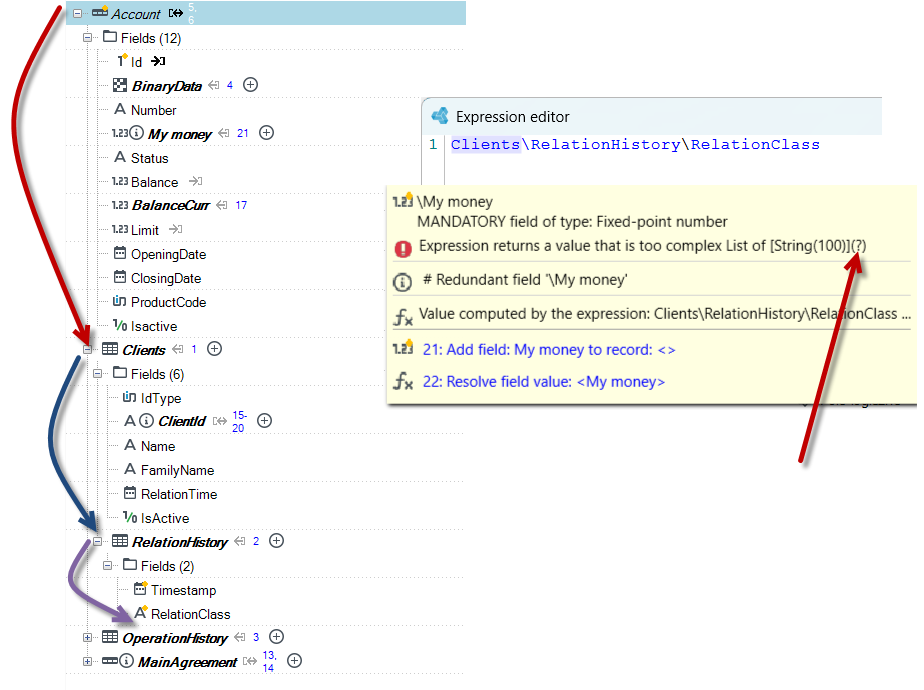
So all in all – paths allow us to walk along tree branches anywhere, trackind multiplicity and nullability.
Named trees
In expressions, by means of paths, references to data which are available 'intuitively' may be used - to a current record (Map in place), to input data (mapping-copy). There are also named trees available which do not have to be related to a specific record being transformed. A reference to such tree is marked by a prefix NAME:
There is usually more than one data tree available in an expression. The default one, has no name and needs no special prefix - if you write Limit+Balance it just does what you need - it takes fields from the local record and passes their values to the + operator.
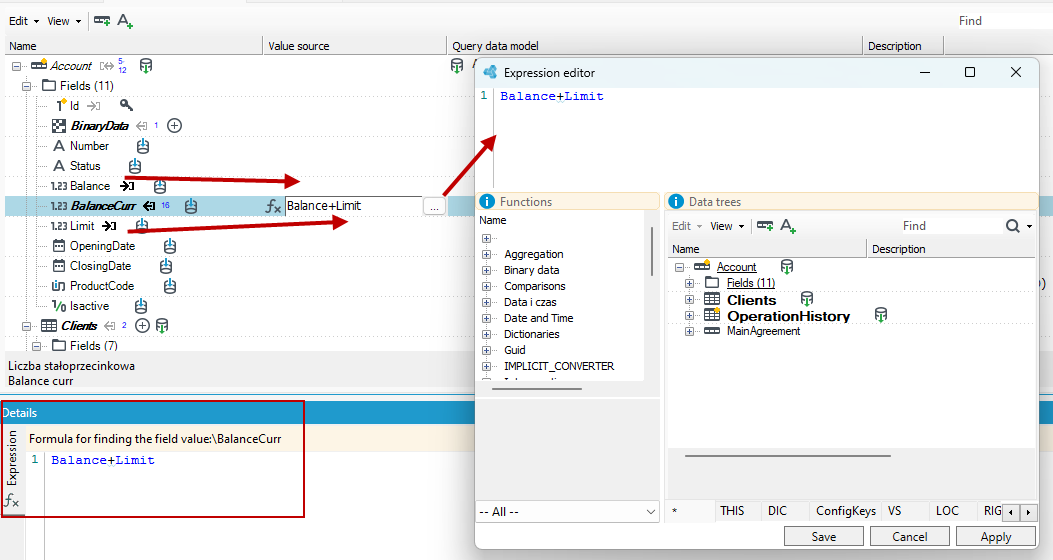
In addition, there are also named trees, not necessarily related to the specific record being processed. The reference to such a tree is denoted by the prefix NAME:
The list of available named trees depends on the context and location in which the expression editor was activated. For example, a different range of data may be available when using the editor at processing packages, and another on forms in Initial mapping.
The named trees available:
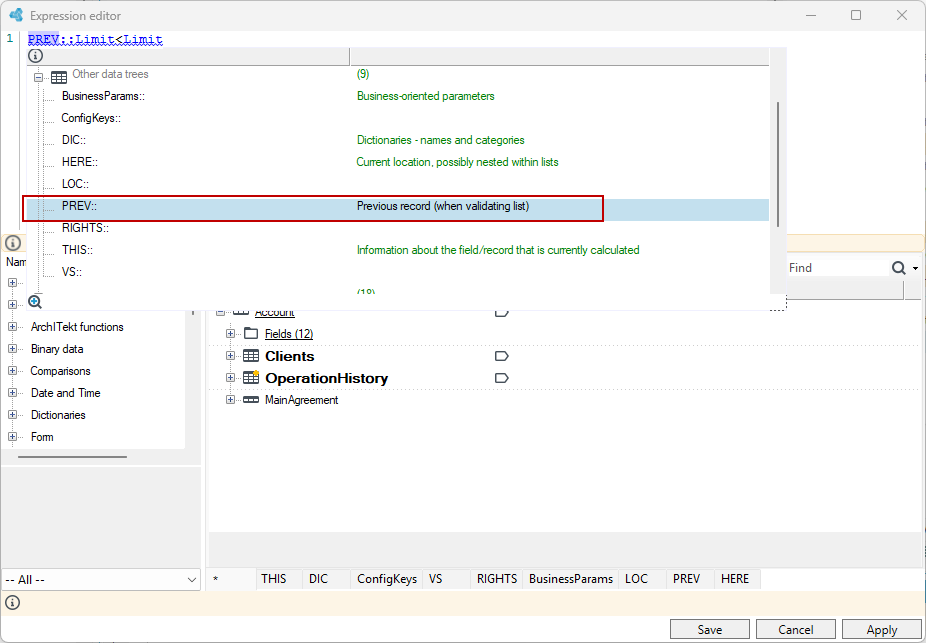
ARG:contains a data tree of package invocation parameters,DIC:a list of available dictionaries with columns,PKG:contains the values of package element parameters (e.g. transformation start time) and its components (e.g. particular blocks details),PREV:andNEXT:reference to the previous record and the record currently being considered; available in the context of operation execution conditions and field calculation. If the record is multiple, as well as in record normalization; in that case, a PREV record means a record that has already been normalized.
When iterating through the list, the expressions of, for example, the condition for performing an operation can conveniently refer to the previous record from the iterator - and this is done with the help of a tree named PREV: In this case, we check whether the previous Limit value was less than the current one.
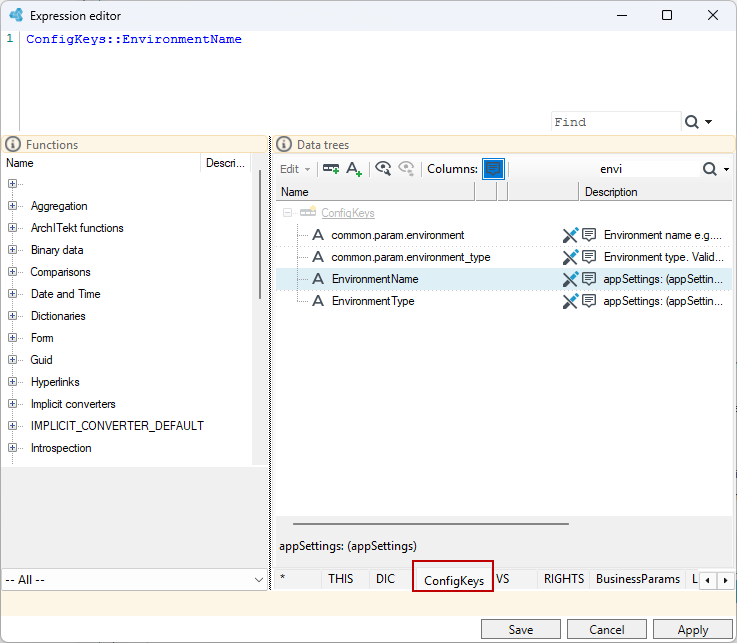
QUERY:a reference to a query record in a code block (CCEvent).DST:destination data tree, available under the conditions of record moving, cloning and merging operations (the source tree is the default tree, without a name). When moving or cloning lists, records to another location, using theDSTtree we have convenient access precisely to the destination, which allows us to merge only records with matching values in key fields. One way to perform joins of data already loaded.ConfigKeys:Configuration keys available from the main configuration (appSettings), .ini file and other technical configuration sources. The comment of each item indicates the source of the key.
Central configuration base keys marked as sensitive CK_SENSITIVE=1 are not accessible in this way.
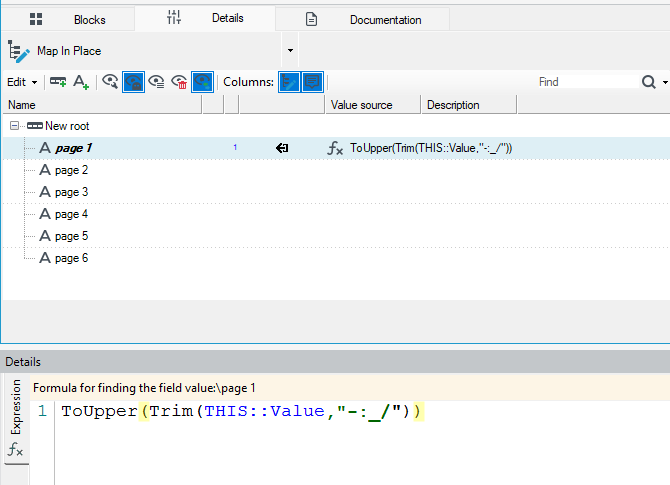
FORM:Describes the current web form in detail.CTL:Describes the current form's control.BLK:Contains information about the name of the current processing phase and the name of the block being executed.THIS:Describes the currently mapped, calculated field or record. Contains both the metadata and the current value of the re-mapped field, allowing convenient processing of fields with an identical expression using theTHIS::Value
For example:
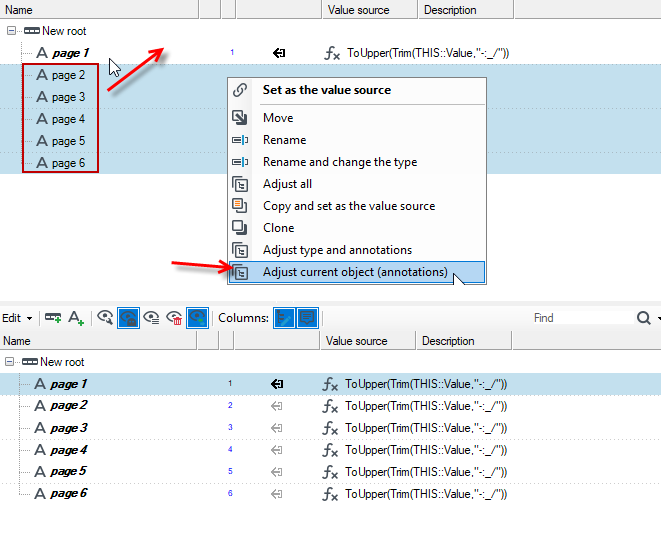
In the following structure, the page 1 field has an expression defined using the THIS::Value parameter.
- Drag the other fields onto the expression and select the option Adjust current object (annotations) from the context menu.
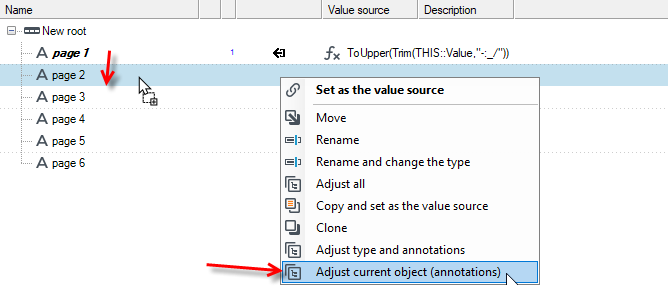
You can also select all fields without annotations, drag them to the first field, and select the option from the context menu. This creates new operations for the remaining fields using the same expression.
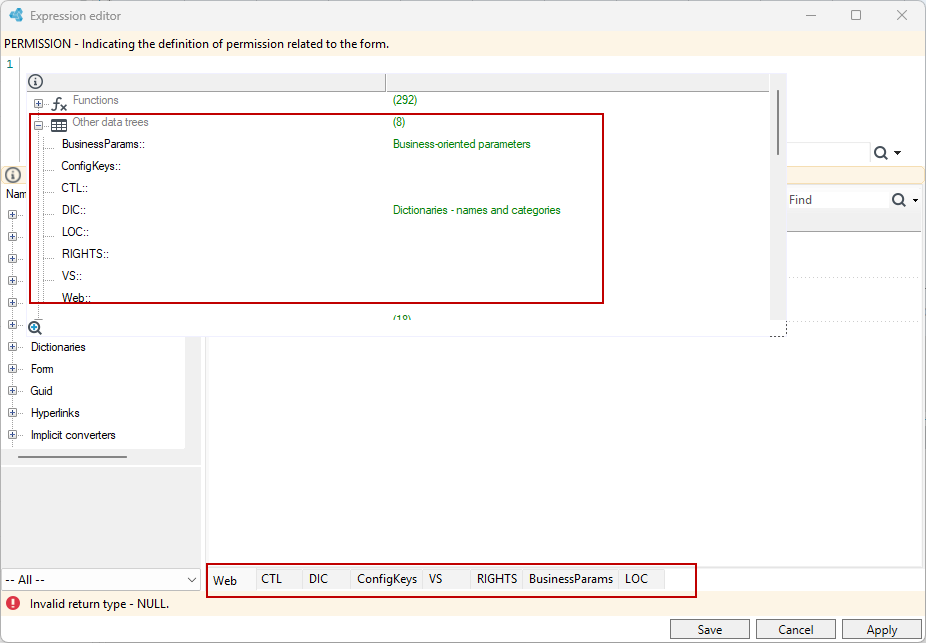
Select Ctrl+Space to display the available data trees in the editor. Besides, these trees are also available as individual tabs in the data section.
Depending on whether the expression editor window is open in the context of processing packages or Initial mappings, different data trees are available on the form.
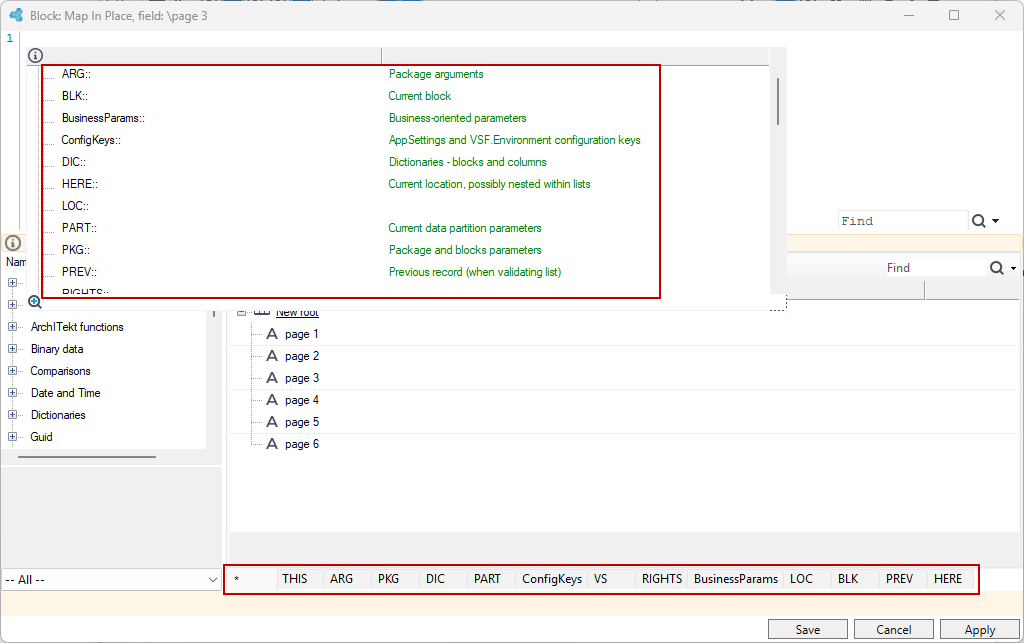
Below is the expression editor window opened in the context of working with processing packages. Here, data trees specific to processing packages such as ARG, PKG, or PART will be available.
Syntax
Programming fragments in Mappings are used in the context of expressions, i.e. their task is to return values. The following elements may be used:
Constant values - simple e.g. 1, 3.1415, „abcdef”
- Logical constants:
true,false - Constant lists, e.g.
{„a”, „b”, „cde”}– useful for a natural notation of the form:
if Abc in {„a”, „b”, „c”}
3. Constants of the date or guid type cannot be entered directly - you should use the functions which create elements of these types, e.g.:
Date(y, m, d), Guid(„1234-…”)
4. Null constant which means no value.
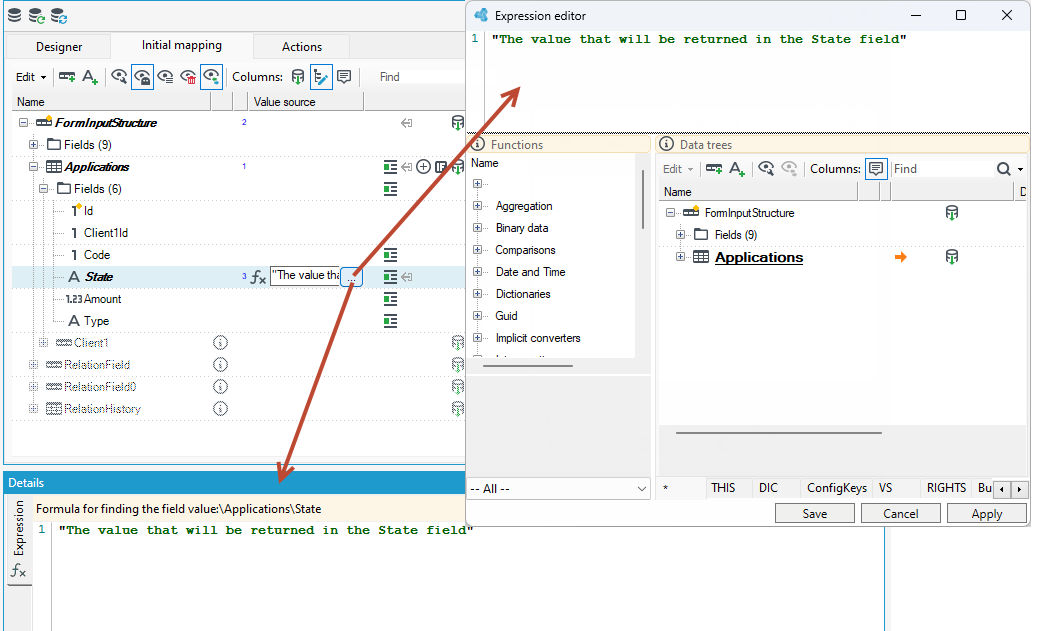
References to data (described above), e.g. abc, [Field 1], ..\..\[Record x]\Field
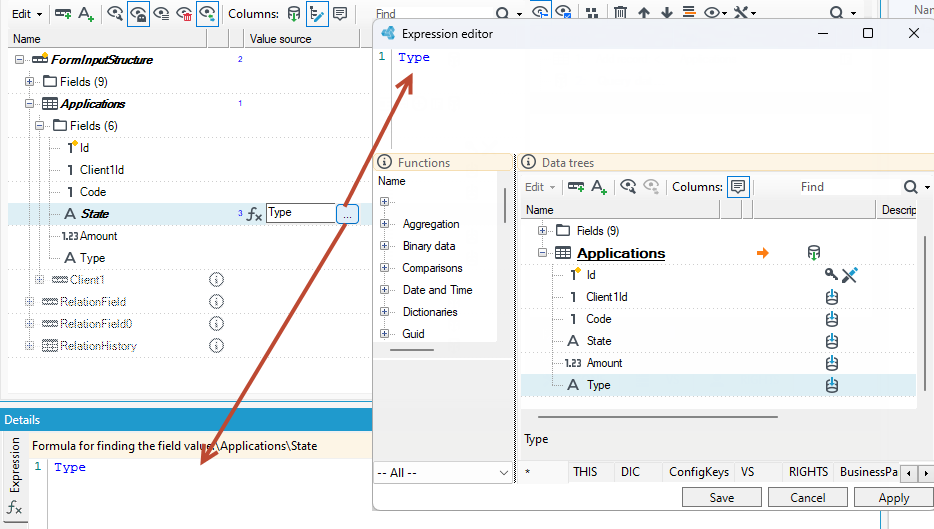
Functions - written as f(arg1, arg2, argN)
- Scalar functions (which operate on simple values),
- Aggregate functions
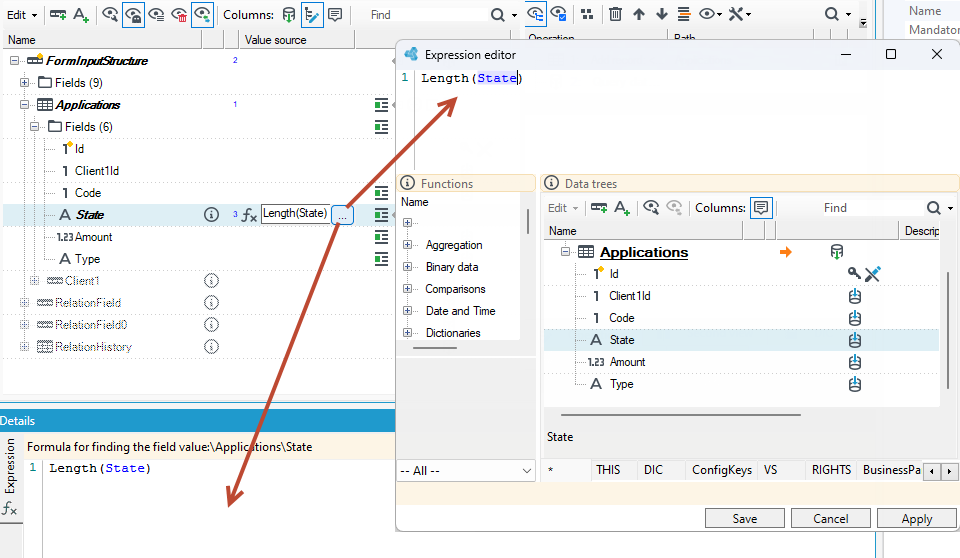
The following example uses the Length( ) function for the State field, which will return the length of the caption that will be in this field. For more on functions, see Functions.
Operators (listed in the order from highest to lowest precedence):
???- strong operator which replaces empty values
e.g. a ??? 0 + b ??? 1 – will return the sum of a and b where the default values are 0 and 1 (if there is no value). You may also write the example using parentheses and a weak operator which replaces empty values:
(a ?? 0) + (b ?? 1) - which is more problematic as far as larger expressions are concerned.
2. Algebraic negation - and logical negation !
3. Various additives:
-
Arithmetic
+ - -
String operator:
+(merging strings),==(character by character equality),-(deleting the occurrences of the right string from the left one),/(trimming the right string from the beginning and end of the left one), -
Operator which adds days:
+
e.g. Date(2010, 01, 01) + 31 == Date(2010, 02, 01)
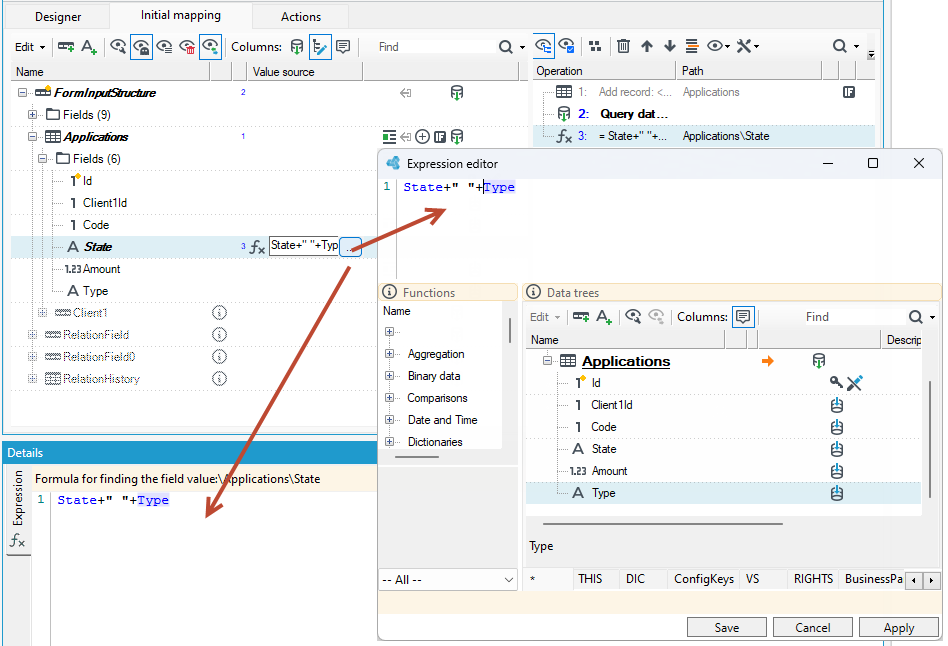
In the following example, field State will return the sum of State and Type or the concatenated texts from these fields with a space between the.
- Multiplicative:
- Arithmetic:
* / % (lo) *- string multiplication, e.g.:„abc” * 4 = „abcabcabcabc”
- Verifications:
-
>, >=, <, <=, ==, != (inequality) -
is_emptyoperator – verifies if an expression on the left has no value; there are also similar functions:IsNotNull()andIsNull. -
a list operator
in– if an element on the left is included in the list on the right (and a string variant which ignores name case:in_CI)„a” in { „a”, „b”, „c”}– will return true
on the right, a reference to data which will be 'flattened' to a list may also occur, e.g. "02" in Clients\ClientType- is any client of the "02" type.
- Advanced string operators:
Contains, ContainsCI – if the right side occurs in the left one (with the ignore name case variant),
StartsWith, StartsWithIC – whether the left side starts with the right one,
EndsWith, EndsWithIC – as above, it concerns the endings of the left string,
LikeRgx, LikeRgxCI - whether the regular expression on the right matches the left side,
Like - works the same as in SQL – wildcards are ? (any character) and % (any string),
- Logic:
&&,|
- Ternary operator:
?
e.g. a ? b : c - if a return b, and if not, return c. For larger number of verifications use parenthesis: e.g. a ? ( b ? c : d ) : e
2. Weak operator which replaces an empty value: ??
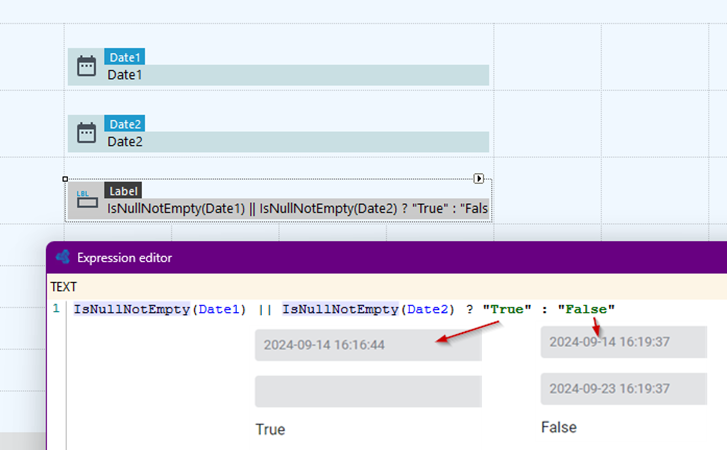
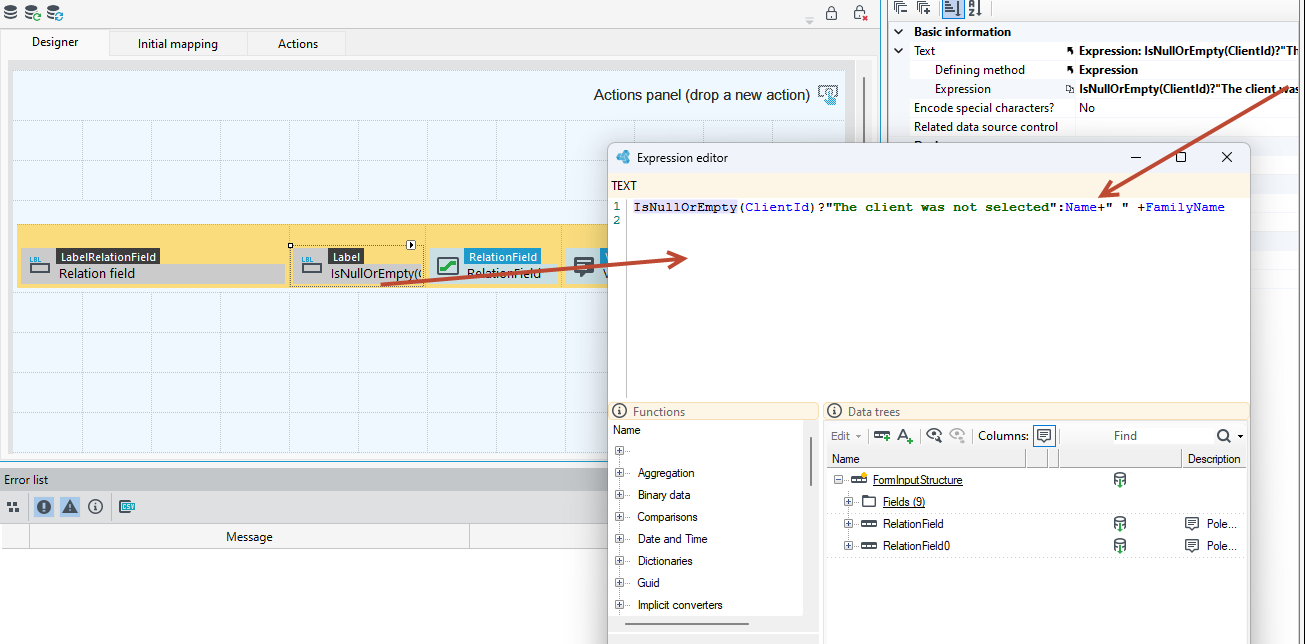
The following example uses an expression to display the text for the Label control:
IsNullOrEmpty(ClientId)? "The client was not selected":Name+" "+FamilyName
The expression uses a trinary operator where, it checks if the value in the ClientId field is null or empty: IsNullOrEmpty(ClientId)?, if so, return the first element, that is, "The client was not selected", otherwise, return the second element, that is, the data from the Name and FamilyName fields :Name+" "+FamilyName
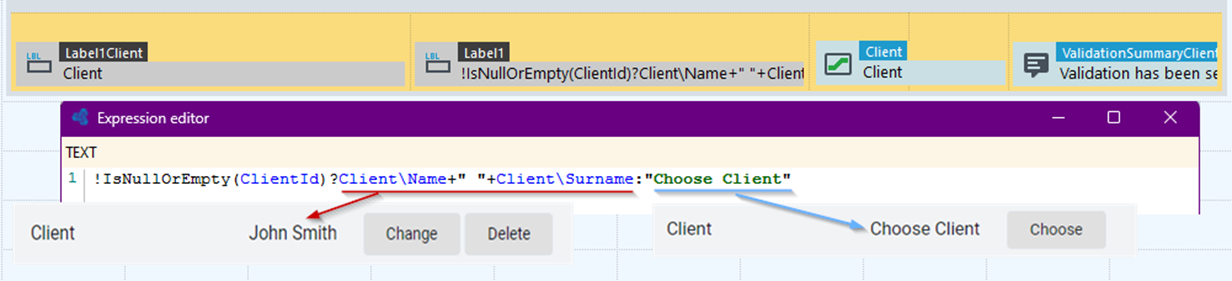
You can also use negation of the whole expression then change the order of the arguments in the function. The effect will be the same. The following example uses the expression:
!IsNullOrEmpty(ClientId)? "Choose Client":Client\Name+” "+Client\Surname
Which means: If ClientId is not empty or not NULL, then return Name and Surname, otherwise return the text Choose Client.
Bit operations – do not exist (may be implemented if needed).
Brackets summary:
- Parenthesis
()– grouping bindings and a list of function arguments, - Brackets
[ ]– uncommon names in the paths, below in the New record name is a space, hence the square bracket is automatically added to the path.

- Braces
{ }– The use of these parentheses creates a list of constants. For example, in such a notation in an expression:{ "A", "B" }- a list of length 2 is created, filled with the constants "A" and "B".
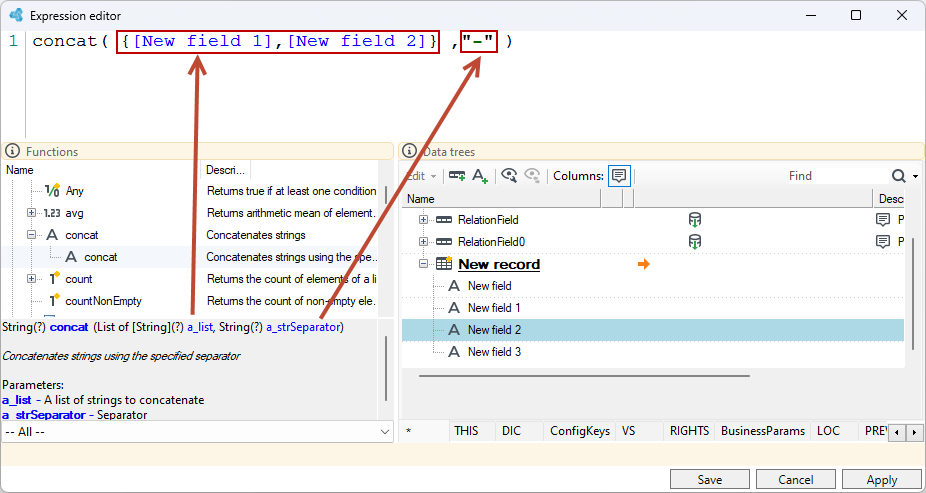
For example, for the concatenation function concat( ) which concatenates strings, the parameter of the function is a list of elements (strings to be concatenated from fields: New field 1 and New field 2) and a separator ("-"). For more on functions, see Functions.
Functions
The built-in functions can be accessed:
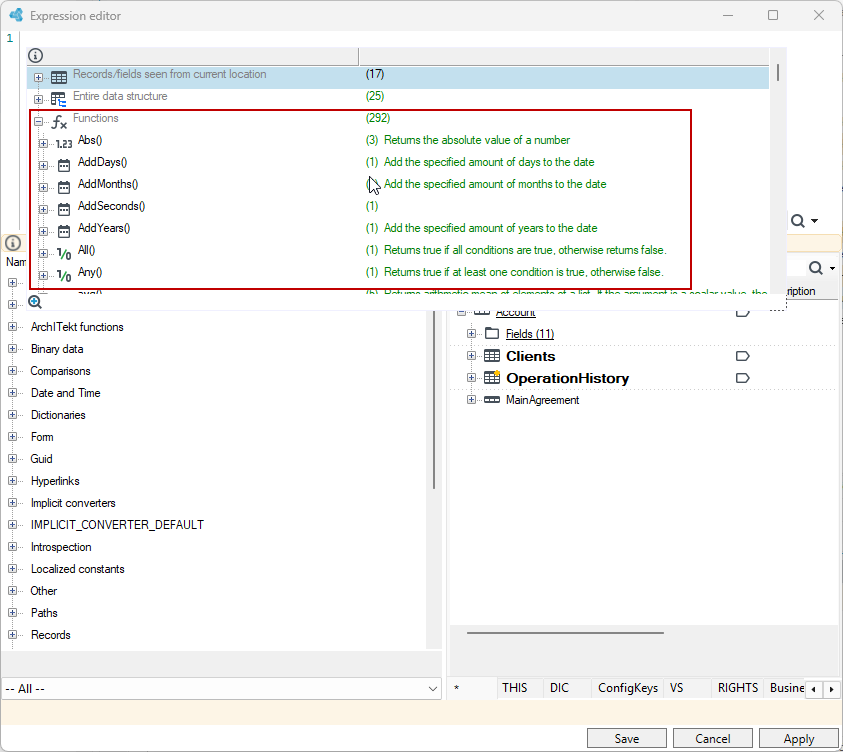
- When you go to the detailed expression editor, by adding the Expression annotation to the field and then click button next to the field. The functions are available in the editor window without going to the syntax prompt, where they are also available.
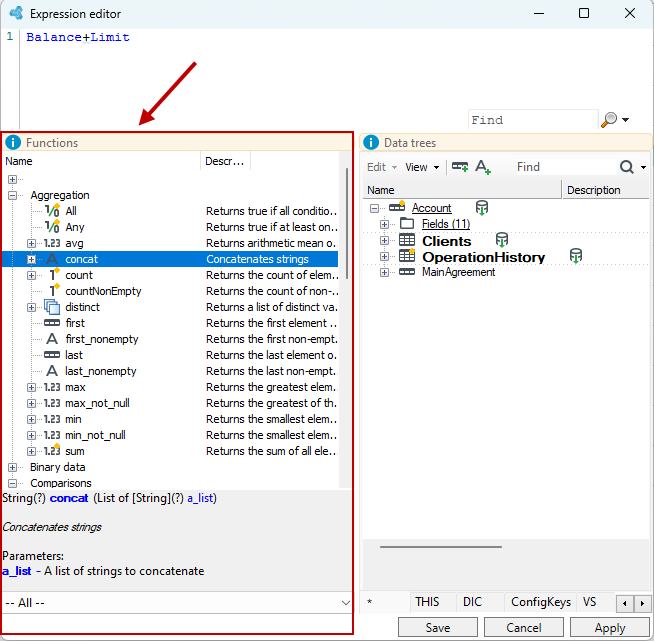
- On the Details panel or in the advanced Expression editor window after selecting Ctrl+Space, where the syntax hinting window will be displayed with the available functions.
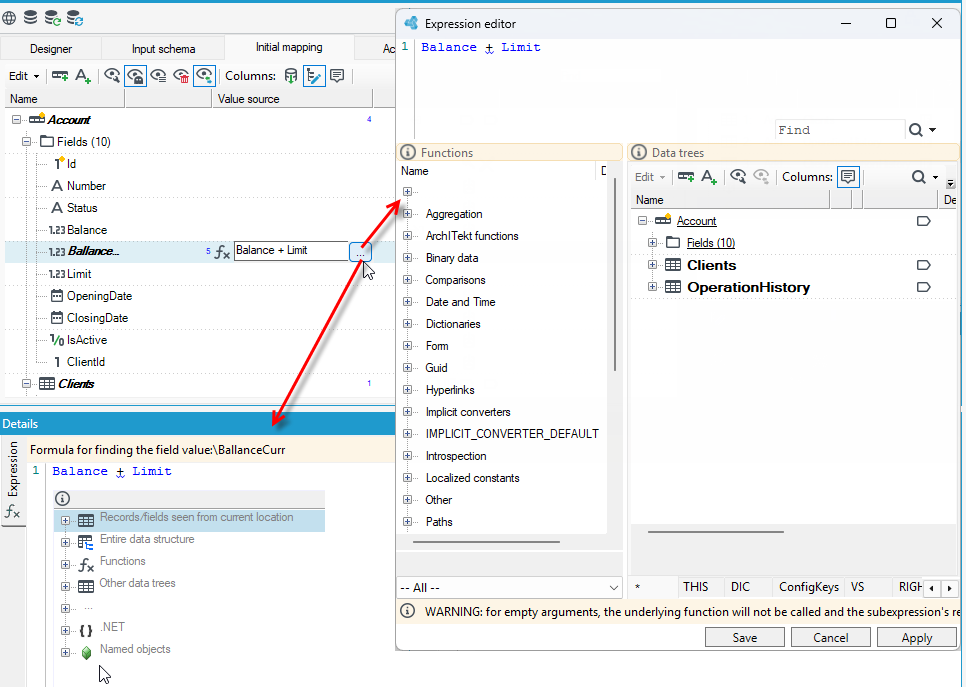
We have a couple hundred buillt-in functions .The most common functions are available in the form of operators:
- arithmetic
(1 / 3 * 5 + 2) % 7
-
logical
true || falsefalse && true! [i know everything] -
operations on sets
Status in {"Some", "good", "statuses"}&& Status not in {"Other", "bad", "ones"} -
string matching, using either simple wildcards or regular expressions.
everyone Like "?Me?"||everyone NOT LikeRgx "regular expressions.*""
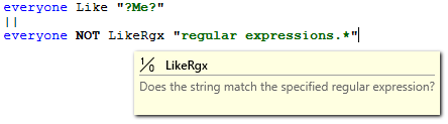
All the rest is called traditionally – name and arguments in parentheses.
Some functions are available only in some contexts (like in data integration packages or web forms) and are not in the global unnamed context – they look like methods of objects, with a dot inside.
namedObject.f(x, y, z)
For more see: Syntax and Functions
Ternary operator
The ternary operator, working just like an IF in excel.
It is used to build conditions. It returns second or third part depending on the first part, which must be a mandatory boolean value.
a > b
? "a is greater"
: "b is greater (or equal)"
You can chain it as long as you like, but - If you need more than a few conditions here, please consider using other solutions like dictionaries or decision tables or, in general, something more maintainable than putting all logic in one huge expression.
Balance > Limit ? "Alrighty"
: Balance > 0 ? "Still above"
: "the sad default"
For more on the types of functions and their structure, see Functions - types and construction.
Dictionary functions
What`s a dictionary? It is a quick, handy lookup to some, so called, slowly changing dimension data – for example a list of departments, countries, users,
Each dictionary element has its own unique Id number. We can use the Dictionary annotation to retrieve the values of dictionary elements names or their descriptions, see Dictionary. You can also use built-in functions for retrieving dictionary elements like DicItemName() and DicItemDescription() in the expression editor after adding the Expression annotation first.
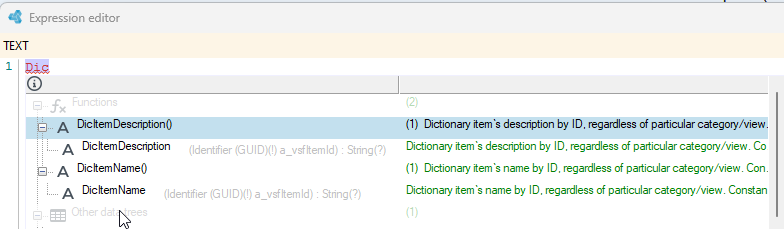
In the middle of the function, indicate which dictionary item (Item Id) we want to retrieve the name or description.
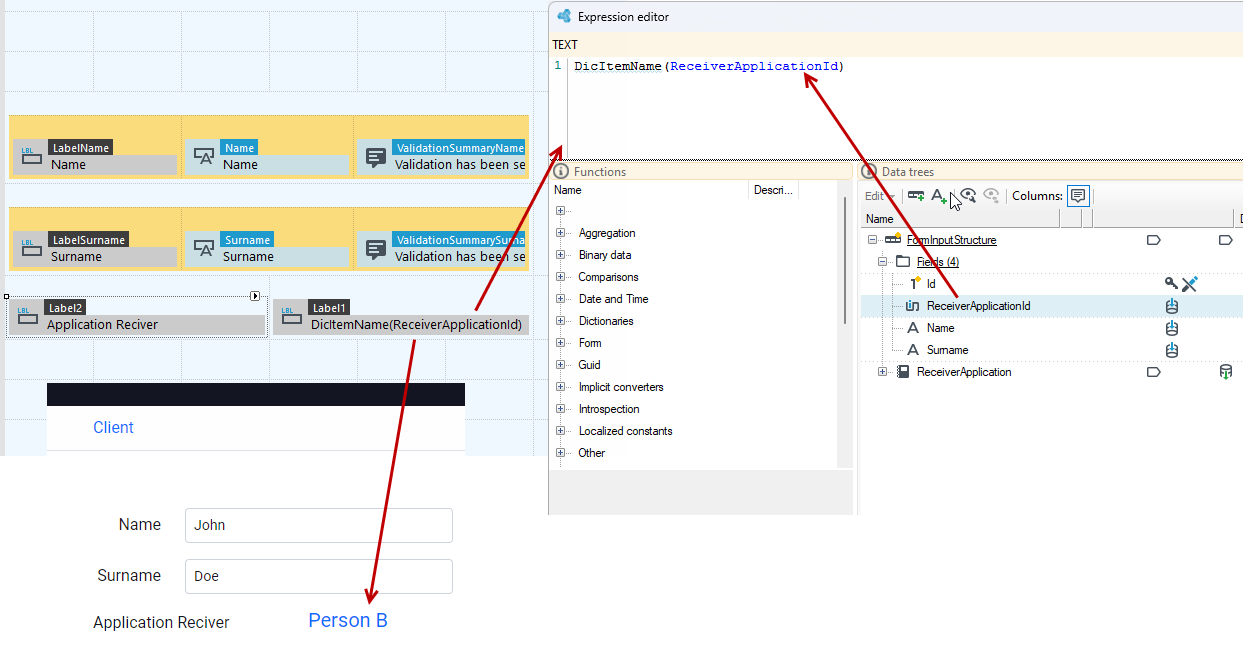
We can get the same effect if we retrieve the name of the dictionary item directly from the dictionary category from the data schema.
Grammar
No value and unknown value
The first important thing here is - how we handle NULLs, that is special values meaning „unknown”. We fully track the nullability, or in other words mandatory status of every field, record and path, and force the designer to decide what to do or save this conscious decision for later, but not until runtime.
- First - it is impossible event to try to call a function that does not handle nulls with a null value. The expression mechanism will automatically convert such an attempt to null result and pass it along to the rest of the expression.
For some functions nulls turn into reasonable defaults, but in general they are treated as non-existent or unknowns, just like in SQL, and propagated. 2. Second thing are the null coalescing operators. We have two forms thereof: double and triple question marks. If the number is null we return zero, just like in popular programming languages.
nullable_number ?? 0
- Consider this example – simple addition. What is the outcome if our numbers are ones? It would seem that the result should be 2.
No, one, because the normal double-question null coalescing operator binds in the grammar in an unfortunate way.
nullable_number ?? 0 + another_nullable_number ?? 0
- Here we have the same expression with parentheses added to illustrate the order of operations. When the first number has a non-empty value, such as 1, the second part is not counted at all and the result of the total is one, not two.
nullable_number ?? (0 + (another_nullable_number ?? 0) )
- Here it is, the triple question mark operator with much stronger binding, no parentheses needed, the outcome is two. This is how the triple question operator works. Below is also its equivalent with parentheses, which, as you can see, are not needed. The result of adding two ones will be two in this case.
   nullable_number ??? 0 + another_nullable_number ??? 0
   (nullable_number ??? 0) + (another_nullable_number ??? 0)
Its very important to realize how null values propagate through arithmetic and logic operators, as we can do a bit more than with popular programming languages. For more see: Special cases: no value vs. empty value.
Empty value
Whereas all types may have null values, meaning „unknown” or missing, not all types may have empty values.
Lets name them:
- empty string,
- empty collection or list,
- empty binary stream,
- empty guid.
Another thing to note here are nulls in list – well, we don`t keep them in lists because a concept of empty slots was often unfathomable for business users and caused more trouble than good.
Every path resolving to a list has null values removed.
Expression - operation properties
After selecting a given operation in the operation tree, individual properties that you can additionally set for a given operation are available in the Properties panel.
CreateMissingField - When set, this operation will add a missing field with a type inferred based on the value.
TryGuessMissingType - When set, the missing field type will be filled in (e.g., 123 as numeric, “true” as boolean, etc.), otherwise it will be a plain string.
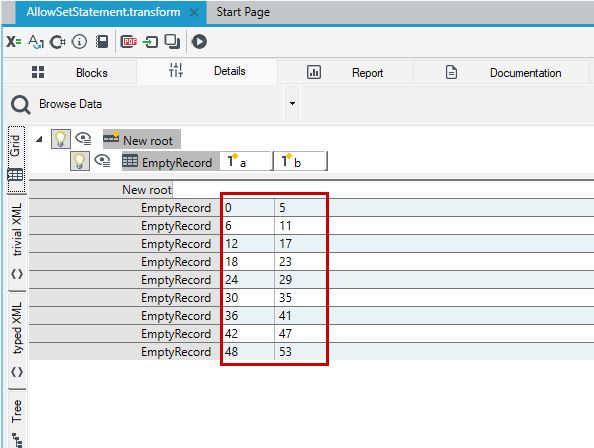
The AllowSetStatement property allows a function to behave like a small program that better understands how different fields affect each other.
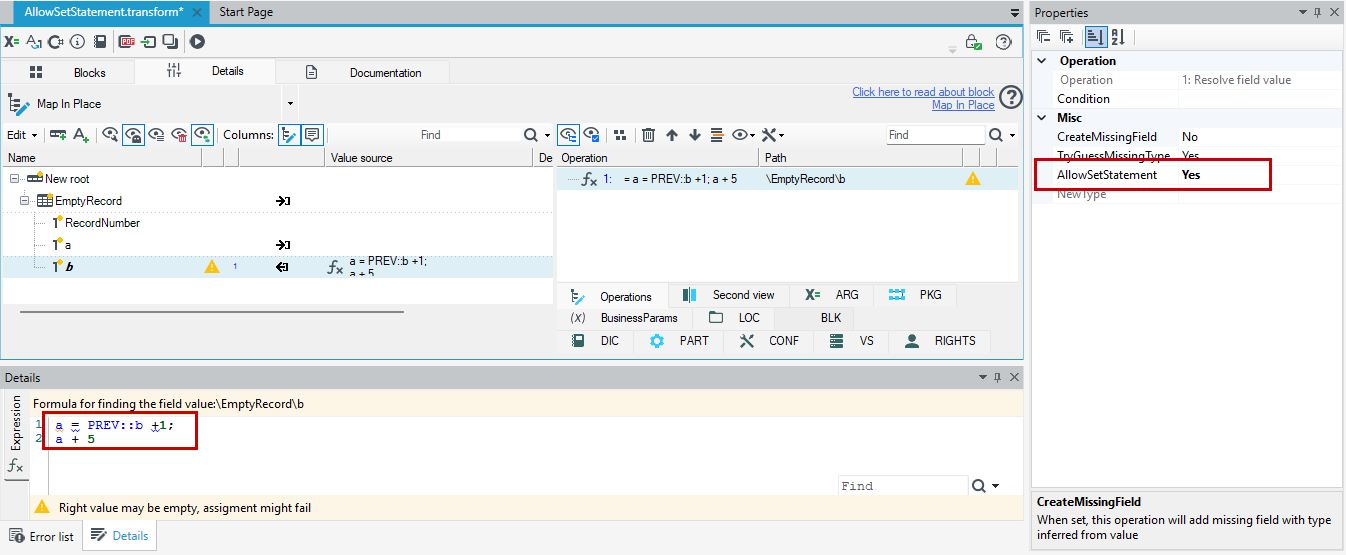
When enabled, the system, while calculating the value of one field (e.g., b), will automatically first calculate another field that this one depends on (e.g., a), store its value, and only then correctly compute and return the value of field b.