Merge records
The operation of merging records enables joining several different records (most often with similar schemas) into one multiple record.
- Performing the operation comes down to "dragging" (drag&drop technique) the source record on the target record and selecting the Merge records option from the displayed context menu.
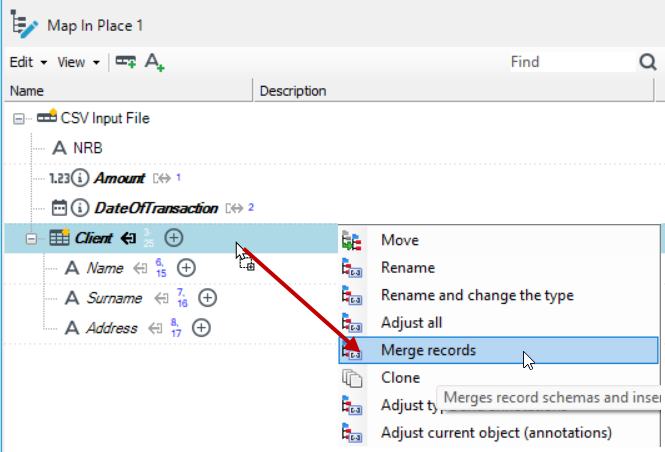
After this operation is performed, the target record's structure will be compliant with both the source record and the target one. It should be noted that copies of source records are created before merging and they are merged (no source record is deleted).
The operation is somewhat opposite to the operation Remove multiplicity. It is particularly useful when denormalized data in a single record (e.g. data coming as a single line in a flat file) should be changed into a tree structure.
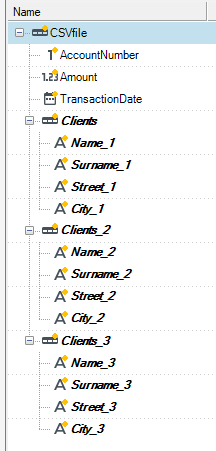
An example of a structure loaded from a flat file:

- If the User wants to get a tree structure, in which the fields such as 'Name', 'Surname' etc. belong to a multiple child record named e.g. Clients, three single records named e.g. Clients (a record to which other records will be merged) Client1, Client2 should be created in the block Map in place.
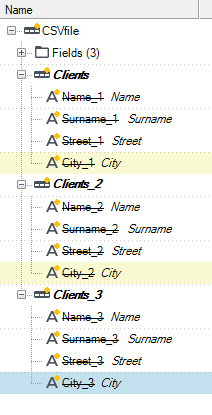
- Next, the fields with the name suffix "_1", "_2", "_3" should be moved to corresponding records.
- The fields which have been moved should be renamed so that they have the same names in all records.
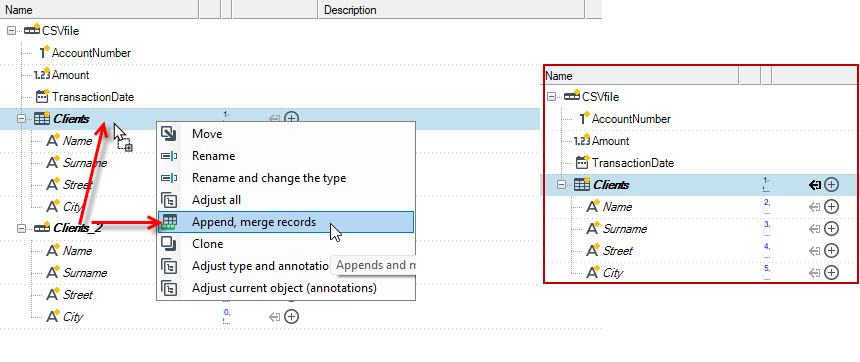
- Merging individual records into the output record Clients is the last stage of the operation. A normalized structure will be the result of the operation.
See also
Conversion of fields to many records in a form of Key-Value pairs - UNPIVOT