Remove multiplicity
The Remove multiplicity operation may be performed on a multiple record and it comes down to creating a new single record with the number of fields and child records of a 'flattened" record equal to its maximum multiplicity.
Example
- There is a multiple record (maximum multiplicity 3):

- The following record will be the result of remove multiplicity.
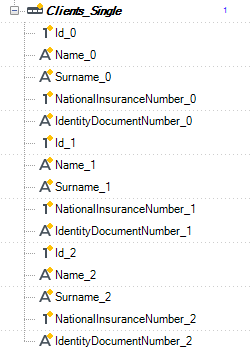
Such operation is particularly useful if there are multiple records which are to be sent to a flat file (CSV) or a fixed length file.
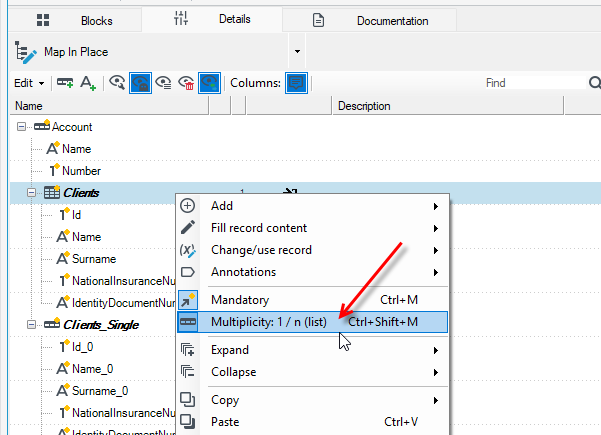
- To call the above-mentioned operation, you should select the option Multiplicity: 1/n(list) from the context menu of a multiple record.
- In order to edit the options of the operation you should select the option in the Operations panel and the suitable editor will appear in the Details editor panel.
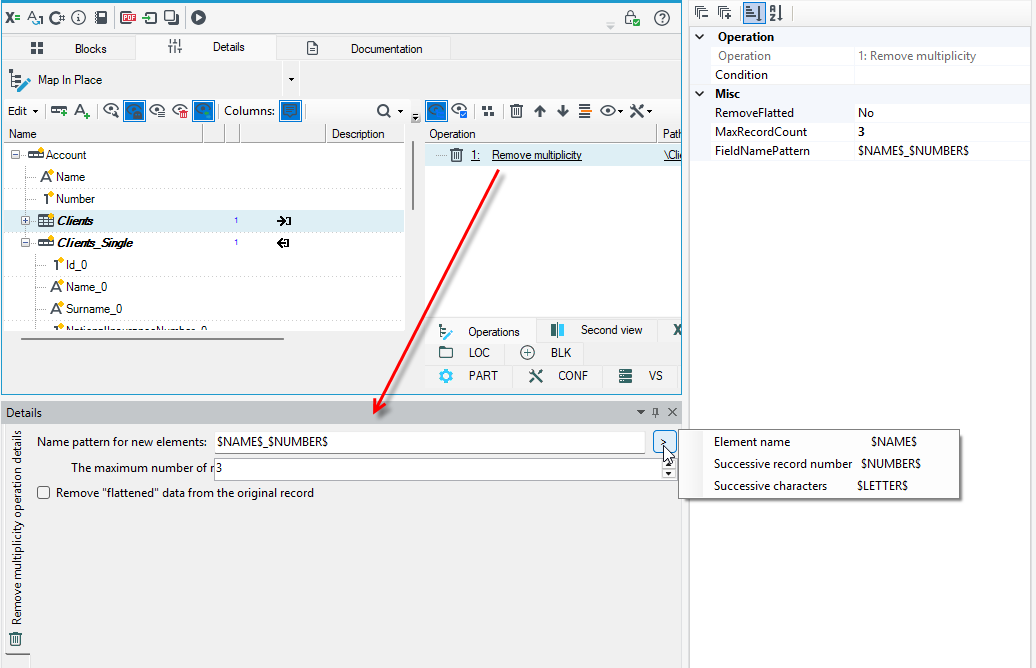
Three options are available for configuration for this operation:
- name pattern of new elements defining how names of fields and child records in the "flattened" record should be created,
- maximum number of records that is the maximum multiplicity of a record in which a multiple is deleted,
- deleting flattened data from an original record which is useful when several first records should be deleted and "flattened" in order to perform transformation. Other records may be used for other purposes.