Subtree introspection – UNPIVOT TREE
Description
The Subtree introspection – UNPIVOT TREE mapping operation (UnpivotTreeOperation) describes a whole data subtree as a flat list of rows: one row for every record in the subtree, including the record the operation is attached to. Each row tells where the record sits, where it comes from (annotations, e.g. its binding to the EDMX data model) and what it holds (fields with values).
It is the extended sibling of the Conversion of fields to many records in a form of Key-Value pairs - UNPIVOT operation (UnpivotRecordOperation), which turns the fields of a single record into key-value pairs.
- Input – any record in the schema (single or multiple) together with its whole subtree.
- Output – a new, multiple child record UnpivotTree, added to the starting record.
When to use it
The operation is useful when the same action needs to be performed on many structures, tables or business cases. Instead of building a separate mapping for each case, you can work on the description of the whole structure as if it were ordinary data — moving one level of abstraction higher.
For example: after a series of operations, e.g. Query to the data model on several related structures, a single operation turns the result into a list of descriptions – structure IDs, table and column names, value sources, field values. Subsequent operations (selection, removal, mapping) then turn this into, e.g., a log payload or key-value data.
Typical use cases:
- archiving or anonymizing data across many tables at once,
- generating SQL scripts based on the data structure,
- analyzing which fields are mapped and where their values come from.
Input data
Any record in the schema (single or multiple) together with its whole subtree – e.g. a record loaded by the Query to the data model operation, or any other record of the structure.
How to add the operation
- In the schema, select the record where the description should start (e.g. a record loaded by the Query to the data model operation).
- From the record's context menu, choose Change/use record → Subtree introspection – UNPIVOT TREE (next to the Unpivot operation).
- The operation is created automatically – in the operation list it has an icon of arrows with a small tree.
- Optionally, set the Include technical records and fields property (see Operation properties).
The operation describes the state of the data at the point where it is placed in the operation list – records and fields added by later operations are not included in the description.
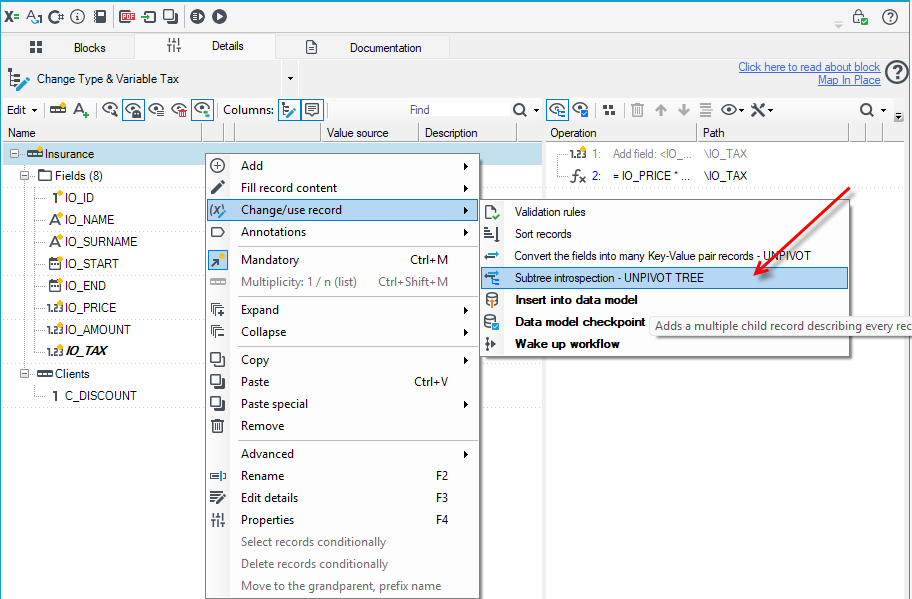
You can further process the operation's result with subsequent mapping operations, e.g. copy, narrow it down to the needed elements, or remove unneeded data.
Example — a data model record and a list of two records through a relation
The Customer data structure (table dbo.CUSTOMER) has a list relation Addresses to the Address structure (table dbo.ADDRESS). The mapping contains, in order:
| # | Operation | Path | Notes |
|---|---|---|---|
| 1 | Add record | \Customer | |
| 2 | Add field | \Customer\Id | |
| 3 | Resolve field value — Copy value ..\Id | \Customer\Id | the query key |
| 4 | Add record | \Customer\Addresses | marker of the relation to read |
| 5 | Query data model — structure Customer | \Customer | |
| 6 | Subtree introspection | \Customer |
After the query (operation 5) the customer has two addresses. Operation 6 appends UnpivotTree with three rows — one for the customer and one for each address:
Customer                                       (read from the data model)
  Id      = 7
  Name    = "ACME"
  Addresses                                    (list, relation)
    [0]  Id = 71, CustomerId = 7, City = "Krakow"
    [1]  Id = 72, CustomerId = 7, City = "Gdansk"
  UnpivotTree                               (added by the operation — 3 rows)
    [0]  SchemaPath = ""           PathWithListIndices = ""
    [1]  SchemaPath = "Addresses"  PathWithListIndices = "Addresses[0]"
    [2]  SchemaPath = "Addresses"  PathWithListIndices = "Addresses[1]"
Row details (structure IDs are made up; the field list is shortened — in reality every field of the structure appears, empty and audit fields included):
Row [0] — the start record Customer
| Column | Value |
|---|---|
SchemaPath / PathWithListIndices | (empty — this is the start record itself) |
Description | the structure's description from the data model, e.g. Company customers |
Annotations | AEdmxRecUsage — Param1 = 5b1c0d3e-0a4f-4c2b-9e61-2d7f8a9b0c11 (structure ID), Param2 = Customer, Param3 = dbo.CUSTOMER, Param4 = (empty — query root) |
Fields | Id = 7, SourceType = ACopy, Source = ..\Id; annotations: AEdmxField (Id, business name, CU_ID, dbo.CUSTOMER), AMappingReadOnly |
Name = ACME; annotation AEdmxField (Name, business name, CU_NAME, dbo.CUSTOMER) |
Rows [1] and [2] — the items of the Addresses list
| Column | Row [1] | Row [2] |
|---|---|---|
SchemaPath | Addresses | Addresses |
PathWithListIndices | Addresses[0] | Addresses[1] |
Annotations | AEdmxRecUsage — Param1 = ID of the Address structure, Param2 = Address, Param3 = dbo.ADDRESS, Param4 = Addresses (relation name) | same |
Fields → City | Krakow; AEdmxField (City, …, AD_CITY, dbo.ADDRESS) | Gdansk |
Fields → CustomerId | 7; AEdmxField (…, AD_CUSTOMER_ID, dbo.ADDRESS) | 7 |
With three addresses there would be four rows; with none — one.
Result structure
The operation adds a new, multiple child record UnpivotTree to the starting record – one row for every record of the subtree. The starting record is always the first row, followed by the remaining records in schema order, depth-first (parent, then its children).
All resulting fields are text. If the name UnpivotTree is already taken on the starting record, the resulting record gets a unique name with a suffix.
UnpivotTree – subtree record fields
| Field | Content |
|---|---|
SchemaPath | the path from the starting record, without list indices, e.g. Adresy; empty for the starting record itself |
PathWithListIndices | the same path with the indices of multiple records, e.g. Adresy[1] or Zamowienia[0]\Pozycje[2] |
Description | the record's description (the Description annotation) |
Technical | the kind of technical data (the Technical data annotation), if the record is technical |
SourceType | the short name of the annotation that determines the value (ACopy, AConst, AExpression), if present on the record |
Source | the text of that annotation: the source path (copy), the value (constant), or the expression's content |
Fields – the record's fields
| Field | Content |
|---|---|
Name | the field's name |
Value | the value as text – per the block's conversion policy, the same as in the Unpivot operation |
Description | the field's description (the Description annotation) |
SourceType, Source | where the field got its value in this mapping – same as for the record (e.g. ACopy / ..\Id) |
Technical | the kind of technical data of the field, if it is technical |
Annotations – annotations of a record or a field
| Field | Content |
|---|---|
TypeName | the short name of the annotation type, e.g. AEdmxRecUsage, AEdmxField, AKey |
FullTypeName | the full type name (with namespace) |
ToString | the textual form of the annotation |
Param1…Param4 | the "popular" parameters of the annotation – only for the annotations listed below; empty for the others |
Annotations that already have their own fields above (Description, Technical data, the value source) are skipped, as are internal annotations of the mapping editor. The full list of annotations is described in Annotations.
Param1–Param4 by annotation type
All values are text. "–" means the parameter is always empty. The most convenient way to select rows is by TypeName – these are the names given next to the headings below. Next to each heading there is also information on whether the annotation occurs on a record or on a field.
Data model (EDMX)
Entity model record – AEdmxRecUsage (in the data), AEdmxRec · record
A record linked to a data structure: the root of a query to the data model, a relation (single or list), or a substructure.
| Parameter | Content |
|---|---|
Param1 | the data structure ID (version GUID); empty for a substructure |
Param2 | the structure name; empty for a substructure |
Param3 | the database table, schema.table; empty for a substructure (it belongs to the parent's table) |
Param4 | the name of the relation or substructure through which the record is reached; empty for the query root |
Entity model field – AEdmxField, AEdmxFieldUsage (a query condition field) · field
| Parameter | Content |
|---|---|
Param1 | the field name in the data model |
Param2 | the field's business name; empty when not defined |
Param3 | the database column |
Param4 | the table that owns the field, schema.table |
Write to the data model – AEdmxInsert · record
A record written by the data-model write operation. AEdmxQuery has the same shape, but it is only visible in the mapping editor's preview, not in the data during processing.
| Parameter | Content |
|---|---|
Param1 | the data structure ID; empty when no structure was selected |
Param2 | the structure name (a hint remembered at selection time) |
Param3 | the database name, if specified |
Param4 | – |
Dictionary attribute – ADicAttributeRec · record
The record of a dictionary element's compound attribute, loaded together with the dictionary.
| Parameter | Content |
|---|---|
Param1 | the attribute type's name |
Param2 | the attribute type's display value |
Param3 | the attribute value's physical type (GUID) |
Param4 | the attribute type's position in the dictionary structure |
Database
Table/column name – ADbObjectName · record or field
The database table name (for a record) or column name (for a field), when it differs from the name in the schema.
| Parameter | Content |
|---|---|
Param1 | the name in the database (may contain parameters in {…}) |
Param2 | a name used only at design time; empty when not given |
Param3, Param4 | – |
Database operation – ADbAction · record
What the database write should do with the record.
| Parameter | Content |
|---|---|
Param1 | the operation kind: None, Skip, Update, Insert, Delete, AUTO_InsertUpdate, AUTO_InsertOnly, Replace, TakeFromParent, Dynamic |
Param2 | the data source name; empty = the database writer block's own data source |
Param3 | the expression that determines the operation (for Dynamic) |
Param4 | the name of the field that receives the marker of the operation performed |
Primary key, Foreign key, Autogeneration – APrimaryKey, AForeignKey, AAutoGenerate · field
Plain markers: the field is a primary key, a foreign key, or its value is determined by the database. All parameters are empty – only the presence of a row with the given TypeName matters.
Dictionaries and keys
Dictionary – ADictionary · field
Mapping of the field's value through a dictionary.
| Parameter | Content |
|---|---|
Param1 | the dictionary name |
Param2 | the key column |
Param3 | the value column |
Param4 | the reaction to a missing key in the dictionary: TRY_RECOVER, ERROR, EMPTY_DATA, SKIP |
Custom keys – AKey · record
| Parameter | Content |
|---|---|
Param1 | the key field names separated by ;, e.g. Kod;Oddzial |
Param2…Param4 | – |
Value constraints
Default value – ADefaultValue · field
| Parameter | Content |
|---|---|
Param1 | the default value as text |
Param2…Param4 | – |
Range – ARange · field
| Parameter | Content |
|---|---|
Param1 | the lower bound; empty = no limit |
Param2 | the upper bound; empty = no limit |
Param3 | whether the lower bound is excluded from the range: True / False |
Param4 | whether the upper bound is excluded from the range: True / False |
Operation properties
| Property | Default | Meaning |
|---|---|---|
Include technical records and fields (ProcessTechnicalRecords) | no | when disabled, technical records (together with their whole subtree, e.g. error records) and technical fields are skipped. When enabled, they are included in the description, and their kind is shown in the Technical column. |
Good to know
- Field value sources stay in the schema. Having the operation in the mapping means that all value-determining operations in this mapping leave their annotations (copy, constant, expression, parser, dictionary) on the schema's fields – otherwise the
SourceType/Sourcecolumns would be empty. For very large schemas this means a bit more memory use. - Loading relations. The operation traverses all records of the subtree, so data-model relations that have not yet been loaded (lazy mode) will be loaded from the database at this point. For large trees, place the introspection on the narrowest possible record.
- Only records present in the data. A record defined in the schema but absent from the instance (e.g. an empty list) does not produce a row.
- The result of another introspection is an ordinary subtree. If this operation already ran earlier on the same subtree, its
UnpivotTreewill be described like any other record. The operation's own result is not described.
What to do next with the result
Typical next steps within the same mapping:
- removing unneeded rows with a condition on
SchemaPath,TypeNameorValue(e.g. keeping only fields withAEdmxFieldand a non-empty value), - moving
UnpivotTreeto a record intended for a log or for sending, - mapping
Name/Valuepairs (orParam3= column /Value) onto the target key-value structure.
Example of use
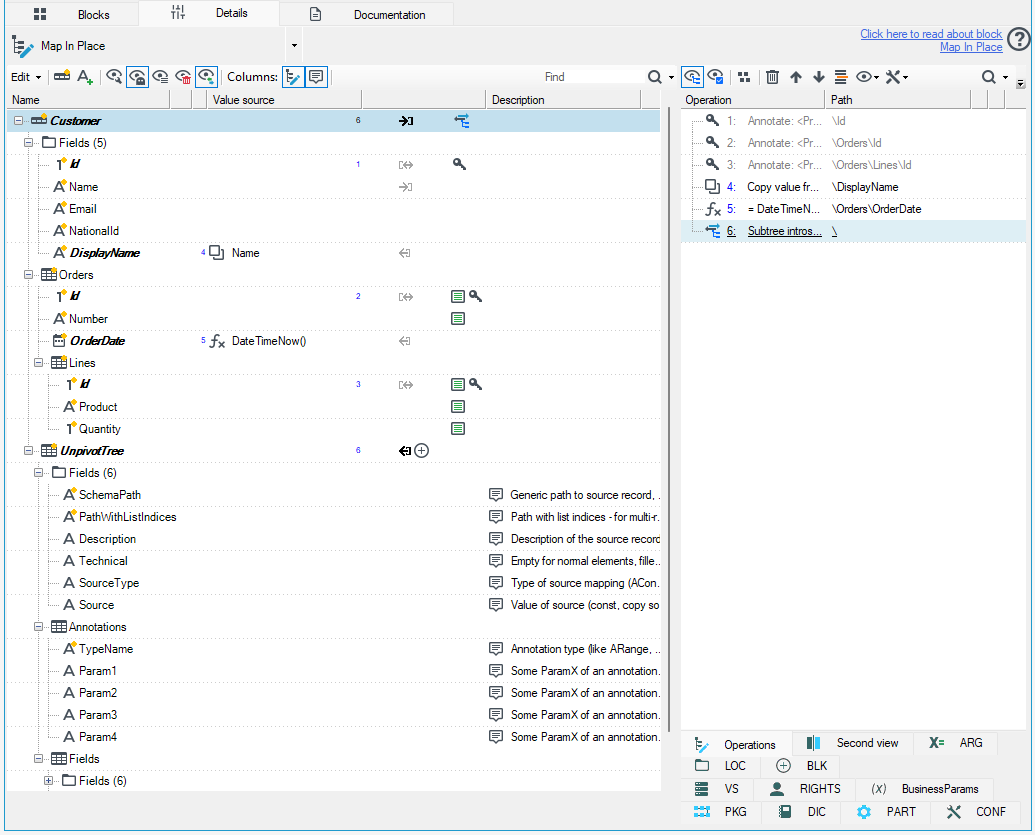
Below is a simple example you can reproduce in archITekt Studio: a customer, their orders and order lines — three levels of a tree.
Database tables
CREATE TABLE Customer (
    Id          INT PRIMARY KEY,
    Name        NVARCHAR(100),
    Email       NVARCHAR(100),
    NationalId  NVARCHAR(11)
);

CREATE TABLE CustomerOrder (
    Id          INT PRIMARY KEY,
    CustomerId  INT REFERENCES Customer(Id),
    Number      NVARCHAR(20),
    OrderDate   DATE
);

CREATE TABLE OrderLine (
    Id        INT PRIMARY KEY,
    OrderId   INT REFERENCES CustomerOrder(Id),
    Product   NVARCHAR(100),
    Quantity  INT
);

INSERT INTO Customer VALUES (1, 'John Smith', 'john@example.com', '0123456789');
INSERT INTO CustomerOrder VALUES (2, 1, 'ORD/2026/003', '2026-10-01');
INSERT INTO OrderLine VALUES (3, 2, 'Monitor', 5), (1, 2, 'Keyboard', 3);
Data structure
Create a structure with three levels of records:
Customer                (annotation: table = Customer)
 ├─ Id, Name, Email, NationalId
 └─ Orders (list)       (annotation: table = CustomerOrder)
     ├─ Id, Number, OrderDate
     └─ Lines (list)    (annotation: table = OrderLine)
         └─ Id, Product, Quantity
Important elements:
- Annotations with the table name on every record. These are the ones expected to show up in the result as parameters.
- Additionally, to check how mappings are reported: add a calculated or copied field on the Customer record, e.g. DisplayName as a copy of Name. This lets you see whether the operation reports the copy and its source.
- Optionally: mark sensitive fields (Email, NationalId) with an annotation, e.g. as personal data. This makes it possible to later filter out the fields to anonymize.
Mapping
- Load the data: the customer with Id = 1 together with their orders and order lines.
- Add a Primary key annotation on the Id fields (root record, and the Orders and Lines records) – this lets you verify the
APrimaryKeyannotation in the result. - Add a Copy value from field operation copying Name to a new DisplayName field – this lets you verify the
ACopyannotation. - On the Orders\OrderDate field, add an operation that computes the value with an expression, e.g.
= DateTimeNow()– this lets you verify theAExpressionannotation. - Finally, add the Subtree introspection – UNPIVOT TREE operation at the level of the whole record (path
\).
- Optionally: add a filter that keeps only the fields annotated as personal data.
What to expect
The operation creates an UnpivotTree record with a list in which each row corresponds to one record of the subtree (Customer, Orders, Lines), together with a nested Fields list describing that record's fields.
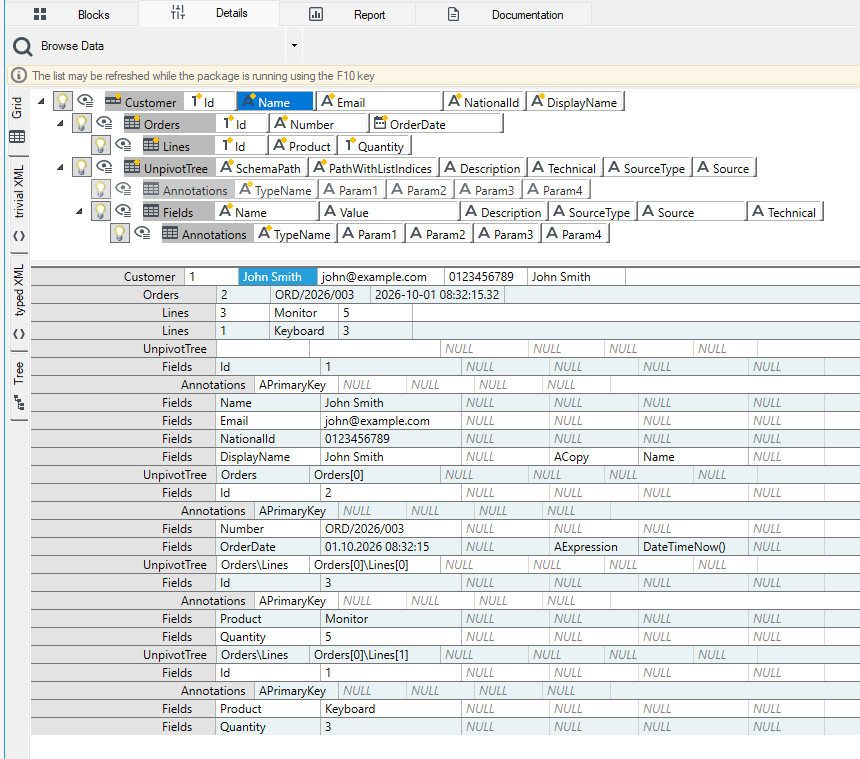
The screenshot shows, among other things:
- SchemaPath indicating the record's path without list indices, e.g.
Orders,Orders\Lines, - PathWithListIndices – the same path with indices, e.g.
Orders[0],Orders[0]\Lines[0],Orders[0]\Lines[1], - an APrimaryKey annotation on the Id fields,
- SourceType = ACopy and Source = Name on the DisplayName field – confirming that the operation does report the copy and its source,
- SourceType = AExpression and Source = DateTimeNow() on the OrderDate field, indicating that the field's value is computed by an expression.
The Email and NationalId fields from the Customer record are ready material for generating an anonymization script, e.g. UPDATE Customer SET Email = ..., NationalId = ....
Example: anonymizing historical data
Problem: historical VBP data needs to be anonymized across dozens of business cases and hundreds of tables. Traditionally this would require a very large number of mapping operations, one for each case.
Solution using Subtree introspection – UNPIVOT TREE:
- Load the data tree.
- Perform the Subtree introspection – UNPIVOT TREE operation. This produces a list of records and fields together with the table names extracted from the annotations.
- Use subsequent mapping operations to select the elements you need, e.g. the fields to anonymize and their sources, and discard the rest.
- Based on this, run a single SQL script that anonymizes the data across all historical tables.
Effect: a handful of mapping operations and a single SQL script instead of hundreds or thousands of manually created operations.
See also
Conversion of fields to many records in a form of Key-Value pairs - UNPIVOT