Design tools
The chapter contains a detailed description of blocks which are the design tools.
The blocks are located in the right hand side of the window in the menu Toolbox.
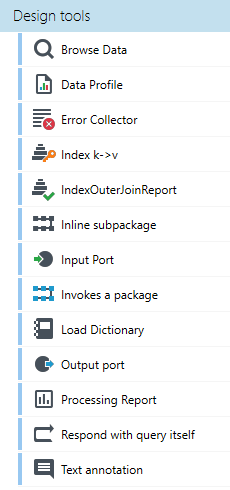
Section Design tools include the following types of blocks:
- Browse Data
- Load Dictionary
- Error Collector
- Index k->v
- IndexOuterJoinReport
- Inline subpackage
- Input port
- Output port
- Data Profile
- Invokes a package
- Processing Report
- Respond with query itself
- Text annotation
Browse Data

The Browse Data block is a design tool used for previewing the given operation results.
- In order to preview the operation results, the Browse Data block should be placed in the chosen location.
- The tab Details is used for browsing the results.
There are four different views of the same data (usually the last, for example, 1000 records flowing through a block).
- Basic grid-tree view
- Trivial XML view
- Typed XML view based on metadata controlling XML formatting, used in other XML mapping operations, such as returning data from a service, formatting an XML field or writing to an XML file. This view can hide some information.
- Tree - A view of the data tree supplemented with columns with values from individual records.
In this view you can see only the first of possibly many child records.
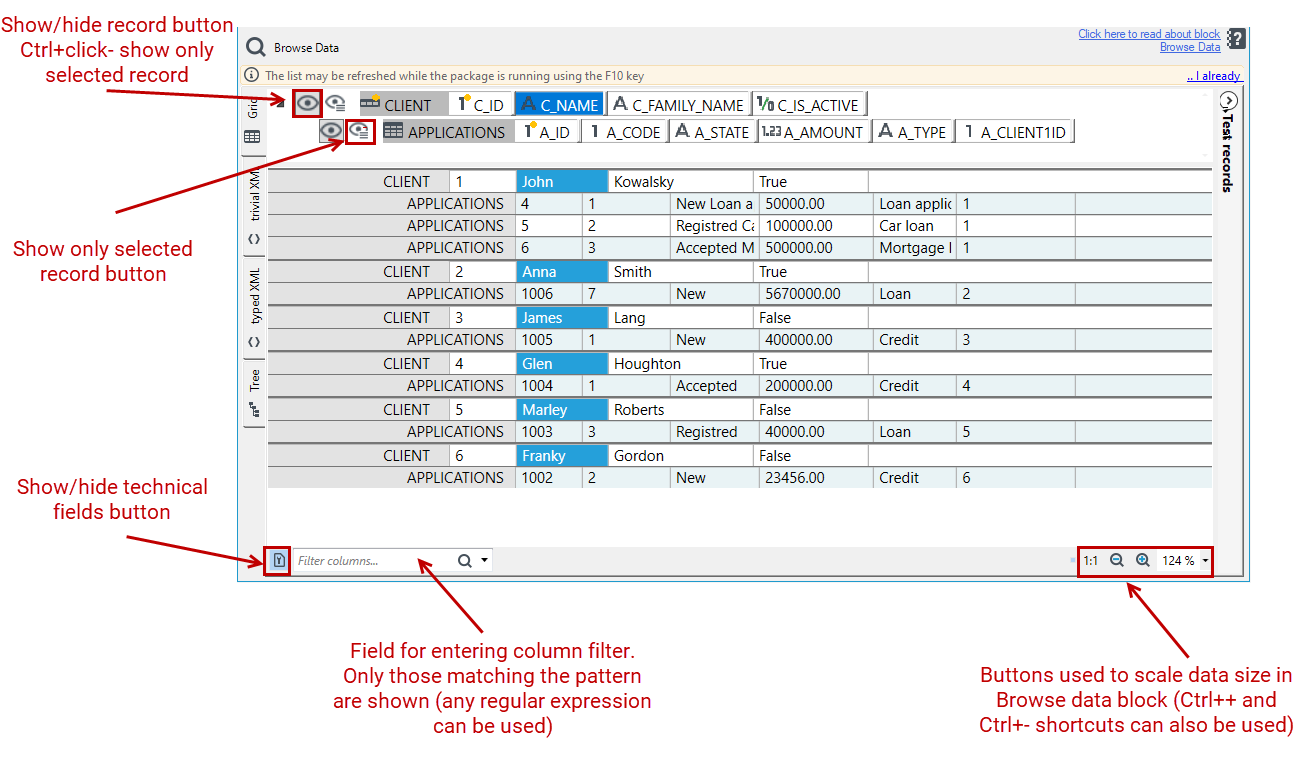
The control of the basic grid-tree view for previewing data offers a large number of possibilities to facilitate the use of the preview, below is a picture showing these possibilities:
Load Dictionary

The block Load Dictionary enables loading input records, using them to create an index and then querying them.
The block loads records prepared in the previous processing as a dictionary. Such a dictionary may be used later in processing (using the annotation Dictionary).
Error Collector

The block Error Collector is an independent tool responsible for gathering errors coming from all the blocks of the given phase.
The block can be used in the package which requires verification in terms of errors that occur.
Using the block in a package is presented below:
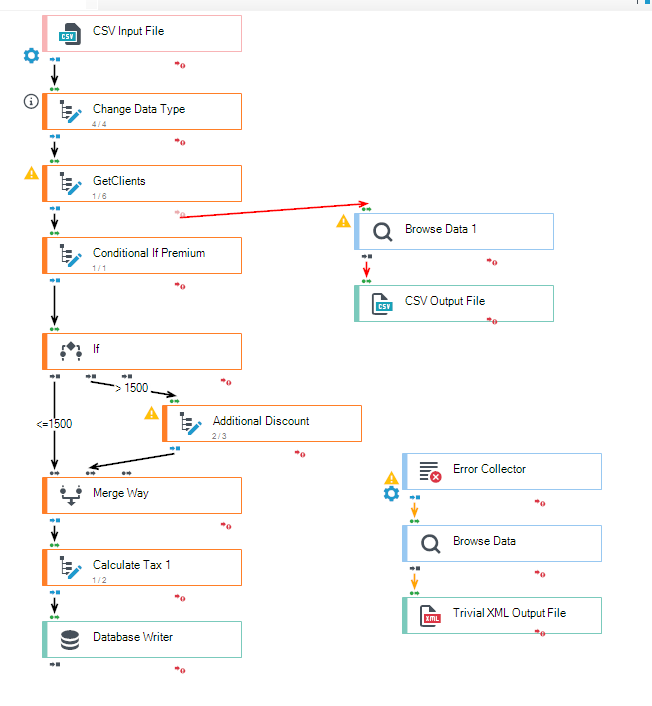
The block may be treated as any other input block - its outgoing records may be processed as other records (a block should have a number of threads defined to be greater than 0 and its processing phase should be the same as the one of the connected subgraph which should be verified). Additionally, in the block details, you can specify the blocks from which errors will be collected.
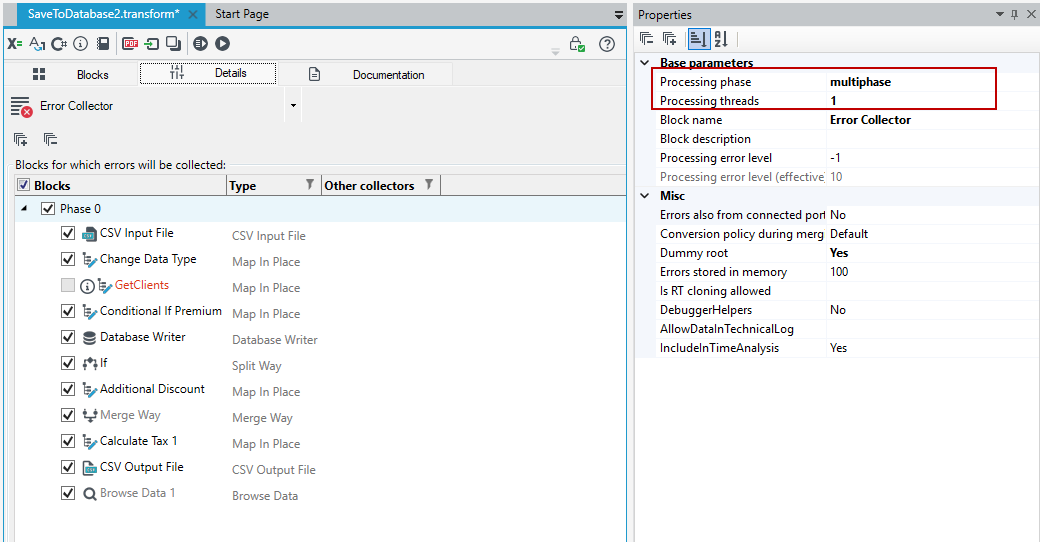
Using the suitable output block, an error list will be saved in an appropriate format in the location indicated by the User or it will be presented in a data preview.
Index k->v

The block Index K->V enables indexing the passing-through records by the key selected by the User.
The function is used while processing files with large data volumes.
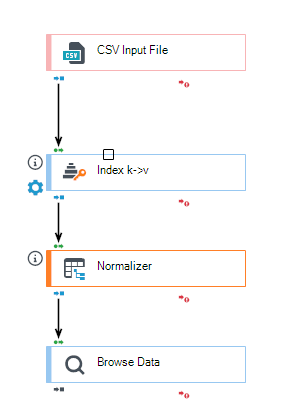
There are three tabs with the block's details.
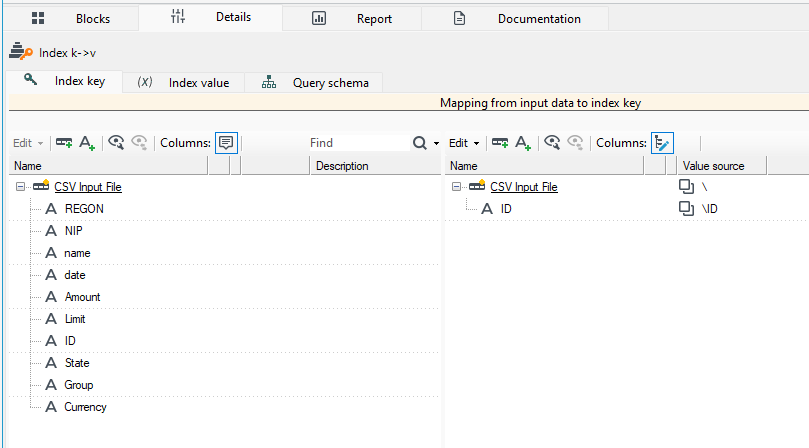
The tab Index key allows to specify which element will be the index key. In order to it, one should drag the appropriate element from the left side of the window being the preview of the input file schema to the window on the right. The element will be marked as an index key.
The tab Index value is a preview of the block's input file schema (a window on the left) and allows to specify information which should be written with the index key (a window on the right).
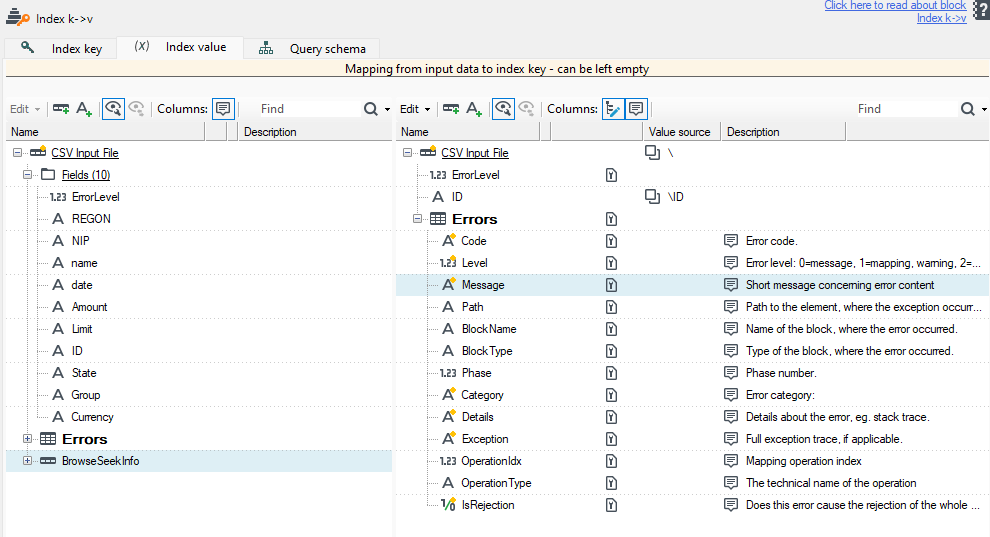
Particular data elements' handling has been described in detail in the chapter devoted to customizing record schemas and fields (see: Data processing).
- The index value does not have to be given in the (default) block operation mode – element sorting in the buffer.
- Then, the entire input records will be stored, which is most often a desirable solution in this mode and which leads to better performance than in case of performing a mapping.
- Previous versions of the block required giving a mapping to an index value. Currently, the System will warn about the possible optimization (removing/deleting a mapping) if it detects a mapping of at least 50% of input schema fields.
External sorting
The system supports sorting data sets which size exceeds the total memory available.
- Sorting such records, the Application creates temporary files on the hard disk (by default, they are created in temporary directories of the Windows system). Therefore, enough free space on the hard disk should be provided.
- The option External indexing should be enabled in the Properties panel in order to be able to use the above mentioned option.
The option TempDirectory should be set in the application configuration file in order to change the default directory for temporary files.
In this operation mode, the block requires giving only one mapping: input data → index key.
Data indexing
In this mode, the block operation rule is more complex and it enables translating and forwarding queries. It sometimes requires as many as 3 mappings:
- What is the key in the data and in the query on the right side of the block – usually the business key, such as the contract number (D→K),
- What is the key on the left side of the block – usually the technical key, e.g. offset in a file or ID in a database (yes, it is easier to use the index in the database if there is a database) (D→V),
- How a query sent to a block’s input should look like depending on the value (and the key) stored in the index, for the value in the original query which appears on the block output. (K, V, Q) → Q`.
It can be written symbolically as follows:
D – the block input data,
K – the fields of the business key which occurs both in input data and in the Q query,
V – the value fields stored for each input record, necessary for preparing the Q query, Q – the query coming from the right side of the block, Q - the query outgoing from the left side of the block, created on the basis of (K, V, Q).
It operates as follows:
- In the first stage, the K→V mapping is built in the memory. All input records are read.
- In the second stage, depending on whether the block is queried or not
- A block is not queried with Q queries
A block does not need the third mapping, it performs the Q` queries one by one on the basis of the index value from the next keys and it returns results to the output port.
- A block is queried with Q queries
A mapping (K→V) is performed, followed by (K, V, Q) → Q`, and the result is returned to the output port.
Example of using the block – see: Data normalization and sorting.
IndexOuterJoinReport

Block IndexOuterJoinReport
Inline subpackage

The Inline subpackage block is a special block as it allows attaching and calling on the processed data the transformations prepared in a form of a standalone transformation package.
The block enables extracting reusable graph fragments (e.g. connected group of blocks) to separate packages (subpackages) and including them in the suitable places.
At launch, the subpackage blocks are embedded in the calling package. This is a completely different behavior from that offered by another block Invokes a package.
The block is usually used for subpackages as:
- common dictionaries declaration,
- extracting common logic (e.g. aggregate calculation).
A path to a subpackage, which should be called, is selected by setting the property Subpackage path in the panel Properties.
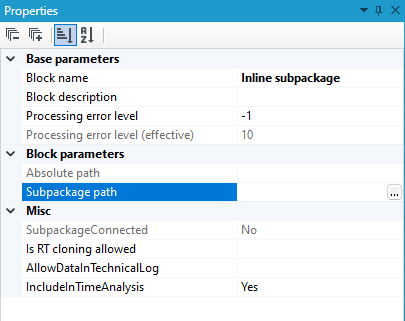
Please note, that a saved path to a subpackage is relative to the entire package path. If a package is moved to another location, a subpackage position in relation to a package must be the same as before.
General remarks
A few remarks which should be considered when designing packages and their subpackages are presented below:
Dictionaries
- To avoid conflicts which may occur in the case of dictionary names (e.g. if a subpackage with Load dictionary is attached more than once), a prefix which is a subpackage name is added to dictionary names. For example, if a dictionary named Currencies is loaded in the Invoke subpackage block named Load dictionaries, it will be called Load dictionaries\Currencies in the main package.
Block names
- Similarly to dictionary names, the prefix with the subpackage name is also added to block names while loading them within a subpackage. It should be particularly considered e.g. in the panel Design messages where the name of the block in which the problem occurred (e.g. error or warning) is given.
Building a subpackage
- Creating a subpackage is similar to creating any other package. The only difference is the method of defining the subpackage input and output.
- The blocks Input port and Output port, which may be found in the toolbox in the tab Design tools, are used for defining the input and output data structure, respectively.
Input port enables defining a minimal data structure required for the correct package execution which means that data provided for a subpackage may take any form. The most important things they should have are the fields and records required by an input port.
Output port is similar - the only difference is that it enables defining the minimal query schema which must be provided to it, as an output processing schema is defined by an input schema provided to a subpackage and transformations designed in it.
Input port

The block is used while defining subpackages. Detailed information about using the block may be found in the chapter which describes the Inline subpackage block.
Output port

The block is used while defining subpackages. Detailed information about using the block may be found in the chapter which describes the block Inline subpackage.
Data Profile

The block Data Profile enables profiling data and extracting suitable information from it, such as data monotonicity, data kind and format, etc.
The function generates a file - a data profile report which is saved in the location indicated by the User in the runtime parameters window which is displayed before running a package.
A sample package which uses the design tool discussed above is presented below:
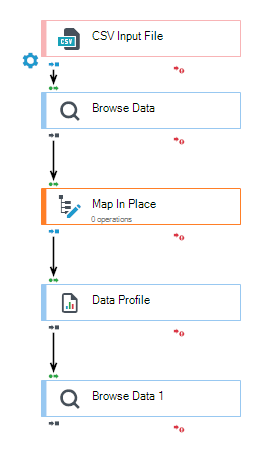
Using a suitable input block, a data profile will be saved in the appropriate format in the location indicated by the User or it will be displayed in a data preview.
A generated data profile document contains the following information:
- number of processed records per data type,
- list of records and fields with a description,
- number and a percentage of empty fields,
- number of different values,
- information about exceeding the limit of 300 different values for each field,
- minimum value and a maximum value,
- comparison type,
- monotonicity,
- number of fixed-point numbers, numbers with a period, numbers with a comma, dates, boolean types,
- maximum length,
- maximum precision of fixed-point numbers,
- maximum scale of the numbers with a period,
- maximum scale of the numbers with a comma.
Invokes a package

Block Invokes a package invokes another processing package in another engine by passing arguments and block's parameters (as the Inline subpackage block did)
- The configuration requires to indicate in the parameters of the package to be called (or only its template used at the time of design - for input loading).
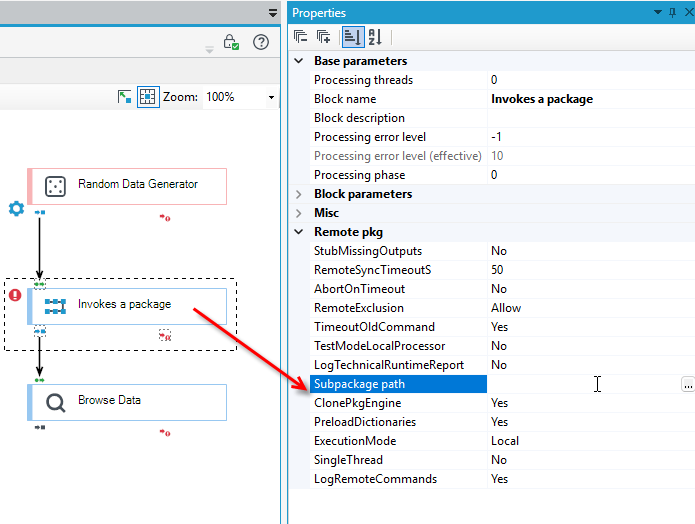
- Next, you need to specify the starting point of the invocation (Select root), and to map the input data, such as the package's start arguments or the values of block parameters (e.g., paths to input and output files).
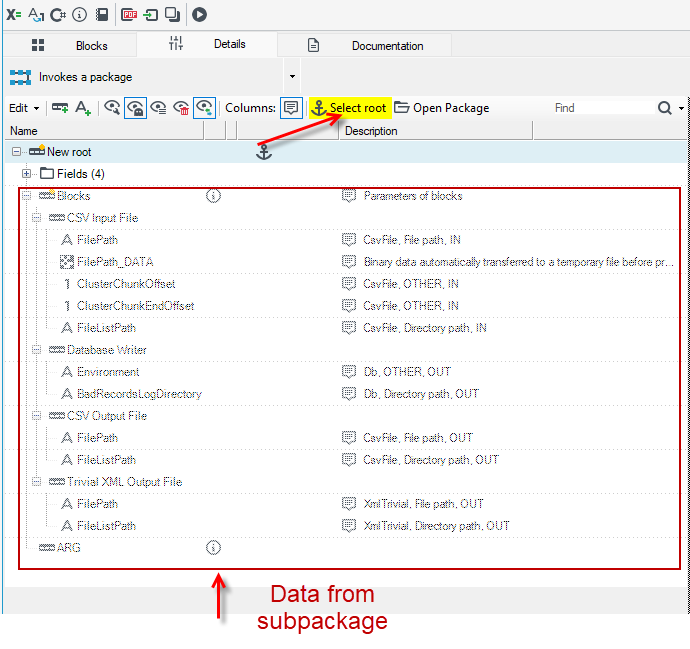
- This configuration is analogous to the blocks Execute the algorithm, Document generation, Call web-service or Workflow start.
It is worth mentioning two typical uses of the Invokes a package block:
- Packaging it into a web-service called, for example, by a web application to perform a large data processing on demand, usually with a prior download of the data content to be processed from the database to disk (to a temporary directory) and recording the status /logs of the processing back to the database.
- Calling it based on the list of records read from the database or file directory for subsequent processing of multiple BLOB files / objects.
Execution mode:
- Local - By default, the package is launched synchronously and executed “here and now” in the same engine, ultimately sharing the user context, data contexts, WCF service context, and all others. The caller must wait for the results. Any paths to physical files must work locally, and the execution log goes directly to the caller.
- RemoteSync means "save the package execution request to the queue and wait until it is: (potentially on another machine, and definitely in another process) taken up, the data processed, and the results returned. This scenario will not work quickly. This is an implementation in a different engine, ultimately on a large pool of workers, with only the user context shared. Keep in mind that we are dealing with distributed processing here, with all the potential consequences that entails. Any binary data to/from IO blocks (with FilePath parameters) is smuggled through a central table with a BLOB field.
- RemoteAsync works as above, but does not wait for the end of processing, only gets an ID for later monitoring.
- We use Remote modes rather for ordering the processing of large files (or generating a package of documents) in a remote environment outside WWW.
Other properties::
- RemoteSyncTimeoutS - Time-out for remote sync. execution. Reaching this threshold will return an error to caller and, optionally, try to abort the package. See: AbortOn Timeout.
- AbortOnTimeout - If set for Remote sync. mode, the engine will try to abort the package runtime upon reaching the configured timeout. If not, the package will continue execution.
- TimeoutOldCommand - Execution requests older than some threshold will be rejectec as being too old. Setting No allows them to be enqueued forever.
- RemoteExclusion - Controls what happens to remote execution commands, when another one of same type (package id) is detected.
Dynamic assignment of a processing package
- In the content of the data needed to call a package, it is possible to specify a path to the package other than at the time of design. This allows you to decide on the specific package to be called at the action (rather than design) stage based on the data.
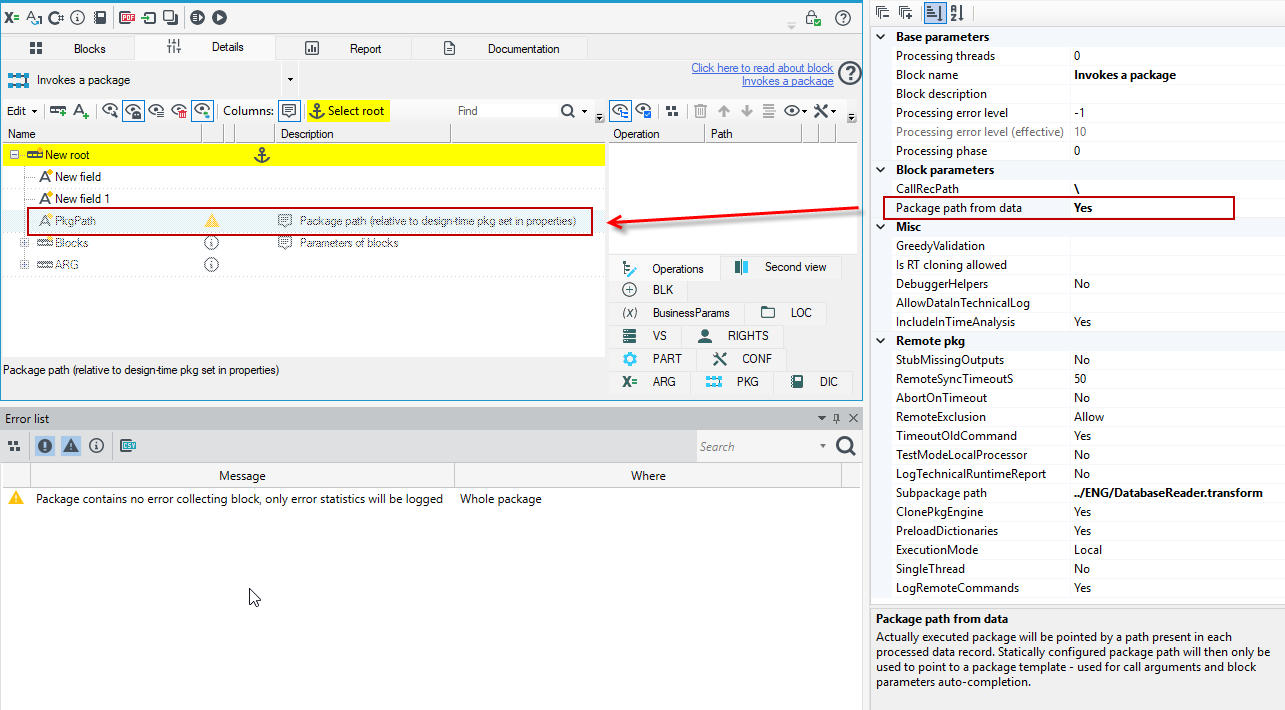
- Select Yes in the Package path from data field in the Properties panel.
- After performing the action, a field will appear in the data schema to be filled in with the path to the launch package.
- This property means that actually executed package will be pointed by a path present in each processed data record. Statically configured package path (Subpackage path) will then only be used to point to a package template - used for call arguments and block parameters auto-completion.
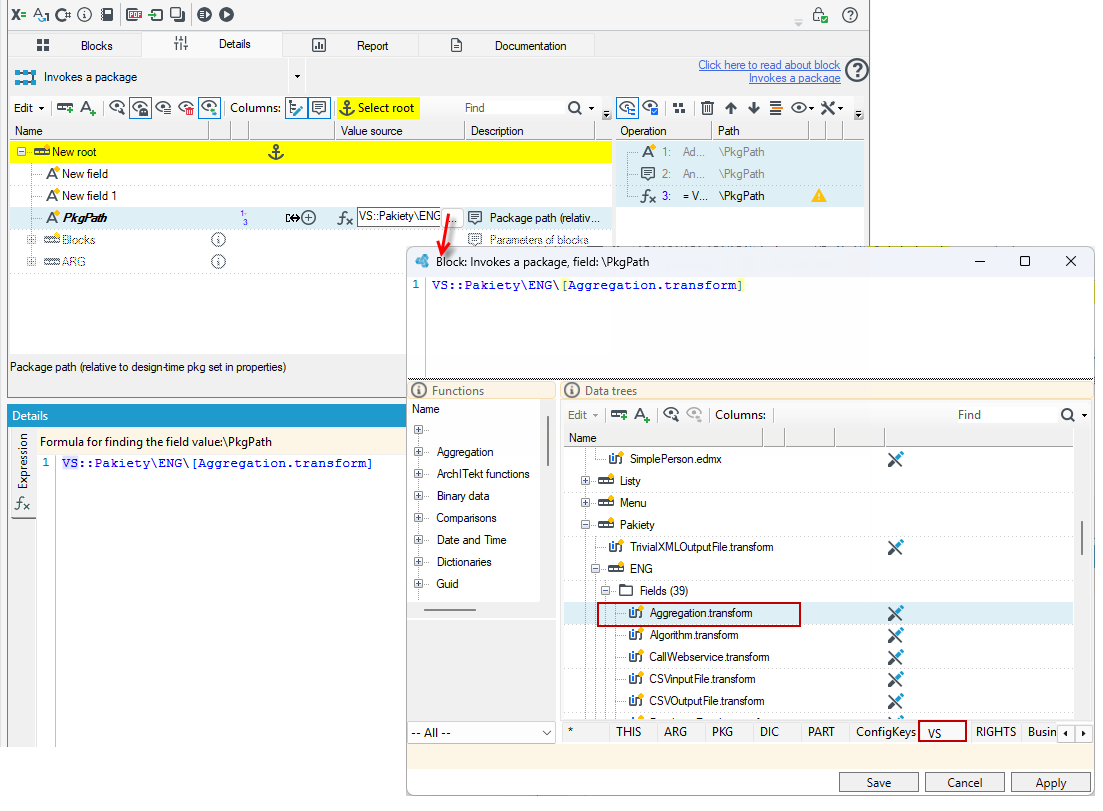
- By selecting the options to add a field to the schema and an annotation, whether it is an expression or a constant, from the context menu, you can specify an absolute or relative path.
Processing Report

The block Processing Report is an independent tool which generates a report of processing lower phase data, starting from the phase it is currently in.
The report is generated using the following blocks:
- Split Way,
- Browse data,
- Data profile,
- Trash.
The package is placed in a tab with a package of which the processing report should be generated.
Using the block in a package is presented below:
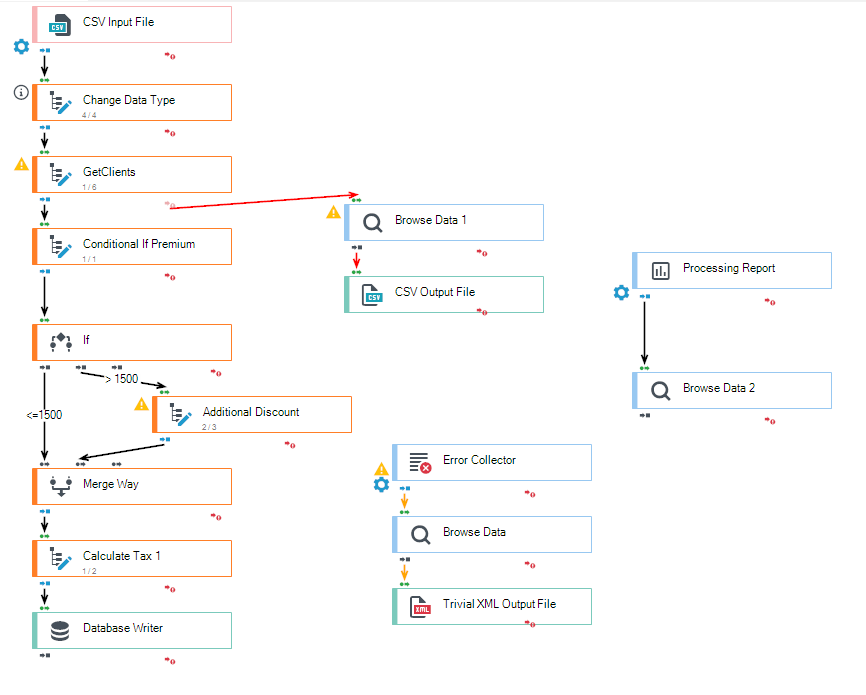
Using the suitable output block, a generated report data will be saved in a appropriate format in the location indicated by the User or it will be presented in a data preview.
Respond with query itself

Block Respond with query itself responds to a query with a simple function od its content. Does not query any external data sources.
Text annotation

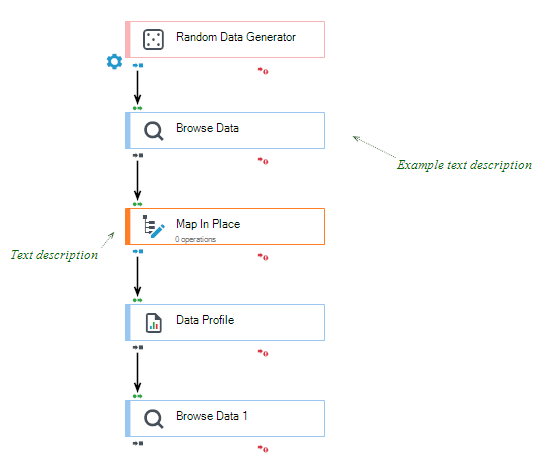
Block Text annotation allows you to add descriptions (comments) within the package you are creating.