File blocks - common parameters
Multi-files concept
The concept of multi-files allows for treating a group of physical files as one continuous logical file.
- Loading and transforming a set of files with identical structure is a situation which is often found during file data transformation.
- In order to operate easily on such sets, all blocks representing input files have an attribute File path pattern that can be set in Properties.
- The value that is to be set in this attribute is a name pattern for all files that are to be transformed.
- The pattern has a form of a regular expression in which groups are named and then added as fields to each output record of this block.
- In case of using the list of files, while running the package, the User sets the parameter FileListPath, instead of the parameter File path pattern.
For example
Mr John Quick is preparing a package that will load a set of flat files (CSV) outputted by system X to database every day in the evening. All files outputted by system X have the name in the form:
invoices_<Hour>.csv
- Exemplary names of files:
invoices_120533.csv,invoices_083000.csv, etc. - In order to load all files with one package, Mr John sets the property File path patternwith the value
invoice_(?'HOUR'\d{6}).csvon the block Input file CSV. It will cause that all files, the name of which will be matched by the above regular expression, will be processed (see: Regular expressions .)

- For each record that will be processed, the value, that has been matched for this group for the filename from which the record comes, will appear in the field
_HOUR. - If the record is loaded from the file
invoice_130700.csv, the value "130700" will appear in the field_HOUR. And if the record is from the fileinvoice_223500.csv, then the field will have a value "223500". While running the package, Mr John will have to set the option FileListPath.
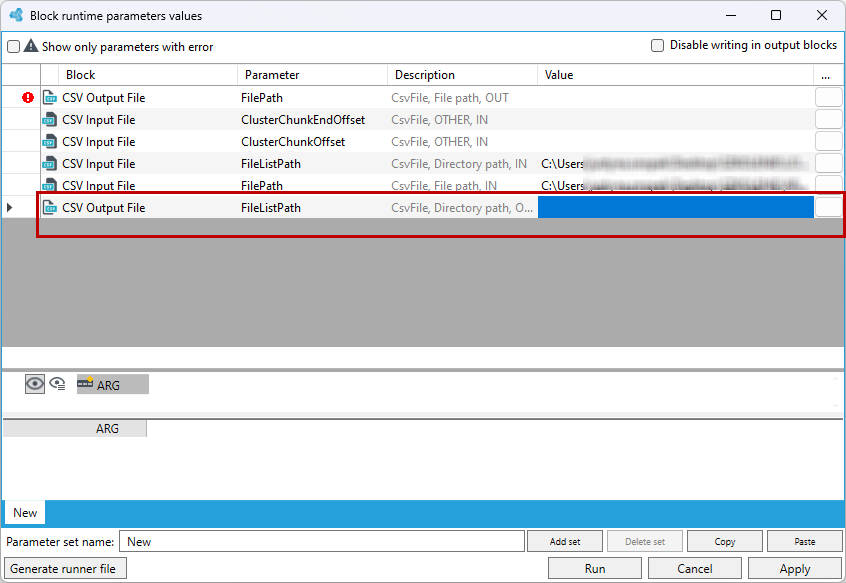
- A similar situation, as in case of Read from file list, may appear when writing to file. The filename, to which the record is to be saved, may depend on the field/a few fields value in the given record.
- In such a case, the name of the output file must be given in the field File path pattern, and the fields that decide about the name are between the characters
{‘‘}
For example:
Having the following schema of records for an output file:

- Having placed the value
Result_{FileType}_{Time}.posin the field File path pattern, the filename will depend on the value ofFileTypeandTimefields. - Therefore, if the field FileType has the value "KI" in a selected record, and Time "23_33_07", then the filename to which the record will be written will be:
Result_KI_23_33_07.pos
When there is no file or path to file
While processing, it may happen that there is no path to file given or the file indicated by this path will not exist.
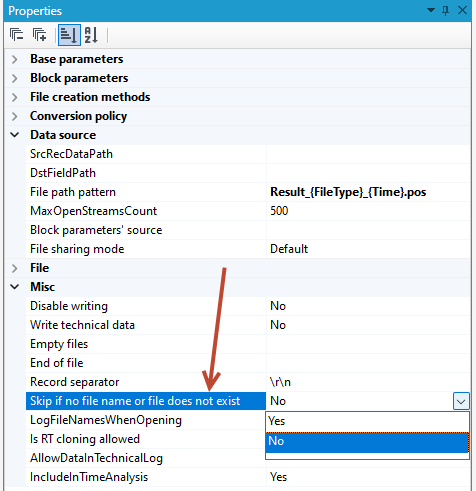
In such a case, the System's behavior depends on the value of the parameter Skip if no file name or file does not exist in the block properties:
- when this parameter has the value No (False), while attempting to run the package an error occurs and no part of the package will be executed, processing will be finished as invalid,
- for the value Yes (True), in such a situation the block will behave as if there is no data in the file. Processing will be completed as usual.
Loading compressed files
- Blocks: CSV input file, Regular expression file, Fixed length input file, KVF input file, FWDK input file and Trivial XML input file, may load data directly from compressed files in the zip or gzip format.
- Whether the file is compressed and in what format it is recognized by the extensions of the loaded file:
.gzfor gzip files and.zipfor zip files. - Extensions are not case-sensitive. In case of zip files, only the first file from the archive is read.
Temporary files
- Temporary files are the files generated in one stage of package processing and loaded in the later stage.
- These files are created as any other file and they stay on the disk after the package execution is finished. However, while launching the package, their existence will not be checked.
- Temporary files may be loaded with the use of blocks Trivial XML input file, Fixed length input file and CSV input file. In the properties Block parameters source, you should point a file output block of an appropriate type from the prior stage.
- Blocks that create temporary files do not require any additional setup.