Data processing
When creating a package, modifying records and schema fields is a common operation.
It can be done by using a context menu having a list of options available for a selected objects after clicking the right mouse button.
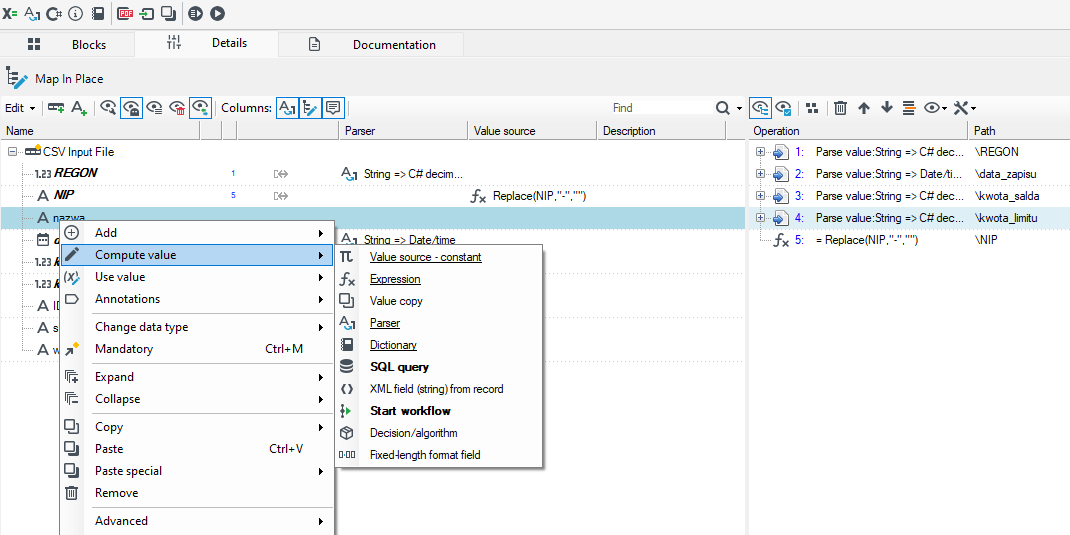
The context menu provides various options depending on the kind of the modified element (a record, a field) and a block variant applied.
The data schema that is presented on the Details tab on the various blocks in the Processing packages is analogous to the data schema presented on the forms in Initial mapping. For more see: What are the Mappings.
Data processing is oriented to tree data structures modification. This chapter presents different mapping possibilities of records and the tree editor itself which appears in many places throughout the system.
The tree editing window is available in many places in the package, especially in blocks containing mapping.
- A control shows a tree which consists of icons and element names.
- Optionally, the visibility of additional columns used for displaying annotations may be switched (the item Columns on the tree toolbar). The most important annotations should appear automatically - otherwise, switching column visibility may be done manually.
- In some contexts (e.g. Map in place) tree elements may be renamed. A name editor is activated after double clicking or after pressing the F2 key.
- In some contexts, schema tree elements may be moved using a "Drag&Drop" technique - it is the primary way of editing a tree. After an element (or elements) is dropped there are several possibilities. The elements from the same tree (and from another view - the tab Second view of the mapping editor), from another tree (e.g. the tabs Schemas or Databases) and also from the text editor (text will be interpreted as a field names list) may be dropped on the tree.
- Editing data types and changing mandatory status is possible and may be done using the context menu of a particular tree node.
Editing annotations is possible in two ways, depending on the annotation complexity level:
- Simple annotations: in a tree column - entering the editor after double clicking,
- Complex annotations: in the bottom panel Details editor - all editors of large annotations "attached" to a selected tree node are displayed in the tabs.
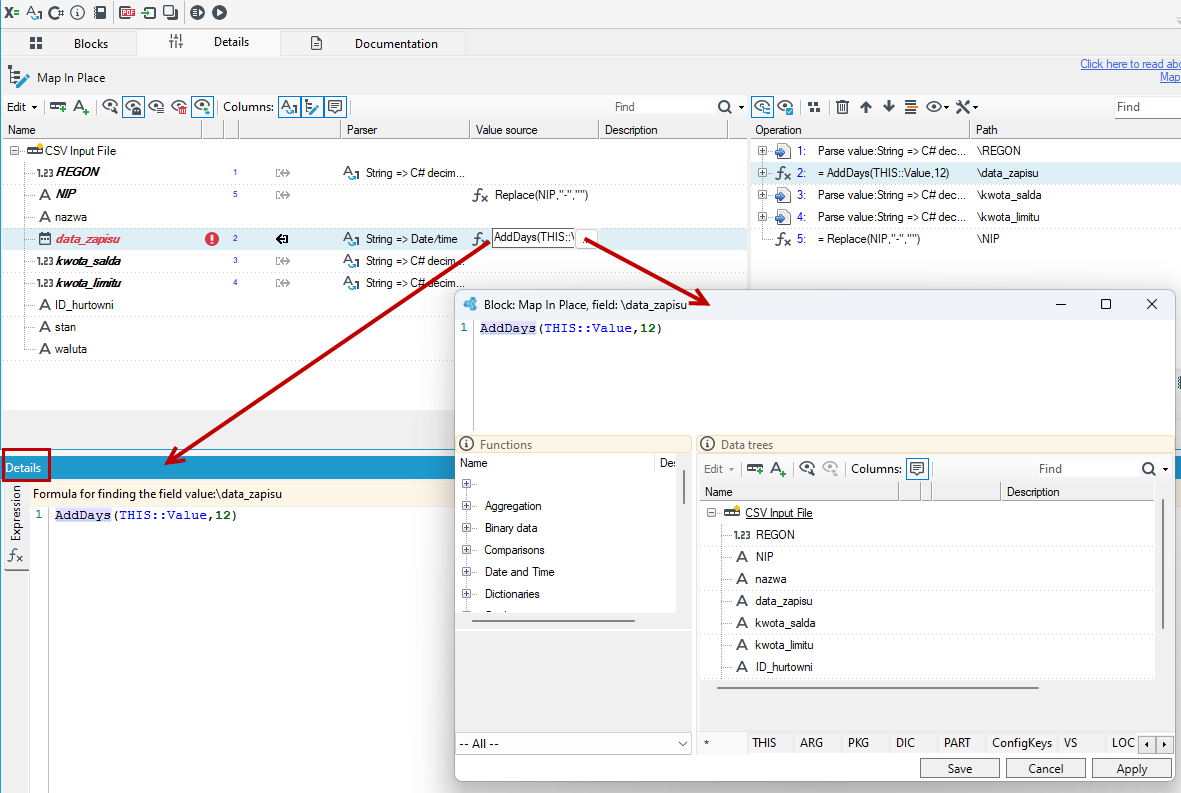
The table presenting mapping possibilities
The table below gathers different available ways of data transformation - using different blocks and different options of the Map in place block or other blocks which include it.
| Operation | Where to look |
|---|---|
| Adding a field/record. | A block Map in place; context menu (or a tree toolbar)> Add field/record. For quick access, menu Add is available by pressing the key Ins. |
| Deleting a field/record. | A block Map in place; context menu (or a tree toolbar)> Delete or a Del key in the tree. |
| Changing a field/record from nonmandatory to mandatory | A block Map in place; Context menu> Mandatory 0/1. During the operation, child records which do not exist will cause the root record to be rejected to error output with a level error of 2. |
| Changing a field/record from mandatory to nonmandatory | As above. There are no additional effects during the operation. |
| Calculating new value of the field: Constant. | A block Map in place; the tree context menu> Constant value. Value may be edited in the column Value source. |
| Calculating new value of the field: Expression. | Calculating new value of the field: Expression. |
| Calculating new value of the field: A copy from another field. | A block Map in place; the tree context menu> Annotations>Copy. The annotation Copy is also attached as a result of the "Drag&Drop" operation ended with selecting Copy with annotation (and changed by Change annotation). Mapping aggregation should be considered while mapping - sometimes, using an aggregate expression may be necessary (e.g. min, max, count,avg). |
| Calculating new value: Type change. | A block Map in place; the tree context menu> Data type. Optionally, the annotation Parser may be used for specifying configuration of a parser used. If it is not done, a default parser from a policy will be used (a policy selected from the name on the block or a default one). During parser configuration, e.g. a method of handling empty or error values is specified. |
| Calculating new value: Mapping by a dictionary. | A block Map in place; the tree context menu> Dictionary. The dictionary annotation options enable defining a dictionary name, a key column name and a value name, a method of handling empty values and what to do if there is no key. |
| Moving a field/record to another location (including cloning a record to many target destinations if there are multiple "records on path"). | A block Map in place; drag&drop into a new location. If a name is changed next, the resulting operation Clone will be updated. |
| Selecting specific records from a multiple record - classification of records inside a parent record. E.g. in order to save particular records to different database tables or to locate them in other elements of the output XML. | As above. In the created operation Cloning a record options, the following may be entered (using the "details" panel):a record selection condition (Boolean expression), a flag specifying whether the selected records should be cloned or moved,a flag specifying whether only the first record (fulfilling a condition) should be selected. Similar to TOP 1 in SELECT SQL (MS SQL). |
| Multiple record arrangement in the desired order (within a parent record). | A block Map in place; the tree context menu> Annotations>Sort. Annotation parameters enable defining sort keys. |
| Merging several adjacent records into one common root key-based - so called NORMALIZATION. Needed e.g. after data read from SQL JOIN operation or flat, denormalized (redundant) files. | A block Normalizer. An annotation Record normalization rule should be added to a record which undergoes normalization. A key should be defined (fields which values are even will be merged) then fields and attached records should be defined (values of neighbors are neither compared nor merged). A key may also be defined using a separate annotation Normalization key. |
| Splitting a record into smaller, separate records. | A block Split tree – two child record cutoff (or cloning) points are specified. |
| Transforming records in different ways - dividing separate records into groups. | A block Split way – enable defining expressions which return a Boolean value (true/false) for each output. If it is true, a record exits by the given output. No expression is treated as 'true'. There are two ways of classifier's work. |
| Merging different transformation paths of similar records. | A block Merge way. |
| Rotating a record schema - changing a multiple record describing a list "name:value" into a flat record with values in separate fields, so called Pivot. | A block Pivot. |
| Preparing a new, much smaller record than the input record, based on the input record. Useful e.g. when creating small database queries. | A block Map Copy. Used very seldom if not used with queries. |
| Attaching other necessary records of other sources to a record. | Blocks Loop Join or Merge Join – depending on if attaching is done on the basis of separate queries' results or if sorted streams are merged. The second method is recommended if it is possible in given context as it offers a possibility of significant transformation optimization. |