Data sources
archITekt platform introduces the concept of a data source in order to facilitate operating on different databases.
Each source has a specified name and represents a set of data with the same schema.
It may be imagined e.g. as a database which has two tables: clients and accounts. An independent source cannot exist - at least one environment must be assigned to it.
The objective of the division into environments and data sources is to facilitate data transformation design - the User designs a package by operating on the abstract data source, using its name only and preparing a transformation on the basis of a data schema of this source. Defining environments is done by a person with technical aptitude who defines available environments and their parameters. Such approach enables to "map" easily an existing deployment model of the Application where there is a test, development and production environment.
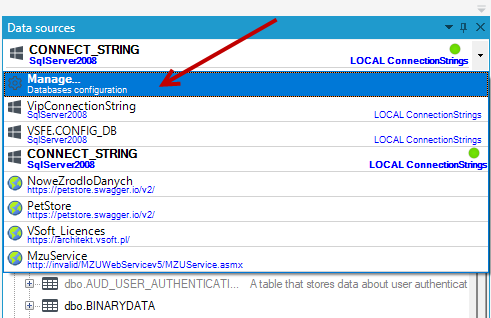
- A dialog box which is displayed after selecting the option Manage from the source list in the database panel is used for defining data sources and environments.
- In the displayed window, parameters of available data sources should be modified or a new source should be entered using the options available (Add data source, Add environment, Delete, Show connection parameters).
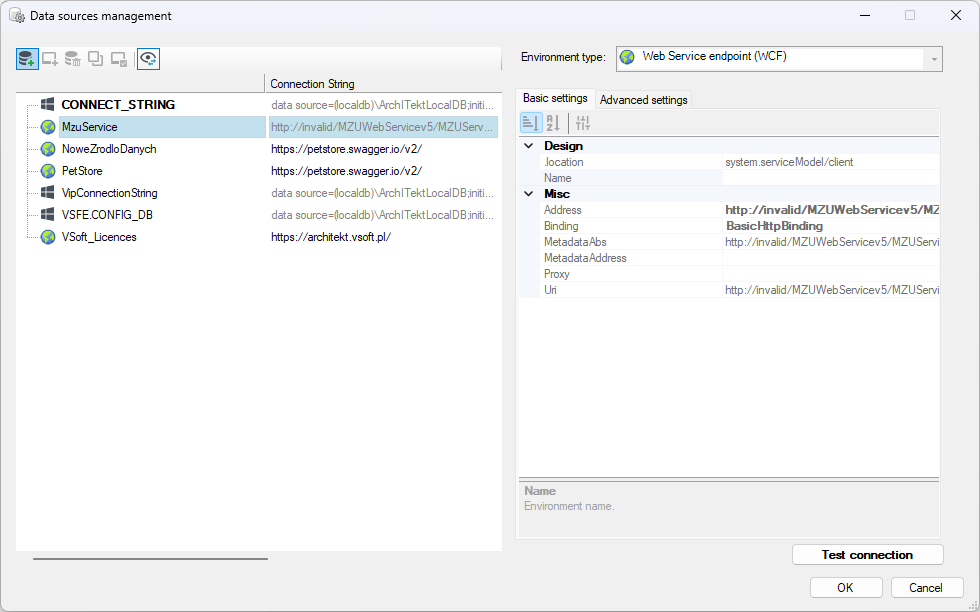
- Configuration of parameters may done on the tabs Basic and Advanced settings by entering appropriate data.
- The tab Basic settings enables defining a database "Dialect" which differentiates database versions e.g. Sql Server 2005 or Sql Server 2008. After a dialect has been defined, columns with the types appropriate for the given dialect may be created and the conversion of types between bases can be done - it is done in a database panel (see Databases).
- An environment type is chosen by selecting the appropriate item on the drop-down list of environments.
- The button Test connection verifies configuration of database connection. The result is displayed as a message in a new summary window.
- The button OK finishes configuration of the source.