Dictionaries
Dictionary is used for remembering a small number of flat records and especially mapping certain arguments to other ones, for example:
- a short name and a description,
- an input code and an output code,
- complete table which describes names, codes, types and descriptions of a large data structure.
In archITekt platform, a dictionary is any table which may be loaded from text files:
- by the designer (subdirectory "Configuration\dictionaries", files separated with the character TAB) or
- within the package - using the block "dictionary declaration" - anything available (e.g. a database query) may be a data source.
All dictionaries defined in VSoft archITekt platform are also available in Data processing packages.
Usage
Such dictionary defined as a table may be applied in many ways. Two of them are described below:
- mapping data during the operation (e.g. when replacing code values between different systems). A reference to a dictionary may be done in several ways, however a dictionary annotation is used or it is used in an expression.
This annotation has a wide list of configuration options and the most important ones are described below:
Mapping error – what should be done if the key has not been found while mapping? Possible solutions are:
- Write default data – write data which occurs in the Default value or Default key configuration field to a field which the mapping concerns.
- Abort package activity – aborts package activity, places a record with an invalid mapping by a dictionary to error output
- Write empty data [Default] – writes an empty value to a field as a mapping result. Additionally, reports information about failed mapping by a dictionary to the Errors record, depending on the Report errors option.
- Skip records (place to error output) – skips the main processing record and places it on the error output; additionally places information about failed mapping in the error collection (in the Errors record)
Trim whitespace from the key – Should the field value have the “white” space removed from the beginning and the end before performing mapping by a dictionary? The Yes/No standard options may be selected. There is also the Inherit from package settings option which means getting values from the package global settings (available to edit in the Properties panel for the entire package).
Report errors - the option may be set only if the option Write empty data has been selected in the Mapping error field. As far as this option is concerned, the most important thing is optimization. If no key often occurs and the reported errors are not used anywhere, enabling the option may considerably accelerate package activity. Similarly to the Cut off white space from the key option, this option inherits its settings from the package global options by default.
Match case – should case be taken into account when comparing letters (should the ‘a’ letter be the same as the ‘A’ letter) while searching for a key in a dictionary?
- supporting the design stage - a dictionary may be used for adding description to fields or for performing a mass change of field names. It is especially convenient if you have Excel spreadsheets filled with abundant specifications concerning hundreds of fields (which may be easily processed to a text file csv).
Dictionaries which are currently loaded in a package may be browsed in the packahge menu>Dictionaries.
Using a dictionary when mapping values
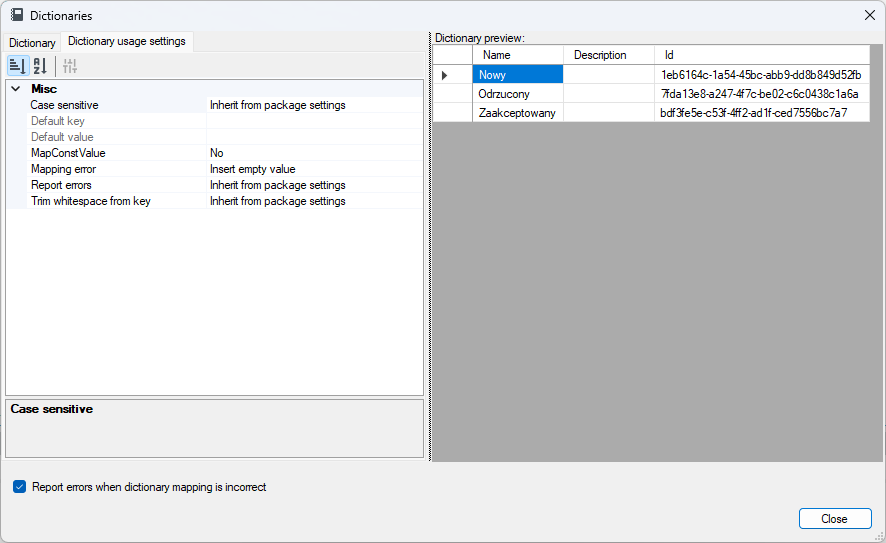
The following elements may be set in the Dictionary annotation in the Map in place editor:
- Dictionary name and a pair of the key>value mapping columns (see figure below) and on the Dictionary usage options tab the following elements may be set:
- If a key has not been matched:
- Insert default value
- Write default value. If it is not specified, write the value for the default key. If it does not exist, write an input key.
- Insert empty value.
- Abort processing.
- Skip record – redirect to the error output of the block which performs mapping.
- Default value and default key – used with the Write default data setting.
- Trim whitespace from the key – should whitespace (spaces, tabs, etc.) be trimmed from both the input value ends before performing mapping?
- Report errors – should information (in the Errors technical record) warning about key mismatch be attached to a record? It is often unnecessary and it may have a considerable impact on the package operation speed.
- Case sensitive – uppercase and lowercase letters have different meaning when mapping by default and historically.