Error handling
There are several kinds of incorrect situations - planned and unplanned.
Among planned errors, there are:
- value mapping errors which cause record rejection (a SKIP setting in parsers or dictionaries, breaking mandatory status of fields and records, etc.),
- value mapping errors which cause a package to stop (an ERROR setting in parsers or dictionaries),
- critical rules of record validation - fragments of code which check whether certain conditions defined by the package creator occurred.
Unplanned errors are mainly exceptions which are critical incorrect situations detected during package execution for which the package has not been designed. Such situations include both errors of external components used in packages (e.g. errors of services, external code, database connection, permissions for directories and files, disk space, etc.) and errors of the platform itself.
Each incorrect situation occurs in the context of transformation of the given block. It causes reporting an error which is logged (each thousandth element of the given class) and is subject to statistical processing (counting occurrences in classes).
-
A data record which was being transformed when an error occurred is related to the information about an error. Full record content is available in an error log (each thousandth one on the basic logging level).
-
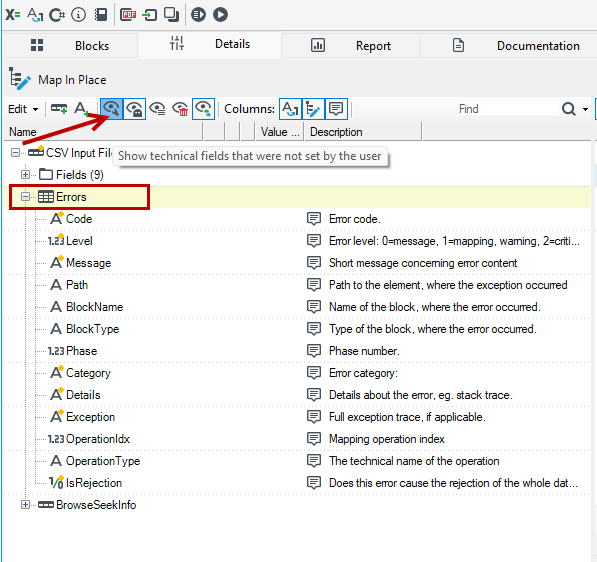
Information about an error is attached to this data record. Technical fields, such as ErrorLevel and multiple record Errors which appear in each record are used for this purpose.
-
To enable visibility of the Errors record, select Show technical... from the menu.
Not each information about an error is associated with a data record. If data is processed in packages containing more elements (e.g. fast methods of loading data) errors with no specific records may occur. Then, an error counter on the error point will show an error but a record will not be generated. Such error will be included in the error statistics (classes, sources).
Example, if you attempt to save about 1500 records to a database using a fast method (working in packs which include 1000 elements each) and the first and the last record of the pack results in a save error, two errors (one for each pack) not related to any data record will be generated and no data will be written to the database.
- Data records which cause errors together with information about the error are redirected to the error port of a block (a red port).
- A special block named Error collector has been defined in order to prevent connecting error ports for all blocks, so they could be handled later. The block gathers all error records from the entire transformation stage (from the unconnected ports or from all the ports). A data schema created by overlaying all schemas of all records of input and output blocks of the given stage is available on the block's output port. It is sufficient in a typical error handling scenario which logs the full content of all incorrect records to e.g. an XML file (with an option of writing technical fields Level and a record Errors enabled).
- Error handling may be enhanced by any components which cause error classification or saving errors to other target destinations e.g. to a database.
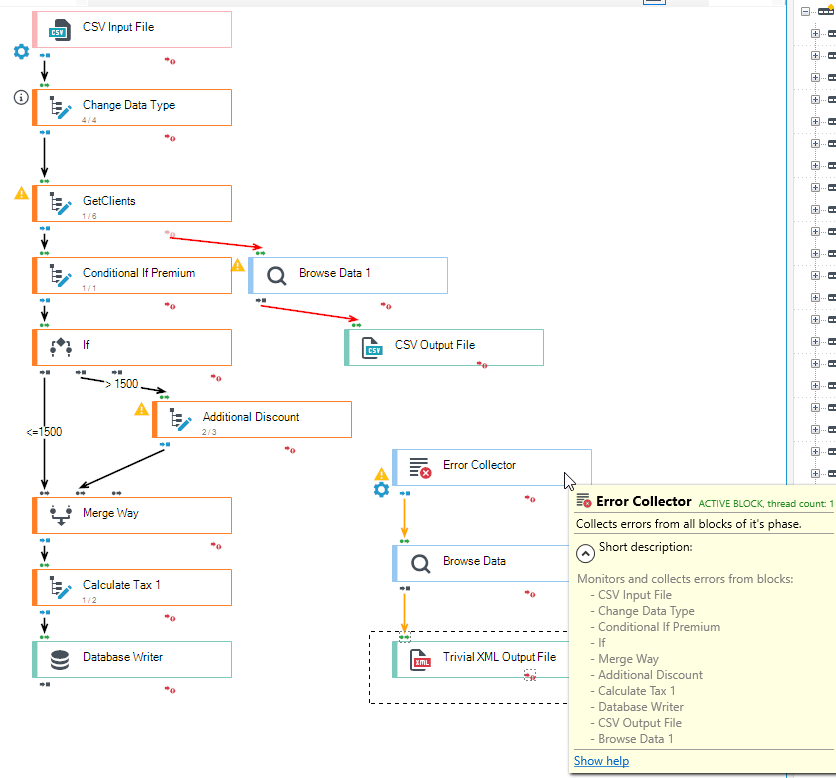
The figure shows a typical, simple schema of handling invalid records - gathering and saving them to an XML file. It is important that a subgraph which deals with collecting errors also has a worker thread set.
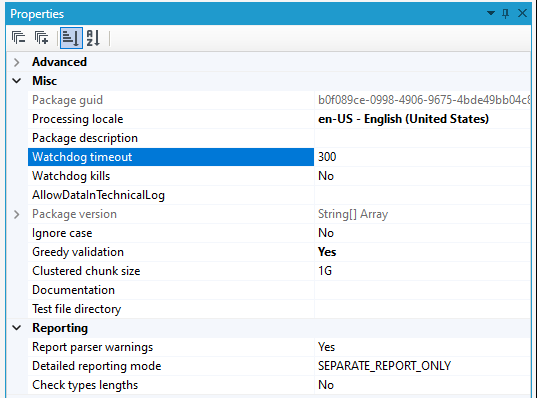
Watchdog
Processing packages under specific circumstances can get blocked on various long-term timeouts (mainly to services or databases). When this happens, the system looks as if it crashed although inside it works as the package author intended.
- To help diagnose this type of situation, you can enable watchdog functionality on packages - a watchdog that, after a configured idle timeout, will log its state in a form suitable for graphical analysis, along with information about the stacks of all working threads. An additional option is the ability to interrupt blocked packets.