A detailed description of tasks
Tasks are defined in .NET classes (you may easily create your own tasks by extending one class – see: Developer's documentation). The "out of the box" System offers a few very useful tasks guaranteeing enormous configuration capabilities.
- The tasks are placed on the Toolbox tab, from where you can drag them to the workspace and then connect them.
| Icon | Function |
|---|---|
 | Bulk Copy: the task connects a data input stream from tables of any data base with a fast method of saving data to MS Sql Server (BULK COPY PROTOCOL). |
 | Bulk Insert: the task reads tabular files (separated e.g. CSV) and saves them with a quick method (BULK COPY PROTOCOL) to MS Sql Server tables. |
 | Shell script: the task which runs a shell interpreted script (by default cmd.exe). |
 | Empty task: the task used mainly as a "filler" which is used for synchronization of several parallel execution paths. |
 | File transport: the task enables uploading/downloading data files content. It supports fields of CLOB (BLOB, RAW etc.) type. |
 | C# task: another task defined in the System code, it does not have its own dedicated icon. It may perform any functions. The definition requires the knowledge of how to program in .NET and how to use a compiler. |
 | Packaged SQL queries: the task allows table iteration and execution of parametric SQL commands by "packages". It also allows executing standard SQL queries (e.g. DML). It is the most popular task used in systems (see the detailed description: Detailed description of tasks > Packaged SQL queries). |
 | SQL report: prepares simple reports on the basis of a text pattern by completing the template elements with a result of any SQL query. |
 | Set file lock: The task sets up a file lock used to synchronize task execution. |
 | Remove file lock: blokadę plikową: The task removes the file lock used to synchronize the execution of tasks. |
 | Processing package: allows defining complex data transformations. |
 | Chunked processing package: allows running data processing in packs, iterates through the key range of the selected database table. Iteration keys (from-to) are passed as package invocation parameters. |
 | Text annotation: allows you to add descriptions (comments) within the created task hierarchy. |
| Incremental copy: the task maintains an up-to-date, incrementally updated copy of one or several tables in another database. |
A task definition usually consists of two elements:
- parameter values (see: Task parameters),
- a task script file – the file pointed to one of the parameters (with the name "FileName"), and if there is no such parameter, by the task name in the directory indicated by a global parameter DefaultDirName, and if there is no such directory, then by the Application start directory.
Usually, the FileName parameter is not used, however, it may be used to obtain the following effect: many tasks, one script. Pasting with referring to the original script works in exactly this way (apart from pasting with the script cloning) – these options are available in the context menu of task hierarchy editing after a task or tasks are copied to the clipboard.
The script content may be embedded in the task hierarchy content, but it is not used too often (options available in the task context menu).
Bulk Insert
The task reads tabular files (separated e.g. CSV) and saves them with a quick method (BULK COPY PROTOCOL) to MS Sql Server tables.
It may also:
- do more comprehensive parsing of data types (non-typical dates, amounts, logical flags),
- samples data to test aims – load each Nth line with a limit of M records,
- identify errors in records and throw them away to an error file (it must be enabled).
| Task parameters | |
| --------------- | |
| Character encoding | Input file encoding – the list of the most popular encodings to be chosen: ISO-8859-2 (Latin2), Mazovia, Windows 1250, UTF-8, UTF-16. Setting "OTHER” results in the value of the parameter "Encoding" being used. |
| Extended character encoding | Number of .NET encoding (see: Code pages) |
| Batch size | Size of a single package (transaction) of Bulk Copy protocol. |
| Input file | Fragment of the path to a data file, of the form: subdirectory\file.extension;DIRECTORY, where: subdirectory is optional, a longer path may occur,directory is a logical name of data file, resolved from configuration, templates of parameters in the form {ParamN} may be used – (see: Task parameter. The above-mentioned rules concern all paths given as parameters values. |
| Timeout | Time out parameter of connection to destination base [s]. |
| Database | Logical name of a destination base. An empty value will result in the global parameter 'DefaultDbName' being used. |
| Error file | A path to the file with invalid records. |
| Field delimiter | String of characters separating columns in a data file. You may enter special sequences: \t |
| Quoting character | Optional string of characters wrapping the value, e.g. ’’ |
|Infer schema from header | Option of reading data schema from the header line. If not set, an exact schema defined in the script will be used. |
| Fields prefix | Common prefix of the table fields used for mapping from the file header. Mapping is done when a column name of a file, which does not have this prefix, matches the header element. |
| Truncate Destination Table | Option enables truncating the entire content of a destination table before data is loaded. |
| In case of error | Default type of an activity when an invalid record is encountered, e.g. too long string value, numerical value, that is not a date. For specific fields, specific values may be set in an appropriate section of the task setup file. Available options:
NONE - No validation and content control. Data is sent straight to loading implementation. It is the fastest variant but if an error occurs in data it results in the processing being stopped;
SKIP - Skipping an invalid record - throwing it away to the file with errors. Remaining records will be loaded;
RECOVER - Invalid and empty values will be changed into default ones (zero, empty string, current date).|
| Allowed number of recovered rows | Maximum allowed number of saved lines in which at least one field has been completed with a default value. If this number is exceeded the task will end up in the ERROR status. UNLIMITED value is set by default, i.e. number of errors has no influence on the final status of the task. Exceeding the set threshold does not immediately stop the task execution. It is needed to get information about all errors, and not only the initial ones (separated by the parameter value) while loading is being finished. If at least one error occurs (if threshold is not exceeded) it results in the task being completed with the WARNING status.|
| Allowed number of skipped rows | Maximum allowed number of thrown away records during data validation before it is saved. If this number is exceeded the task will end up in the ERROR status. UNLIMITED value is set by default, i.e. number of errors has no influence on the final status of the task. Exceeding the set threshold does not immediately stop the task execution. It is needed to get information about all errors, and not only the initial ones (separated by the parameter value) while loading is being finished). If at least one error occurs (if threshold is not exceeded) it results in the task being completed with the WARNING status.
| Sampling data to tests | |
|---|---|
| Every nth record | Limit of the number of records - each Nth record is loaded. |
| Maximum row count | Limit of the number of loaded records. |
| Parsing values – default settings | |
|---|---|
| Boolean values format | Specification of Boolean values format: Bool |
| Date format | Specification of dates format, e.g. Date(yyyyMMddHHmmss) |
| Decimal number format | Specification of fixed-point numbers format, e.g. Decimal(.) |
Content of an exemplary script:
#DESTINATION_TABLE
loading.IBS_CIF

#FILE_HEADER
ACN|ZSYPLN|BOO|CC|CIFCLCD|DLC|LFU|CIFOFF|DAO|DEP|DOB|DOD|EDUC|FAXNUM|LNM| …

#MAPPINGS
ZSYPLN, TARGET_ZSY

#FIELD_TYPES
ZHCV Decimal(.)
DTD1 Date(yyyy/MM/dd)

#FIELD_VALIDATION
CIFCLCD, SKIP
CIFOFF, RECOVER
FAXNUM, NONE
Script sections:
#DESTINATION_TABLE– name of the destination table.#FILE_HEADER– header of an input file in an original form (separated). It is used for identification of columns when a header is not in a data file.#MAPPINGS– mapping of column headers of the file in the table columns. It may be omitted if the columns match (taking the value of TablePrefix parameter into consideration).#FIELD_TYPES– used for connecting information on the value format to specific input fields,#FIELD_VALIDATION– in this section validation method on the level of a single field may be defined. Available types of validation are the same as in the parameterValidationErrorAction– NONE, SKIP and RECOVER. Validation method specified for a particular column hides the value specified for the entire table (by the parameterValidationErrorAction).
Allowed field parsers (values of parameters Default Parser and specifications in the section #FIELD_TYPES):
- Bool(x), where x is a default value returned if the value cannot be loaded. E.g. bool(1), bool(). The last value will return an empty value.
- Decimal(separators), where "separators" are a string of characters and each of the characters is treated as a decimal separator and the rest of the characters are OMITTED (with the exception of the following:
–eE). Decimal(.)orDecimal(,)are usually used butDecimal(,.)is also allowed.
If an invalid separator is used it will result in loading a number with an omitted character of a decimal separator (i.e. too large number).
- DecimalExact(separator), where "separator" is a string of characters occurring as a decimal separator. Usually, it will be
DecimalExact(.)orDecimalExact(,). Using an invalid separator (similarly as occurrence of not allowed characters in the value) will result in data format error being occurred. The way of handling the error depends on the setting of the property "ValidationErrorAction". - Date(format), where the format consists of characters specifying fragments of dates. A detailed description of format specifiers: http://msdn.microsoft.com/en-us/library/8kb3ddd4.aspx
In short:
- yyyy – 4-digit year,
- MM – month,
- dd – day,
- HH – hour (24h format),
- mm – minutes,
- ss – second
Bulk copy
The task connects a data input stream from tables of any database with a fast method of saving data to MS Sql Server (BULK COPY PROTOCOL).
It enables e.g. efficient transfer of large fragments of data (or entire tables) between databases. It is successfully used for cloning entire data warehouses between bases in DB/2 z/OS architectures and MS SQL Server.
| Task parameters| | | ----------| | | Batch size | Size of a single package (transaction) of Bulk Copy protocol. | | Destination timeout | Time out parameter of connection to destinantion base (MS Sql) [s]. | | Destination database | Logical name of a destination base. An empty value will result in the global parameter 'DefaultDbName' being used. | | Source timeout | Time out parameter of connection to source base (MS Sql) [s]. | | Source database | Logical name of a source base. The parameter must have a value set. | | Truncate destination table | Indicates whether entire content of a destination table must be truncated before data is loaded.Indicates whether entire content of a destination table must be truncated before data is loaded. |
Content of an exemplary script:
#SOURCE_QUERY
SELECT   KLDO_PESEL,  KLDO_DOK_KOD,  KLDO_DOK_NUM,  KLPROD_ID_PRODUKTU,  KLPROD_UDO_WSK, KLPROD_UDO_DATA_P,  KLPROD_UDO_OKRES,  KLPROD_UDO_WSK_B
FROM BKK.KLIENT
INNER JOIN BKK.DANE_OSOB
ON KL_ID_DANE_OSOB = KLDO_ID_DANE_OSOB
INNER JOIN BKK.KLIENT_PRODUKTY
ON KL_ID_KLIENTA = KLPROD_ID_KLIENTA
WHERE KL_WSK='A' AND KLPROD_AKT='A' AND KLPROD_TYP='WL'

#DESTINATION_TABLE
dbo.BKK_KLIENCI_BUF_DUPL

#MAPPINGS
KLDO_PESEL, PESEL
KLDO_DOK_KOD, KLDO_DOK_KOD
KLDO_DOK_NUM, KLDO_DOK_NUM
KLPROD_ID_PRODUKTU, PROD_ID_PRODUKTU
KLPROD_UDO_WSK, KLPROD_UDO_WSK
KLPROD_UDO_DATA_P, KLPROD_UDO_DATA_P
KLPROD_UDO_OKRES, KLPROD_UDO_OKRES
KLPROD_UDO_WSK_B, KLPROD_UDO_WSK_B
Sections:
#SOURCE_QUERY– content of the query to a source base,#DESTINATION_TABLE– name of a table in a destination base,#MAPPINGS– mappings of source columns into destination columns.
Shell script
The task enables running shell scripts, especially CMD and POWERSHELL. It may point at the path to its own command processor.
You may place your own parameters inside the script. They will be changed into specific values before the script is run. Parameters format of the script content is defined by the property ParameterFormat.
- A task will end with an error if any data appears on the standard error (default behavior may be changed with a property – see the table below).
| Parameter name | Description |
|---|---|
| Interpreter | Type of an interpreter - the path to <exe> file may be given. cmd.exe is a default interpreter. |
| Arguments | Interpreter arguments. In case of powershell empty arguments are automatically changed into: -command \"-\" (reading data from a standard input). |
| Working directory | Working directory from which the script will be run. An absolute path to the directory or the name of the directory from the configuration may be entered, preceded by a semicolon. |
| Input parameters format | Regular expression on the basis of which the parameters in the script are identified. Default parameters have the following form: #(parameter_name)# |
| Output file name | Path to the file in which the result of script execution will be saved. The path is not required because output data is saved in logs and Message of the task. |
| Maximum log length | Maximum number of lines of the output stream and error stream which will be saved in the application log. |
| Maximum message length | Maximum number of lines of the output stream and error stream which will be saved in the field 'Message' of the task. |
| Status on error | Status which will be taken by a task if any data is written to the standard error output. By default ERROR. The “error” status is detected when anything is being written to STDERR. Example error-triggering for powershell: Write-Error ”Some error message”and for cmd.exe: echo Error message >&2 |
An exemplary script illustrating the use of external parameters:
xcopy #(DATA)#_CONTRADR.TXT # (TECH)#\#(BANK)#\ /S /I /F /R /K /Y
xcopy #(DATA)#_CUSTDATA.TXT # (TECH)#\#(BANK)#\ /S /I /F /R /K /Y
xcopy #(DATA)#_CONTCUST.TXT # (TECH)#\#(BANK)#\ /S /I /F /R /K /Y
xcopy #(DATA)#_SCHEDULE.TXT # (TECH)#\#(BANK)#\ /S /I /F /R /K /Y
dir # (TECH)#\#(BANK)#\
File transport
The task enables uploading/downloading data files content. It supports fields of CLOB (BLOB, RAW etc.) type.
- File transport Task is a task which transfers files from bases on disks from disks to data bases. The task may pack and unpack the file during transport - with the use of ZIP algorithm. One task enables transport of greater number of files.
| Task parameters | |
|---|---|
| Database name | Name of data base that is a source or destination of the transport file |
| Task's definition file | Path to the file script describing further details of the transport process. |
| Action type | Type of the performed operation. There are two opportunities: transport to a base from a disk – Upload, transport to a disk from a base – Unload. |
Content of an exemplary script:
#TABLE
0:TABLE_TO_FILES
1:TABLE_TO_FILES

#DATA_COLUMN
0:F_CONTENT
1:F_CONTENT

#FILE_NAME
0:FilePath1
1:FilePath2

#KEY_COLUMN
0:F_ID
1:F_ID

#KEY_VALUE
0:Log:Id
1:Korekta:Id

#FILE_TRANSFORMATION
0:UNZIP
1:UNZIP
The script is divided into sections. Each section must have numbered subentries (at least one) for each transported file.
#TABLEDefinition of tables which the files are to be uploaded to or downloaded from.#DATA_COLUMNnames of columns for storing subsequent transported files.#FILE_NAMEsource or destination paths for transported files.#KEY_COLUMNprimary key column of a table storing files. It is needed while running an appropriateSELECTorUPDATEquery.#KEY_VALUEvalue of primary key for a query that downloads or uploads a file to a base.#FILE_TRANSFORMATIONpossible transformation done while the file is being transported. At this moment, only packing or unpacking with the ZIP algorithm is possible. The section is not required.
Packaged SQL queries
The task enables table iteration and execution of parametric SQL commands by "packages". It also allows executing standard SQL queries (e.g. DML). The most popular task used in systems.
Processing consists of 3 phases:
- initial – before package queries,
- package,
- final – after package queries.
| Setup parameters | |
|---|---|
| Check key type | It enables verification of the key type at the stage of validation (technical, for backward compatibility). By default: False. |
| Timeout | 'Timeout' parameter of SQL command, expressed in seconds. By default: 1 hour (preparation for long-lasting commands). |
| Database | Logical name of database on which the queries will be executed. An empty value will result in the global parameter 'DefaultDbName' being used. |
| Last executed | Initial ID of the recently executed package. Value used in advanced scenarios to resume particularly long-lasting tasks. |
| Partial resume | Option enables making a decision whether resumption of the task is to be continued starting from the place when the last package has been successfully executed. If not, resumption will restart the execution. |
Content of an exemplary file script:
#TABLE
TMP_CURR_MIRROR_ACC
#COLUMN
TMPCA_ID
#PKG_QTY
1000
#QUERIES
0:  insert into TMP_CURR_MIRROR_CLI (#DSTCOLUMNS(TMP_CURR_MIRROR_CLI, TMPCC_)#)
  select #SRCCOLUMNS(CLIENTITEM_CURR, CLIIT_)#
  from TMP_CURR_MIRROR_ACC (nolock)
  join CLIENTITEM_CURR (nolock)
  on TMPCA_BRANCH=CLIIT_BRANCH
  and TMPCA_TRANSID=CLIIT_TRANSID
  and TMPCA_TRANS_TYPE=CLIIT_TRANS_TYPE
  and TMPCA_FILE=CLIIT_FILE
  and CLIIT_FILE <> 1
  where not exists (
  select 1 from ERRORS_K (nolock)
  where ERR_TR_ID=TMPCA_TR_ID
  and ERR_CLI_LINE=CLIIT_LINE
  )
  and TMPCA_ID between @lowBound and @highBound
  and CLIIT_WSAD_ID=SRC_ID
#PREPARING_QUERIES
0:  SRC_ID = SELECT max(WSAD_ID) FROM WSAD WHERE WSAD_VISIBLE=1
1:  ? drop table TMP_CURR_MIRROR_CLI
2:  create table TMP_CURR_MIRROR_CLI
  [...]
In the editor, syntax prediction may be used in sections, and it is activated with Ctrl+Space bar.
Subsequent SQL queries must be separated by a query number + colon, or just a colon character (the number may be omitted).
Script sections:
PREPARING_QUERIES- queries executed before "package" queries,TABLE– name of a table after which "package" iteration follows,COLUMN– name of a column after which "package" iteration follows,PKG_QTY– number of packages,QUERIES– content of package queries (see below),CLOSING_QUERIES- content of final queries, executed after "package" iteration.
In package queries, a few extensions may be used:
- Parameter
@lowBoundor#MIN– bottom bound of the current package, - Parameter
@highBoundor#MAX– top bound of the current package.
There is no difference between these extensions, however, using the values #MIN or #MAX is recommended, and the values @lowBound and @highBound are also correct from the "Historical" point of view.
A few extensions may be used anywhere in queries:
#BatchId– value of the current ID of processing cycle,#TaskId– ID of the current task in runtime environment,#TaskRevision– number of task revision,#TaskName– task name,#ParamN– string value of N parameter available at the moment of task execution (specified on a task or inherited from preceding tasks).
You may also use the mentioned parameters with the use of syntax ##ParamN – then the parameter value will be inserted literally, to the query text. The variant with a single character # inserts a parameter to the query. It is useful for getting one script template run for many table or column names that differ in e.g. name suffix only.
Moreover, the execution plans of SQL queries which contain constant values instead SQL parameters may be prepared by the server as being more optimal.
Advanced extensions:
#SRCCOLUMNS(TabelaA, PrefixA [, Omit1 [, Omit2 …]] )##DSTCOLUMNS(TabelaB, PrefixB [, Omit1 [, Omit2 …]] )#Expressions expanding in a list of columns of tableA and tableB - respectively for the columns that are in both tables (adjustment with omitting prefixes specific for tables), optionally with omitting columns marked as OmitN. It is useful for automatic formatting long queries of the INSERT type that concern very complex schemas of tables.#SET#- analogically to what is mentioned above, it concernsUPDATEqueries, where the clause will be expanded to the list a1=b1, a2=b2, and the names of source and destination tables will be retrieved from the content of the rest of the query.
SQL report
It prepares simple reports on the basis of text templates by completing the template elements with a result of any SQL query.
| Task parameters | |
|---|---|
| Typical character encoding | Input file encoding – the list of the most popular encodings to be chosen: ISO-8859-2 (Latin2), Mazovia, Windows 1250, UTF-8, UTF-16. Setting "OTHER” results in the value of the parameter "Encoding" being used. |
| Character encoding | Number of .NET encoding see: Code pages |
| Timeout | Time out parameter of a connection to the destination base [s] |
| Column delimiter | String of characters separating columns in a data file. You may enter special sequences: \t |
| Database | Logical name of a destination base. An empty value will result in the global parameter 'DefaultDbName' being used. |
| Output file name | Name of a report of an output file (in the form of a regular path-parameter: subdirectory\file.csv;DIRECTORY). |
| Trim values | Should leading and trailing whitespace be removed from output strings? It is very useful for fields of "CHAR(n)" type – with a constant length completed with spaces. |
An exemplary script of a task:
#REPORT_TEMPLATE

New batch validity report:
* New mirror accounts number: {0}
* New mirror clients number: {1}

* Old mirror accounts number: {2}
--------------------------------------------------
The WSAD table's content:
{3}
#PARAMS
0:  select b2it_wsad_id, count(*) as Ile from bik2_item group by b2it_wsad_id

1:  select b2cliit_wsad_id, count(*) as Ile from bik2_clientitem group by b2cliit_wsad_id

2:  declare @old_acc_mirror varchar(50);
  select top 1 @old_acc_mirror = name from sys.objects where name like 'BIK2_ITEM_OLD%' order by create_date desc;
  EXEC('select b2it_wsad_id, count(*) as Ile from ' + @old_acc_mirror + ' group by b2it_wsad_id')

3:  select top 20 * from WSAD order by WSAD_ID desc
Script sections:
#REPORT_TEMPLATE– report template. References to data have the form{n}, where n is a query number from the section #PARAMS. In a minimal version it may have a form{0}
If a single scalar is a result, it will be inserted as such.
If a table is a result, a header in the first line will be added.
2. #PARAMS – subsequent numbered queries which results should be substituted for the references in the section #REPORT_TEMPLATE
The task is suitable for generating reports that may be opened by Microsoft Office Excel – in order to do it you should name the file with an ".xls" extension and define a simple report template containing only: {0}
Chunked processing package
The Chunked processing package task is used for running the Processing package task a certain number of times.
- That number is determined from a range of values existing in a column of a database table specified in task parameters.
- Execution of the task begins with retrieving minimum and maximum values from a column given in the Key column name parameter belonging to a table in the Key table name parameter from a database indicated in the Database parameter. Chosen column type must be numeric (e.g. int, bigint, numeric, decimal, float) or the column must be an SQL expression which returns such type. Text types are also allowed but the user must make sure that data stored in this column are numbers and that they are stored in a form that allows SQL operators min and max to return sorted values correctly (e.g. left padding with zeroes to equal length). The Key table name parameter can contain a table name or a SQL subquery in a form that can be used in the FROM clause.
- Range of values from minimum to maximum is divided into intervals of the length equal to the Maximum package size parameter (and in the case of the last interval – the remainder of the entire range). Note that this parameter does not determine the number of elements in an interval – the number can be smaller (even 0) or bigger (if there are duplicates). The intervals are closed and the difference between the upper end of the previous interval and the lower end of the next one equals 1. This has to be taken into account with float data type because due to possible rounding errors, some items might be lost between the intervals. For each interval, the following actions are executed in a given order:
- Execution of a query given in the Query before package parameter (if any was given).
- Execution of the processing package.
- Execution of a query given in the Query after package parameter (if any was given).
- Strings
#MINand#MAXcan be used in the queries in the Query before package and Query after package parameters. They will be replaced with lower and upper end of the current interval. - Those values can also be used inside the processing package if they are passed as its runtime parameters. To do that, the
{#MIN}or{#MAX}string must be set as a value of a runtime parameter:
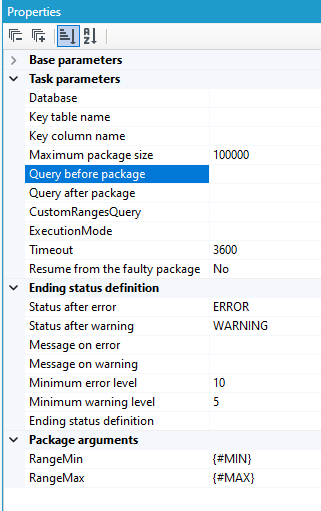
- Maximum allowed time for execution of the query determining range of values, Query before package and Query after package can be specified in seconds in the Timeout parameter. Remaining parameters belong to the “Processing package” task and should be filled according to its documentation.
Task parameters
| Key column name | Column name or expression from which a range of values will be determined. |
|---|---|
| Key table name | Table name or a subquery containing the key column. |
| Database | Database containing the key table. |
| Query before package | Query executed before each execution of the processing package. |
| Query after package | Query executed after each execution of the processing package. |
| Timeout | Maximum allowed time (in seconds) of execution of range determining, Query before package and Query after package queries. |
Processing package
The task is used for defining complex data transformations, including diverse data sources, destinations, references to external code etc.
Transformation task, which will be executed, will usually require setting a few elements :
- invocation parameters (for entire package) – e.g. boundary dates – displayed in the settings section Package arguments,
- values of blocks parameters – e.g. paths to files – displayed in the section Block:
<name>(type), - values of parameters common for all tasks of data transformation type.
Parameters of the first two types, although they are different for each task, are automatically recognized and displayed as separate parameters to be set in the Properties panel.
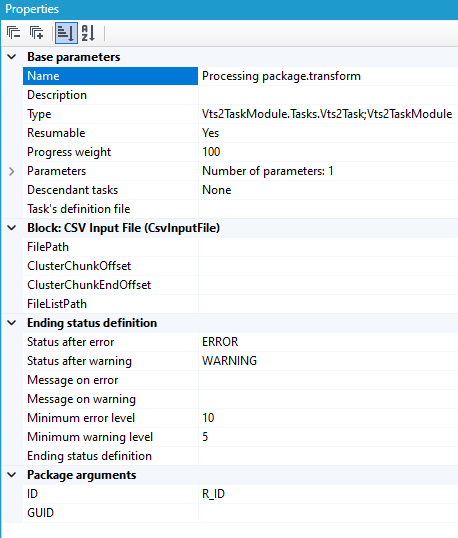
Parameters common for all types of tasks of data transformation type:
| Parameters | |
|---|---|
| Minimum error level | Minimum error level resulting in an error being reported from the package transformation. It results in an ERROR status being set on the task.By default: 10. The option is available only when the algorithm for setting the final status FinishStatusDefinition has not been defined. |
| Minimum warning level | Minimum error level resulting in a warning being reported from the package transformation. It results in a WARNING status being set on the task. By default: 9. The option is available only when the algorithm for setting the final status FinishStatusDefinition has not been defined. |
| Ending status definition | Definition of a final status that is to be taken by a task at the end of the package executions. The status is defined on the basis of the criticality level of the occurred errors and their numbers. Setting the definition will result in the usage of parameters Minimum error leve and Minimum warning level being disabled. A detailed description of this option is presented below. |
Error and warning levels
Data processing package reports error messages during its operation. Each of such messages has an error level – the higher the level, the more serious the error is.
- E.g. value 10 means unexpected exception in transformation,
- value 1 means warning related to mapping the value,
- value 3 means throwing the record away from transformation (without stopping the package exection).
The package tracks maximum value of an error value during its operation.
- In order to translate this value to the status of the task (OK, WARNING, ERROR) the following general parameters are defined: Minimum error level, Minimum warning level.
- If the error level is >= Minimum error level, the task will report the ERROR status which will result in interrupting the branch of tasks hierarchy transformation. Similarly - exceeding the value Minimum warning level will set the WARNING status.
Ending status definition- an algorithm for setting a task finish status
- Finish status definition is empty by default and Minimum error level, Minimum warning level parameters are significant.
- Both parameters define simply a situation when a task is to take WARNING or ERROR status.
- If a detailed definition of a finish status is set, both basic parameters lose their significance and their values will not be taken into consideration.
A collection editor shown in the figure below is used for setting a finish status.
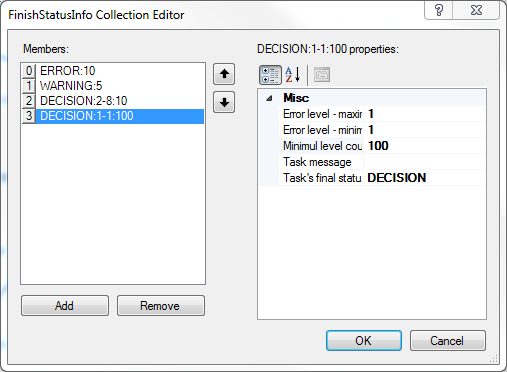
- Four defined situations may be noticed on the left. An algorithm for status setting will analyze each situation starting "from top".
- If number and level of errors in a package fulfill some situation, a status defining this particular situation will be returned.
- All successive situations will no longer be analyzed.
- If none of the defined situations is fulfilled, a task will be given a final status OK.
- Details of a selected situation are presented on the right of the figure. It is possible to define an interval from minimum to maximum error level (weight) and minimum number of errors from this interval which is necessary for fulfilling this situation.
- Of course, specifying a task status to be returned in a particular case is also possible. Apart from standard resting statuses of Task Manager: OK, WARNING, ERROR, it is possible to define one's own statuses (e.g. a status DECISION is such status).
Taking the above exemplary definition into consideration, a task will return a status:
- ERROR if there is at least one error on the level 10 or higher,
- WARNING if there is at least one error on the level 9 and there are no errors with higher weight,
- DECISION if there are at least 10 errors on the levels from 2 to 8 or at least 100 errors on the level 1 and there are no errors on the level higher than 8,
- OK if none of the above situation occurs.
Types of parameters – package invocation parameters
On the side of Task, parameters are strings only. On the side of data processing packages, invocation parameters have types, often other than strings. In order to reconcile this situation, an annotation Parser configured to an appropriate value type change may be attached to package invocation parameters.
- E.g. if a parameter has values of "20100214" form and it indicates a date (yyyyMMdd) assigned to a D2 parameter, a parser String>Date with a suitable date format "yyyyMMdd" may be attached to an invocation parameter.
Default argument values
Similar method may be used to solve a problem of parameters having a default value.
- E.g. when a transformation package may operate in several modes, depending on the setting of parameters of the "Boolean value" type, which are initially required, and some default method of executing a package is desired.
- Such invocation parameters may be given a note Constant value including a default value of parameters. In such situation, setting parameter values on the side of task configuration will not be necessary.
Additional information see: Package arguments.
Incremental copy
The CopyDataIncrements task keeps a copy of one or more tables in another database up to date. On every run it copies only the rows whose increment column – a timestamp, a growing numeric key, or a SQL Server rowversion – has moved since the last run, loads them into a staging table on the destination, and merges them into the target table by its primary key.
It is a plain scheduler task: you point it at two logical databases, hand it a list of tables, and schedule it. There is nothing to install in either database, and the source is only ever read from.
What it is and what it is not
| It does | It does not |
|---|---|
| Copy new and changed rows, in windows, without loading the whole table | Use CDC, replication, triggers or log reading |
| Merge by the target's primary key, so a re-copied row is updated, not duplicated | Provide transactional consistency across tables – each table is processed independently |
| Work between different database engines (see Engine support) | Copy DDL changes, indexes, constraints or IDENTITY behaviour |
| Optionally propagate deletes, with a full pass over the source keys | See a delete on its own – a timestamp cannot express one |
| Is resilient to being interrupted during execution – no data is retained between runs | Copy a row whose increment column was not touched by the update |
If you need a full reload of a table on every run, use the Bulk Copy task instead. If you need row-by-row transformation, that is a job for a data processing package.
How one run works
┌─────────────────────────────────────┐
│    Source database (read only)      │
│                                     │
│      ┌──────────────────┐           │
│      │   Source table   │           │
│      └──────────────────┘           │
└─────────────────────────────────────┘
                 │
                 │ 1. one window of rows
                 ▼
┌─────────────────────────────────────┐
│         Destination database        │
│                                     │
│  ┌───────────────────────┐          │
│  │     Staging table     │          │
│  │      target + _INC    │          │
│  └───────────────────────┘          │
│              │                      │
│              │ 2. MERGE             │
│              ▼                      │
│  ┌───────────────────────┐          │
│  │      Target table     │◄────┐    │
│  └───────────────────────┘     │    │
│                                │    │
│  ┌───────────────────────┐     │    │
│  │      Keys table       │─────┘    │
│  │    target + _INC_KEYS │          │
│  └───────────────────────┘          │
└─────────────────────────────────────┘
          ▲
          │ 3. KeySweep only:
          │    all primary keys
          │
┌──────────────────┐
│   Source table   │
└──────────────────┘

4. DELETE rows with no match
Keys table (_INC_KEYS) → Target table
Steps 1 and 2 repeat per window until the table has caught up. Steps 3 and 4 run once at the end of a table, and only when DeleteMode is KeySweep.
The task processes Workers tables in parallel, each on its own connections, and finishes when the last one is done. Recurrence is the scheduler's job – one run is one catch-up session.
The moving window
Both edges of the window come from the data, never from a clock, so nothing here depends on the time zone or on clock drift on the machine running the task.
                       Overlap
                     |<------->|
   --o-----o------o--|----o----|-----o------o-----o-----o--|------------>  increment column
     |                        |                            |
     oldest row               lower edge of the first       ceiling
     in the source            window = destination          = newest value in the source
                              watermark minus Overlap         (rowversion: MIN_ACTIVE_ROWVERSION() - 1)

                              |<- ChunkSize ->|<- ChunkSize ->|
                              +---------------+---------------+-------+     per window:
                              |   window 1    |   window 2    |  ...  |     TRUNCATE staging
                              +---------------+---------------+-------+     bulk load the window
                                                                            MERGE into the target
                                                                            wait ChunkPauseSeconds
- Ceiling – the newest value present in the source when the run starts. Rows that arrive above it wait for the next run.
- Destination watermark – the newest value already present in the target table. This is the only thing the task remembers, and it lives in the destination, not in the task.
- Overlap – how far below the watermark the first window starts. It exists because a transaction that started earlier may commit later: its rows carry an older timestamp than rows already copied. Overlap must be larger than the longest write transaction in the source, or those rows are skipped forever. Re-copied rows at the boundary are harmless – MERGE updates them in place.
- ChunkSize – the width of one window. It bounds the size of the destination's transaction log per window, which is what makes the first, full load of a large table practically feasible.
0means one single window. - Windows are half-open, (lower, upper], which ensures that within a single session no row is copied twice.
- Empty target – the first window starts one tick below the oldest row in the source, so the very first load starts directly at the actual data, without the need to pass through a series of empty windows from the earliest possible point in time.
If the run is interrupted, or the task is stopped, its execution stops between windows. The destination watermark then simply remains lower, and the next run resumes from that value.
Increment column kinds
The kind is inferred from the column's value, not configured. It decides what the unit of Overlap and ChunkSize is:
| Column type | Window unit | Notes |
|---|---|---|
datetime, datetime2, timestamp (Oracle/DB2/PostgreSQL), any date-and-time type | seconds | The common case. A ChunkSize of 86400 is one day per window. |
int, bigint, decimal, any integer or fixed-point type | key units | Use it for an ever-growing surrogate key or a sequence. A ChunkSize of 100000 is 100,000 keys per window. |
rowversion / timestamp (SQL Server) | counter ticks | The ceiling is MIN_ACTIVE_ROWVERSION() - 1, below which nothing can still commit, so Overlap can be 0. The destination column must be binary(8). |
Requirements on the column, checked by Check:
NOT NULL. A row with aNULLvalue would never be assigned to any window, and individual database engines differ in how they sortNULLvalues, which means the window boundaries themselves would be unpredictable.- It must grow with every change to the row. If the application updates a row without modifying this column, that change will not be copied. This is the one aspect the task is unable to verify automatically.
- It should be the leading column of some index. Without one, every window requires a full table scan, which makes splitting into windows counterproductive rather than helpful. The Check mechanism issues a warning in that case.
Both the source table and the target table must have a primary key on both sides – it is on this basis that the MERGE operation matches corresponding rows.
Parameters
Set in the task's <params> in the hierarchy, or in the property grid in archITekt Studio.
| Parameter | Studio label | Default | Meaning |
|---|---|---|---|
SourceDbName | Source database | – (required) | Logical name of the source database. |
DestinationDbName | Destination database | global DefaultDbName | Logical name of the destination database. |
FileName | – | task name | Where the table list lives: list.txt;LOGICAL_DIR (a logical directory from the configuration), a bare list.txt (resolved in the hierarchy's global DefaultDirName, or in the logical TASKS directory, or next to the hierarchy file), or an absolute path. Without the parameter the task's own name is used as the file name. |
Workers | Workers | 4 | How many tables are copied in parallel. Leave at 1 for the first, full load, so the source is not choked. |
Overlap | Window overlap | 300 | How far back the first window starts, in increment units. See The moving window. |
ChunkSize | Window width | 86400 | Width of one window, in increment units. 0 means one window – reasonable only for small tables. |
ChunkPauseSeconds | Pause between windows [s] | 1 | Real seconds of pause between windows, so the source can serve its own traffic. |
DeleteMode | Deletes | None | None or KeySweep. See Propagating deletes. |
CreateMissingTables | Create missing tables | false | Create tables and columns missing in the destination. Types are copied verbatim from the source schema, so this only makes sense between two databases of the same engine. |
BatchSize | Batch size | 1000 | Rows per BulkCopy batch. |
SqlBulkCopyOptions | BulkCopy options | KeepIdentity | Leave it at KeepIdentity. The staging table inherits the target's IDENTITY property, so without it the load renumbers the keys and MERGE hits the wrong rows. |
StagingTableSchema | Staging table schema | (empty) | Schema of the staging table, analogous to Destination schema. Empty means the same schema as the target table. |
StagingTablePrefix | Staging table prefix | (empty) | Prefix of the staging table name, analogous to Destination name prefix. |
StagingTableSuffix | Staging table suffix | _INC | Suffix of the staging table name. Must not be empty – an empty one would aim the staging table at the target table itself, and every window starts by truncating the staging table. |
TargetSchema | Destination schema | (empty) | Schema of the target tables. Empty means the same schema as in the source. |
TargetPrefix | Destination name prefix | (empty) | Prepended to the target table name. |
TargetSuffix | Destination name suffix | (empty) | Appended to the target table name. |
SourceDbCmdTimeout, DestinationDbCmdTimeout | Source/Destination timeout | 3600 | Query timeout in seconds. |
Target table names. The three name conventions map the source name onto the destination name. For a source table a.b: TargetSchema=x gives x.b; adding TargetPrefix=p_ and TargetSuffix=_s gives x.p_b_s. With all three empty the target keeps exactly the source name, in the other database – the usual case. Both sides may be the same database, which is handy for testing the whole mechanism, but then at least one of the three must be set, otherwise the task would copy tables into themselves; Check refuses that.
The table list
The task's script is a plain text list of tables, one per line. Columns are separated by tabs, because a table name may legitimately contain spaces.
dbo.Orders      ModifiedUtc
dbo.OrderLines  ModifiedUtc     WHERE Status = 'ACTIVE'     -Payload,-Notes
dbo.Events      EventId
# dbo.Heap      ChangedAt       no primary key, disabled until it has one
| Column | Required | Meaning |
|---|---|---|
| 1 | yes | Table name, schema-qualified as in the source. |
| 2 | yes | The increment column. |
| 3+ | no | WHERE <condition> and/or -column,-column, in any order. Anything else is a comment. |
- A line starting with
#or--is a comment. That is how you disable a table without deleting it. WHERE <condition>is raw SQL added to every query against the source – window edges, windows and the key sweep – so the destination becomes a mirror of the subset, consistently.-column,-columncauses the specified columns to be excluded from the copying process. An excluded column does not need to exist in the target table; however, if it does, theMERGEoperation does not modify it, so the target table may retain its own value there. It is not possible to exclude the primary key column or the increment column.- A bare
WHEREwith no condition is an error, not "no filter". - A list pasted with spaces instead of tabs causes a clear error, rather than silently corrupting a name.
Instead of a separate file, the list may be placed directly within the hierarchy's XML file, as the task's internal script.
Example task in a hierarchy:
<task>
    <name>MirrorOrders</name>
    <type>TaskModule.Task.CopyDataIncrements;TaskModule.dll</type>
    <status>START_PENDING</status>
    <params>
        <param key="FileName" value="MirrorOrders.txt;DATA_MIRROR_TASKS" />
        <param key="SourceDbName" value="SRC" />
        <param key="DestinationDbName" value="MIRROR" />
        <param key="ChunkSize" value="3600" />
    </params>
    <nextTasks/>
</task>
In archITekt Studio
The task is located in the toolbox under the name Incremental copy. Once dragged onto the hierarchy graph, it produces a task with its type already filled in, a script file created from a template – containing a commented-out example of the table list – and parameters visible in the property grid under the labels from the table above. Double-clicking the task opens the table list in the text editor.
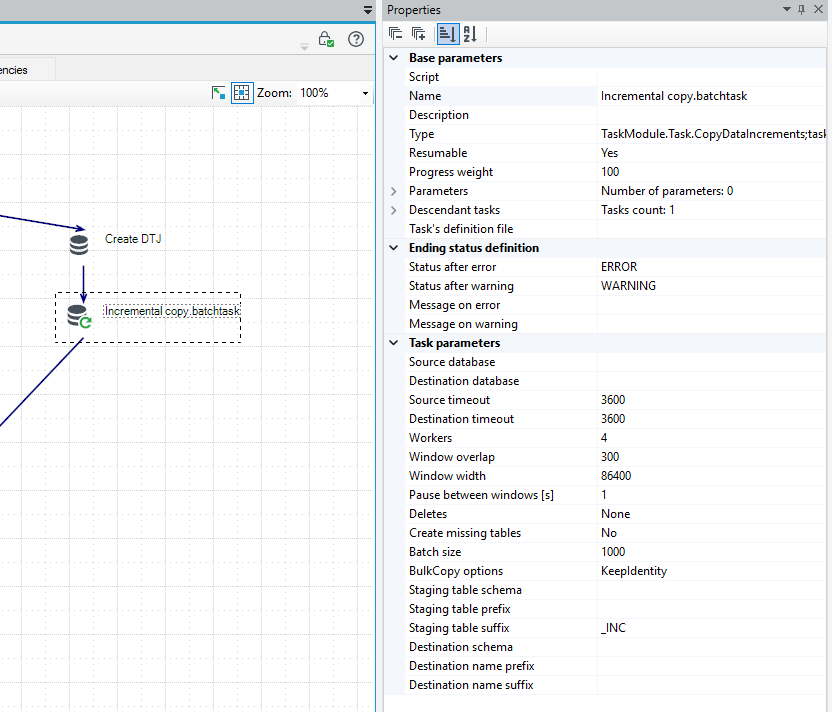
Check behaves differently at design time: in archITekt Studio it validates the table list and the task's configuration, but does not establish a connection to the databases, so validating a hierarchy remains fast and can be performed from a workstation without database access. The schema checks listed below are performed on the server, before the task is started.
One table, step by step
- The task asks the source database for the newest increment value (the first row past the index) → the source database returns the ceiling.
- The task asks the destination database for the newest increment value in the target table → the destination database returns the destination watermark.
- The lower edge of the first window = the watermark minus Overlap (for an empty target: one tick below the oldest row in the source).
- The task creates the staging table if it is not already there.
- For every window,
ChunkSizewide:TRUNCATEthe staging table → read the window from the source (lower edge exclusive, upper edge inclusive) → bulk copy it into the staging table →MERGEthe staging table into the target one, by primary key → pause for ChunkPauseSeconds. - If DeleteMode =
KeySweep:TRUNCATEthe keys table → read all primary key values from the source → bulk copy them into the keys table →DELETEthe target rows with no match in the keys table.
Propagating deletes
A timestamp is not able to express the fact of a deletion: the row simply ceases to exist, and no window will ever mention it. With the DeleteMode = None setting (the default value), deleted rows therefore remain in the target table indefinitely.
The DeleteMode = KeySweep setting eliminates this problem. After copying all the windows of a given table, the task loads the complete set of primary keys from the source into a second work table, and then removes from the target table every row for which no match was found. This operation is deliberately performed after the windows have been processed: a row inserted between the key snapshot and the copy would otherwise be copied and then immediately removed as an orphan record.
Practical guidance:
- It is a full pass over the source keys, so the cost corresponds approximately to one full read of the key columns. This is significantly cheaper than copying the entire table, though not free of cost.
- It is recommended to assign it a separate hierarchy node with the
DeleteMode = KeySweepsetting, scheduled less frequently than the increments – for example once a day or once a week, depending on how long the presence of a lingering deleted row can be tolerated. - If the source table turns out to be empty, the pass is skipped along with an appropriate warning, rather than resulting in the target table being cleared – an empty source far more often results from a configuration error than from an intended action.
- Deletions constitute the only case in which a write to the target table occurs outside of the
MERGEoperation, therefore the account used must hold theDELETEpermission on the target tables.
Check — the report mode
Check runs before every start and can also be triggered on demand from archITekt Studio. It is a pure report: it connects to both databases, reads both schemas and writes nothing. In archITekt Studio it stops after the table list and the configuration and never connects – see In archITekt Studio.
It verifies, per table:
- whether the table exists in the source, and whether the corresponding table exists in the destination database (or will be created, if the
CreateMissingTablesoption is enabled); - whether the increment column exists and holds the
NOT NULLattribute; - whether both tables have a primary key, and whether the key columns of the target table also exist in the source table;
- whether every copied column exists in the target table;
- whether the columns excluded from copying exist in the source table, do not constitute the primary key or the increment column, and do not hold the
NOT NULLattribute in the target table without a defined default value; - whether the target table does not contain a
rowversioncolumn other thanbinary(8); - whether an existing work table holds the same set of columns as the table being copied;
- whether the source table and the target table are not the same table.
It warns when the increment column is not the leading column of any index – the copy will work, and will be slow.
Objects created and permissions
| Object | Where | Created by | Notes |
|---|---|---|---|
Staging table target + StagingTableSuffix | destination | the task, on first use | SELECT ... INTO from the target, plus an index on the primary key. Kept between runs and reused. |
Keys table staging + _KEYS | destination | the task, on first use, only with KeySweep | Primary key columns only. |
| Target tables and missing columns | destination | only with CreateMissingTables | Tables without IDENTITY, added columns always NULL. |
Minimum rights:
- Source:
SELECTon the listed tables. Nothing else, ever. - Destination:
SELECT,INSERT,UPDATEon the target tables,DELETEas well withKeySweep; on the work tables also the right toTRUNCATEthem (on SQL Server that isALTERon the table).CREATE TABLEandCREATE INDEXunless you pre-create the work tables by hand. A target with an IDENTITY column additionally needs the right to switchIDENTITY_INSERT.
Engine support
The mechanism is engine-agnostic apart from two spots:
- Creating work tables is performed using the
SELECT ... INTOsyntax, specific to SQL Server. For any other destination database engine, the work tables must be created manually, once – as copies of the target table (or solely of its key columns) together with an index based on the primary key. The remainder of the mechanism then operates without any changes. - The loading process uses the fast BulkCopy protocol when the destination is SQL Server, and otherwise relies on
INSERTstatements executed in batches. Both variants function correctly, though the fallback variant offers lower performance.
Merging uses the engine's own MERGE where it exists, and an UPDATE + INSERT pair generated from the same definition where it does not. The delete pass is a portable NOT EXISTS. The source can be any engine the platform supports.
Recipes
- First, full load.
Workers = 1,ChunkSizesmall enough that one window is minutes rather than hours (for a busy table, an hour of data),ChunkPauseSecondsa few seconds. Run Check first, then let it run; it will walk from the oldest row to the newest across as many windows as it takes. RaiseWorkersandChunkSizeonce it has caught up. - Steady state. A
ChunkSizeequal to one day is appropriate when the interval between runs is significantly shorter than a day: in such a situation, there is normally one window per run. TheOverlapvalue should exceed the duration of the longest write transaction by a few minutes. - Mirror of a subset. A
WHEREcondition should be added to the table's line. It is worth remembering that subsequently narrowing the filter leaves rows in the target table that no longer belong to the given subset – these will be removed during aKeySweeppass. Widening the filter is more difficult to carry out: newly included, older rows are located below the destination watermark and will not be automatically picked up, so it becomes necessary to clear the target table (or the affected rows) and allow the task to reload the data. - Wide table, narrower copy. It is advisable to exclude unneeded columns using the
-columndesignation. This solution reduces network traffic, but does not reduce the load on the source side. - Testing the mechanism within a single database. The same database should be pointed to as both source and destination, with the
TargetSuffix = _COPYparameter set. If this setting is omitted, the configuration will be rejected by the Check mechanism, which prevents tables from accidentally being copied into themselves.
Limits and traps
- An update that does not modify the increment column remains invisible to the mechanism. None of the described functionalities is capable of detecting such a change.
- An
Overlapvalue smaller than the duration of the longest transaction causes some rows to be silently skipped. This is the only parameter whose value is worth determining on the basis of measurement rather than estimation. - Handling deletions requires the
DeleteMode = KeySweepsetting. Without it, the size of the target table only ever grows. - No consistency across tables. Individual tables are processed independently and in parallel, so a report referring simultaneously to two mirrored tables may observe one of them in a state slightly older than the other.
- Changing the filter or the column list requires caution. See Recipes above; an outdated work table containing the previous set of columns is reported by the Check mechanism – it should be removed and will be recreated.
- A schema change in the source table (e.g. the addition of a new column) is reported by the Check mechanism until the corresponding column is added to the target table – either manually or using the
CreateMissingTablesoption.
Failures, stopping and resuming
- A failure in the processing of one table does not stop the processing of the others; the run ends with the
ERRORstatus, and the tables for which an error occurred are listed in the task's message. - An error classified as a server error (e.g. a dropped connection, a service restart, a deadlock) results, instead of the
ERRORstatus, in theRESUME_PENDINGstatus being set after one minute, after which the scheduler re-runs the task. Resuming constitutes a plain re-run and is safe precisely because the destination watermark is the only element remembered by the task. - Stopping the task allows the current window's processing to be completed, after which the task stops before starting the next one. The key-based pass is skipped in such a case. No window is ever left partially merged: a given window is either merged in its entirety or not at all.
Log messages worth knowing
| Message | What it means |
|---|---|
| 0: 1 row(s), watermark moved to 2 | Information on the progress of processing a table while catching up on backlog – one line of message per window. |
| 0: 1 row(s) in 2. | The table has reached a current state (has caught up on its backlog). |
| 0: the source table is empty - nothing to copy. | The source table contains no rows, or none of them satisfy the filter condition. |
| 0: without an index on 1 every window is a full scan - splitting into windows hurts here instead of helping. | A warning issued by the Check mechanism. An index should be added, or the ChunkSize = 0 value should be set. |
| 0: delete propagation skipped - an empty source would wipe the whole destination... | The KeySweep mechanism refused to perform the operation against an empty source. The filter and the contents of the source table should be verified. |
| 0: work table 1 has a different set of columns than the one being copied - drop it, it will be created anew. | The column list or the target table's schema has changed. The work table should be removed. |
| 0: increment column 1 is nullable - it must be NOT NULL. | The column definition in the source table should be corrected, or a different increment column should be chosen. |
| Unsupported increment column type: 0 - timestamps, integers, decimal and rowversion are allowed. | The column is of a data type for which windows cannot be determined, or its type differs between the source and target tables. |
Code pages
The following table presents encoding numbers (the value of "Encoding" parameters occurring in different locations) together with a description and a number of a Windows code page.
| CodePage | Identifier and name | WindowsCodePage |
|---|---|---|
| 37 | IBM037 | 1252 * |
| 437 | IBM437 | 1252 * |
| 500 | IBM500 | 1252 * |
| 708 | ASMO-708 | 1256 * |
| 720 | DOS-720 | 1256 * |
| 737 | ibm737 | 1253 * |
| 775 | ibm775 | 1257 * |
| 850 | ibm850 | 1252 * |
| 852 | ibm852 | 1250 * |
| 855 | IBM855 | 1252 * |
| 857 | ibm857 | 1254 * |
| 858 | IBM00858 | 1252 * |
| 860 | IBM860 | 1252 * |
| 861 | ibm861 | 1252 * |
| 862 | DOS-862 | 1255 * |
| 863 | IBM863 | 1252 * |
| 864 | IBM864 | 1256 * |
| 865 | IBM865 | 1252 * |
| 866 | cp866 | 1251 * |
| 869 | ibm869 | 1253 * |
| 870 | IBM870 | 1250 * |
| 874 | windows-874 | 874 |
| 875 | cp875 | 1253 * |
| 932 | shift_jis | 932 |
| 936 | gb2312 | 936 |
| 949 | ks_c_5601-1987 | 949 |
| 950 | big5 | 950 |
| 1026 | IBM1026 | 1254 * |
| 1047 | IBM01047 | 1252 * |
| 1140 | IBM01140 | 1252 * |
| 1141 | IBM01141 | 1252 * |
| 1142 | IBM01142 | 1252 * |
| 1143 | IBM01143 | 1252 * |
| 1144 | IBM01144 | 1252 * |
| 1145 | IBM01145 | 1252 * |
| 1146 | IBM01146 | 1252 * |
| 1147 | IBM01147 | 1252 * |
| 1148 | IBM01148 | 1252 * |
| 1149 | IBM01149 | 1252 * |
| 1200 | utf-16 | 1200 |
| 1201 | unicodeFFFE | 1200 * |
| 1250 | windows-1250 | 1250 |
| 1251 | windows-1251 | 1251 |
| 1252 | Windows-1252 | 1252 |
| 1253 | windows-1253 | 1253 |
| 1254 | windows-1254 | 1254 |
| 1255 | windows-1255 | 1255 |
| 1256 | windows-1256 | 1256 |
| 1257 | windows-1257 | 1257 |
| 1258 | windows-1258 | 1258 |
| 1361 | Johab | 949 * |
| 10000 | macintosh | 1252 * |
| 10001 | x-mac-japanese | 932 * |
| 10002 | x-mac-chinesetrad | 950 * |
| 10003 | x-mac-korean | 949 * |
| 10004 | x-mac-arabic | 1256 * |
| 10005 | x-mac-hebrew | 1255 * |
| 10006 | x-mac-greek | 1253 * |
| 10007 | x-mac-cyrillic | 1251 * |
| 10008 | x-mac-chinesesimp | 936 * |
| 10010 | x-mac-romanian | 1250 * |
| 10017 | x-mac-ukrainian | 1251 * |
| 10021 | x-mac-thai | 874 * |
| 10029 | x-mac-ce | 1250 * |
| 10079 | x-mac-icelandic | 1252 * |
| 10081 | x-mac-turkish | 1254 * |
| 10082 | x-mac-croatian | 1250 * |
| 12000 | utf-32 | 1200 * |
| 12001 | utf-32BE | 1200 * |
| 20000 | x-Chinese-CNS | 950 * |
| 20001 | x-cp20001 | 950 * |
| 20002 | x-Chinese-Eten | 950 * |
| 20003 | x-cp20003 | 950 * |
| 20004 | x-cp20004 | 950 * |
| 20005 | x-cp20005 | 950 * |
| 20105 | x-IA5 | 1252 * |
| 20106 | x-IA5-German | 1252 * |
| 20107 | x-IA5-Swedish | 1252 * |
| 20108 | x-IA5-Norwegian | 1252 * |
| 20127 | us-ascii | 1252 * |
| 20261 | x-cp20261 | 1252 * |
| 20269 | x-cp20269 | 1252 * |
| 20273 | IBM273 | 1252 * |
| 20277 | IBM277 | 1252 * |
| 20278 | IBM278 | 1252 * |
| 20280 | IBM280 | 1252 * |
| 20284 | IBM284 | 1252 * |
| 20285 | IBM285 | 1252 * |
| 20290 | IBM290 | 932 * |
| 20297 | IBM297 | 1252 * |
| 20420 | IBM420 | 1256 * |
| 20423 | IBM423 | 1253 * |
| 20424 | IBM424 | 1255 * |
| 20833 | x-EBCDIC-KoreanExtended | 949 * |
| 20838 | IBM-Thai | 874 * |
| 20866 | koi8-r | 1251 * |
| 20871 | IBM871 | 1252 * |
| 20880 | IBM880 | 1251 * |
| 20905 | IBM905 | 1254 * |
| 20924 | IBM00924 | 1252 * |
| 20932 | EUC-JP | 932 * |
| 20936 | x-cp20936 | 936 * |
| 20949 | x-cp20949 | 949 * |
| 21025 | cp1025 | 1251 * |
| 21866 | koi8-u | 1251 * |
| 28591 | iso-8859-1 | 1252 * |
| 28592 | iso-8859-2 | 1250 * |
| 28593 | iso-8859-3 | 1254 * |
| 28594 | iso-8859-4 | 1257 * |
| 28595 | iso-8859-5 | 1251 * |
| 28596 | iso-8859-6 | 1256 * |
| 28597 | iso-8859-7 | 1253 * |
| 28598 | iso-8859-8 | 1255 * |
| 28599 | iso-8859-9 | 1254 * |
| 28603 | iso-8859-13 | 1257 * |
| 28605 | iso-8859-15 | 1252 * |
| 29001 | x-Europa | 1252 * |
| 38598 | iso-8859-8-i | 1255 * |
| 50220 | iso-2022-jp | 932 * |
| 50221 | csISO2022JP | 932 * |
| 50222 | iso-2022-jp | 932 * |
| 50225 | iso-2022-kr | 949 * |
| 50227 | x-cp50227 | 936 * |
| 51932 | euc-jp | 932 * |
| 51936 | EUC-CN | 936 * |
| 51949 | euc-kr | 949 * |
| 52936 | hz-gb-2312 | 936 * |
| 54936 | GB18030 | 936 * |
| 57002 | x-iscii-de | 57002 |
| 57003 | x-iscii-be | 57003 |
| 57004 | x-iscii-ta | 57004 |
| 57005 | x-iscii-te | 57005 |
| 57006 | x-iscii-as | 57006 |
| 57007 | x-iscii-or | 57007 |
| 57008 | x-iscii-ka | 57008 |
| 57009 | x-iscii-ma | 57009 |
| 57010 | x-iscii-gu | 57010 |
| 57011 | x-iscii-pa | 57011 |
| 65000 | utf-7 | 1200 * |
| 65001 | utf-8 | 1200 * |
Other tasks
Empty task
The task which does not carry out any useful operations, it is used as a central starting point, end point or synchronization point in the dependency network.
C# task
Another task defined in the System code, it does not have its own dedicated icon. It may perform any functions. The definition requires the knowledge of how to program in .NET and how to use a compiler.