Configuration merge mechanism
The ConfigMerge tool is used to merge partial configuration files into a single target configuration file *.config It is used to merge the configuration provided by the VSoft archITekt platform with configuration specific to the final application. It allows selected configuration elements to be extended, replaced, and overwritten with the user's or application's own settings.
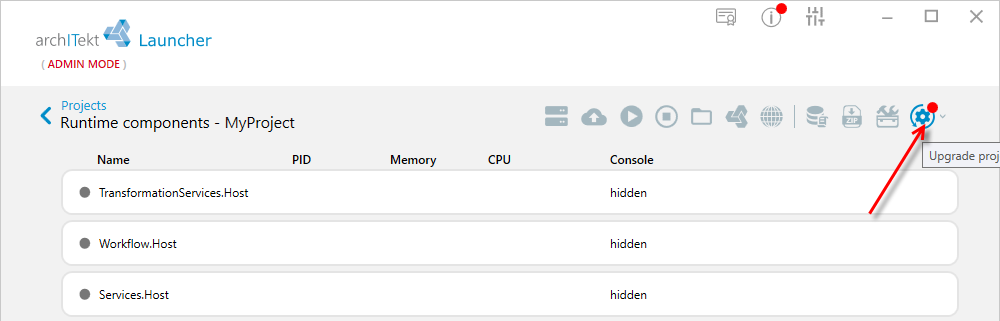
The tool is run automatically during the Upgrade operation performed from the VSoft archITekt Launcher - see: Updating the environment.
Basic scenario: adding configuration
The tool allows new configuration elements to be added to the resulting file. If the specified entries do not exist in the base configuration, they will be added to the generated configuration file. This makes it possible to extend the platform configuration without having to modify the original files provided by archITekt.
Suppose we want to extend the Bindings.config file provided by the platform with our own entry. Editing this file directly in place makes no sense — it will be restored to its original state on the next project Upgrade.
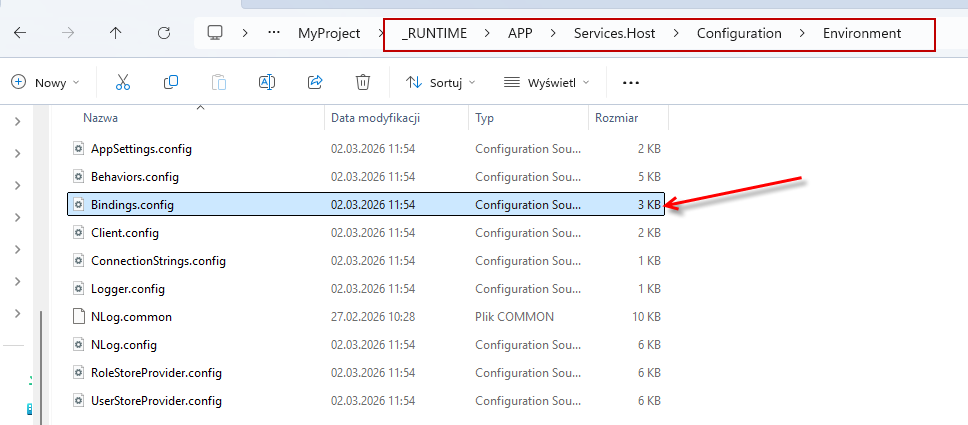
To permanently extend the configuration, you need to create your own partial file in the Files folder, mirroring the exact path of the original file within it — it is not enough to add just the file, the whole directory path must be recreated (in this example: Files\APP\Services.Host\Configuration\Environment), e.g. Bindings.config.myapp — the name must have an additional extension* and cannot be identical to the name of the original file.
*do not use these extensions: .core, .base, .shell, .mvc, .vbp, .vmd, .vts, .algorithms, .vds, .sch, .sm, .vip They are used internally by the platform.
In the newly created file, only the added elements are placed, e.g. a new basicSOAPBinding binding inside the basicHttpBinding section, which does not exist in the base file. The user's file may also redefine an element that already exists in the base file (here: defaultBasicHttpBinding) — if its content is identical to the original, the mechanism overwrites it with no visible change.
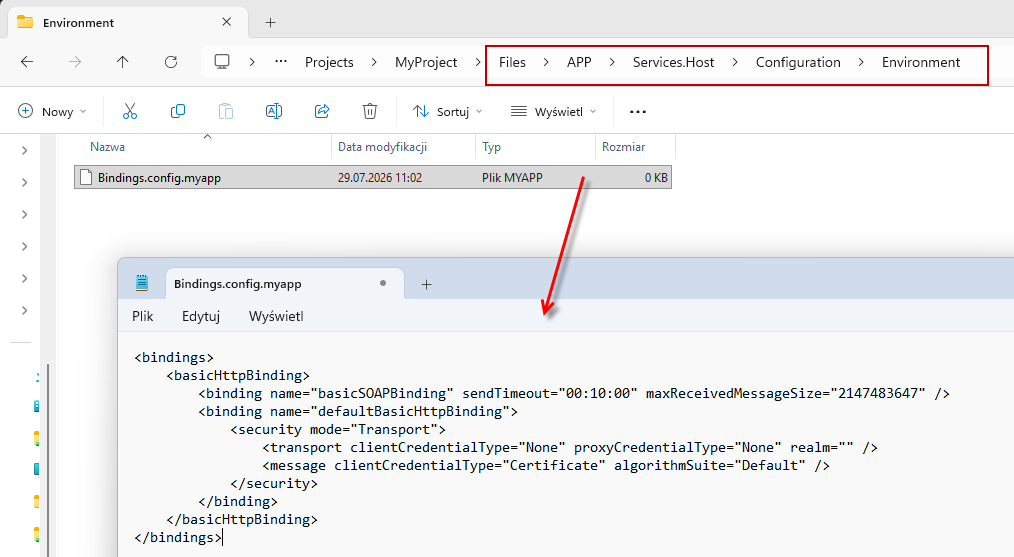
After running the project Upgrade, the original Bindings.config file will be extended with exactly these entries, without affecting the rest of the configuration provided by the platform.
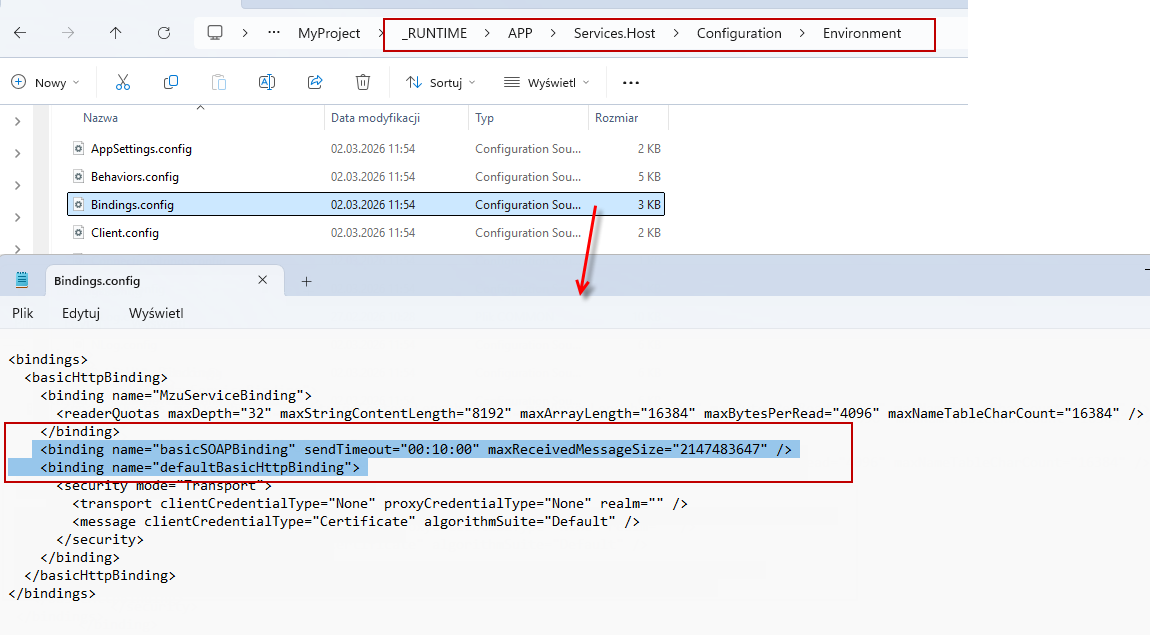
Original (Bindings.config):
<bindings>
  <basicHttpBinding>
    <binding name="MzuServiceBinding">
      <readerQuotas maxDepth="32" maxStringContentLength="8192" maxArrayLength="16384" maxBytesPerRead="4096" maxNameTableCharCount="16384" />
    </binding>
    <binding name="defaultBasicHttpBinding">
      <security mode="Transport">
        <transport clientCredentialType="None" proxyCredentialType="None" realm="" />
        <message clientCredentialType="Certificate" algorithmSuite="Default" />
      </security>
    </binding>
  </basicHttpBinding>
</bindings>
File created by the user (Bindings.config.myapp):
<bindings>
    <basicHttpBinding>
        <binding name="basicSOAPBinding" sendTimeout="00:10:00" maxReceivedMessageSize="2147483647" />
        <binding name="defaultBasicHttpBinding">
            <security mode="Transport">
                <transport clientCredentialType="None" proxyCredentialType="None" realm="" />
                <message clientCredentialType="Certificate" algorithmSuite="Default" />
            </security>
        </binding>
    </basicHttpBinding>
</bindings>
Resulting file (Bindings.config after Upgrade):
<bindings>
  <basicHttpBinding>
    <binding name="MzuServiceBinding">
      <readerQuotas maxDepth="32" maxStringContentLength="8192" maxArrayLength="16384" maxBytesPerRead="4096" maxNameTableCharCount="16384" />
    </binding>
    <binding name="basicSOAPBinding" sendTimeout="00:10:00" maxReceivedMessageSize="2147483647" />
    <binding name="defaultBasicHttpBinding">
      <security mode="Transport">
        <transport clientCredentialType="None" proxyCredentialType="None" realm="" />
        <message clientCredentialType="Certificate" algorithmSuite="Default" />
      </security>
    </binding>
  </basicHttpBinding>
</bindings>
Advanced scenarios
The following describes the various scenarios for the operation of the configuration merging mechanism. For each mechanism, an example is provided to illustrate its operation.
Adding configuration
The following example repeats the material described in the basic scenario chapter, but with a different example.
Merging of configurations is done by merging entries from both configuration files while maintaining the XML node hierarchy. This is the most common case found in solutions.
Original (AppSettings.config):
<?xml version="1.0" encoding="utf-8" ?>
<appSettings>
    <add key="RefreshTimeSec" value="2" />
    <add key="WorkThreads" value="3" />
</appSettings>
File created by the user (AppSettings.config.myapp):
<appSettings>
    <add key="wcfTransportSecurity" value="{scheduler.bool.transportSecurity}" />
    <add key="wcfSecurityClientCredentialType" value="None" />
</appSettings>
Resulting file (AppSettings.config):
<appSettings>
    <add key="RefreshTimeSec" value="2" />
    <add key="WorkThreads" value="3" />
    <add key="wcfTransportSecurity" value="{scheduler.bool.transportSecurity}" />
    <add key="wcfSecurityClientCredentialType" value="None" />
</appSettings>
Configuration overwriting
Configuration overwriting involves replacing an existing entry with an entry from a later processed configuration file. This is used when an application wants to change the configuration provided by VSoft archITekt.
The mechanism for recognizing whether an XML element is the same in both files is based on identical values of the key and name attributes with special consideration of several configuration elements.
Original (ConnectionStrings.config):
<connectionStrings>
  <add name="VSFE.CONFIG_DB" connectionString="{common.connection.db_config}" providerName="System.Data.SqlClient" />
  <add name="VSFE.NODES_DB" providerName="System.Data.SqlClient" connectionString="{common.connection.db_config}" />
</connectionStrings>
File created by the user (ConnectionStrings.config.myapp):
<connectionStrings>
  <add name="VSFE.CONFIG_DB" connectionString="{my.configuration.db_config}" providerName="System.Data.SqlClient" />
</connectionStrings>
Resulting file (ConnectionStrings.config):
<connectionStrings>
  <add name="VSFE.CONFIG_DB" connectionString="{my.configuration.db_config}" providerName="System.Data.SqlClient" />
  <add name="VSFE.NODES_DB" providerName="System.Data.SqlClient" connectionString="{common.connection.db_config}" />
</connectionStrings>
Deleting a configuration fragment
Configuration deletion involves removing part or all of the records from the files processed so far.
Note that the deletion mechanism cannot recognize list elements. If you want to modify the list, you need to delete the element containing the list and add it anew.
Variant 1 — deleting the entire section and replacing it with new content:
Original (ConnectionStrings.config):
<connectionStrings>
  <add name="VSFE.CONFIG_DB" connectionString="{common.connection.db_config}" providerName="System.Data.SqlClient" />
  <add name="VSFE.NODES_DB" providerName="System.Data.SqlClient" connectionString="{common.connection.db_config}" />
</connectionStrings>
File created by the user (ConnectionStrings.config.myapp):
<!--REMOVE: connectionStrings -->
<connectionStrings>
  <add name="DICTIONARIES" connectionString="{common.connection.db_config}" providerName="SqlServer2008" />
</connectionStrings>
Resulting file (ConnectionStrings.config):
<connectionStrings>
  <add name="DICTIONARIES" connectionString="{common.connection.db_config}" providerName="SqlServer2008" />
</connectionStrings>
Variant 2 — deleting a single entry:
Original (ConnectionStrings.config):
<connectionStrings>
  <add name="VSFE.CONFIG_DB" connectionString="{common.connection.db_config}" providerName="System.Data.SqlClient" />
  <add name="VSFE.NODES_DB" providerName="System.Data.SqlClient" connectionString="{common.connection.db_config}" />
</connectionStrings>
File created by the user (ConnectionStrings.config.myapp):
<connectionStrings>
  <!--REMOVE: add name="VSFE.NODES_DB" -->
</connectionStrings>
Resulting file (ConnectionStrings.config):
<connectionStrings>
  <add name="VSFE.CONFIG_DB" connectionString="{common.connection.db_config}" providerName="System.Data.SqlClient" />
</connectionStrings>