Encrypt configuration
The configuration encryption mechanism is used to secure (encrypt) part of our application's configuration - that contains access data to databases and other secured components with which the application connects (e.g. SMTP server, Active Directory server).
Method of operation
Data is encrypted using the AES algorithm, which requires an encryption key. The encryption key is a 16-character byte string, generated automatically, based on the password entered by the administrator using the MD5 algorithm.
The system does not impose any requirements on the complexity of the password, leaving this to the decision of the administrator.
The password specified by the administrator is not saved anywhere. Its loss results in the loss of the ability to perform administrative operations of the environment.
Each component of the environment must have access to the encryption key in order to read (decrypt) the environment configuration. The information about the encryption key is passed to the components in a secure way:
- in the case of containerized environments: as an environment variable,
- for On-premises and Developer environments: as an entry encrypted using the Data Protection API in the
*.config.inifile for each component
Using the Data Protection API, the key encrypted in the *.config.ini file can only be read on the same machine. Attempting to read the key on another machine will fail.
The above method of securing the encryption key protects against its leakage if the application binaries are copied to another machine.
Only one component of the encrypted environment - archITekt Studio - allows and supports an attempt to run on a different machine than the one originally installed. This was dictated for practical reasons, making the environment easier to manage.
If archITekt Studio is run on a machine where it does not have the ability to automatically read the value of the encryption key, the user is prompted asking for the administrator's password. Based on this, an encryption key is generated, with which the application attempts to read the environment's configuration.
Scope of encrypted data
On a secured environment, the elements of the encrypted configuration include:
- project configuration files (
project.json,default.runtime.json)

- component configuration files
*.config.ini

- configuration table entries (base
*_CONFIG, tableCONFIG_KEYS).
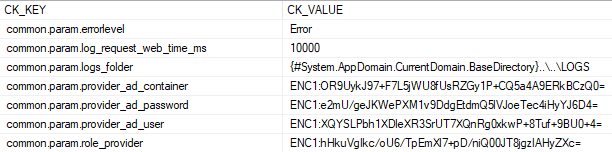
Entries are constructed according to the convention [prefix]:[value], where the prefix specifies how the entry is encrypted:
- ENC1 means encrypting the entry with an encryption key.
- DPAPI means encrypting the entry using the Data Protection API mechanism.
- ENV means storing the entry in an environment variable.
The last two mechanisms are used only to secure the encryption key data.
By default, the installed environment encrypts the part of the configuration that is related to connections to external components. The values of system keys that are sensitive by definition (e.g. the SMTP server password) are encrypted as well when given in the configKeys parameter - see Sensitive keys.
If you use additional configuration, provided by the system administrator, it is up to the administrator to decide which parts of the configuration are to be encrypted - by marking the chosen keys as sensitive.
Below is an excerpt from the project.json file with additional environment variables entered by the administrator. In this case, the administrator decided to protect the value of the third.secret.setting variable.

Sensitive keys
A configuration key can be marked as sensitive. For such a key:
- the value is stored encrypted - both in the project files (
project.json,custom.project.json) and in theCONFIG_KEYStable, - the key is hidden from key listings (the
CK_SENSITIVEcolumn of theCONFIG_KEYStable is set to 1), - the value of the key is not written to the logs of the deployment scripts.
Encryption uses the environment's security password (the SecurityPassword parameter).
If the environment has no security password, the values of sensitive keys stay unencrypted and the script displays a warning. Flagging the key in the CONFIG_KEYS table and hiding it from key listings work nevertheless.
Encrypting the value and the CK_SENSITIVE flag are two independent mechanisms: the application decrypts every value with the ENC1: prefix regardless of the flag, and the flag alone encrypts nothing. The deployment scripts make sure both are set for a sensitive key.
System keys sensitive by definition
Some system keys are sensitive by definition - this cannot be changed. A value given for them in the configKeys parameter is encrypted automatically, with no additional parameters. These are:
| Group | Keys |
|---|---|
| SMTP server | common.param.smtp_server, common.param.smtp_username, common.param.smtp_password |
| Active Directory | common.connection.provider_ad, common.param.provider_ad_user, common.param.provider_ad_password, common.param.provider_ad_user_container, common.param.provider_ad_role_container |
| Service account | common.param.servicehost_user, common.param.servicehost_password |
| Connection strings | common.connection.db_data, common.connection.scheduler_data, common.connection.version_server, common.connection.provider_mzu, studio.connection.version_server, www.connection.sql_session_state |
| Authorization and signing | common.auth.client.auth_api_client_secret, scheduler.auth.client.client_secret, common.auth.server_rsa_signing_key, scheduler.restapi.signingKey, common.param.user_token_secret_key |
| Addresses | common.url.adfs_metadata, common.url.provider_mzu |
The list may change between platform versions. The current list for a given image is returned by the ReleaseInfo.ps1 script in the image folder (keys with "sensitive": true):
cd "C:\Program Files\VSoft\archITekt\Images\[image name]"
.\ReleaseInfo.ps1 -OutFile C:\Temp\release.json
Marking your own keys as sensitive
Any other key - in particular your own custom.* key - can be marked as sensitive in two ways:
- by giving its name in the
sensitiveConfigKeysparameter of the environment creation script (e.g.OnPremisesCreate.ps1) or of theReconfigure.ps1script, - by giving its value in the
configKeysparameter already encrypted (e.g. with theSecurityOperation.ps1 -Operation Encryptscript described below). The scripts treat a key whose value in the project files is encrypted as sensitive and report it in the log (Config key '...' has an encrypted value - adding it to ConfigKeysSensitivity).
The second way also covers projects created with older platform versions: on the first run of the new scripts (installation / update of components, Reconfigure.ps1) their keys with an encrypted value are marked as sensitive automatically.
An encrypted value does not mark a system key (defined by the platform) that is not sensitive by definition. Such a key can be marked only with the sensitiveConfigKeys parameter.
When creating the environment:
.\OnPremisesCreate.ps1 [...] -SecurityPassword "[password]" `
  -configKeys @{ "custom.api.url" = "https://api.example.com"; "custom.api.token" = "abc123" } `
  -sensitiveConfigKeys "custom.api.token"
In an existing environment (the Reconfigure.ps1 script):
# mark the key as sensitive (the value stored in the project will be encrypted)
.\Reconfigure.ps1 -pathProjectFolder "[project folder]" -SecurityPassword "[password]" `
  -sensitiveConfigKeys "custom.api.token"

# set the value and mark the key in one call
.\Reconfigure.ps1 -pathProjectFolder "[project folder]" -SecurityPassword "[password]" `
  -configKeys @{ "custom.api.token" = "new-value" } -sensitiveConfigKeys "custom.api.token"

# unmark the key (the value will be decrypted)
.\Reconfigure.ps1 -pathProjectFolder "[project folder]" -SecurityPassword "[password]" `
  -notSensitiveConfigKeys "custom.api.token"
Rules:
- The
sensitiveConfigKeysandnotSensitiveConfigKeysparameters take a list of key names, e.g.-sensitiveConfigKeys @("key.a", "key.b"). When the script is called from outside PowerShell (e.g.pwsh Reconfigure.ps1 ...run bydocker compose run), a single comma-separated string can be given instead:-sensitiveConfigKeys key.a,key.b. - Give key names only, without a node (NODE). Marking a key covers the key without a node and all of its per-node values (
variable name@node name). A key cannot be sensitive on one node only. - The script checks the parameters in its verification phase, before making any change, and fails if:
- a name includes a node (
key.name@node), - a name contains characters other than letters (no national characters), digits,
.,-,_, - a name is longer than 255 characters,
- the same key is given in both parameters,
- the
notSensitiveConfigKeysparameter names a key that is sensitive by definition.
- a name includes a node (
- The marking is stored in the project files and applies to every subsequent installation.
- Changes made with
Reconfigure.ps1reach the database on the next update of the environment components - just like changes of theconfigKeysparameter. - Unmarking (
notSensitiveConfigKeys) decrypts the key's value in the project files (for all nodes), and after the components are updated the key reappears in key listings. Apart from this case the scripts never decrypt a key's value. - A key that is sensitive by definition cannot be unmarked.
- A system key that is not sensitive by definition can be marked as sensitive.
- Giving a key that is sensitive by definition in
sensitiveConfigKeysis not an error - the script reports that it skips the key (skipped - it is sensitive by definition), because it is treated as sensitive anyway. - For a key present in the project files, the
CK_SENSITIVEflag in the database follows the project files: a marked key is sensitive, an unmarked one is not. A key absent from the project files (e.g. added directly in archITekt Studio) is left unchanged by the installation.
A project with a locked image version (LockedImageVersion = "On") is handled by the scripts of the image it was locked to. The sensitiveConfigKeys and notSensitiveConfigKeys parameters are available only if that image supports them - otherwise the script fails with an unknown parameter error.
Storage in the project files
The marking is stored in the project files in the ConfigKeysSensitivity section, next to the ConfigKeys section:
{
  "ConfigKeys": {
    "custom.api.token": "ENC1:zaOsj/6qVh/e8w9SCUe4AL/grkMNzHgTCl0mjzMpcs0=",
    "custom.api.url": "https://api.example.com"
  },
  "ConfigKeysSensitivity": {
    "custom.api.token": true
  }
}
- The
ConfigKeysSensitivitysection is kept incustom.project.jsonforcustom.*keys and inproject.jsonfor the other keys. - The section holds sensitive keys only (value
true). Keys that are sensitive by definition are not stored in it. - Unmark a key with the
notSensitiveConfigKeysparameter, not by editing the file - if the entry is removed by hand, the encrypted value marks the key as sensitive again on the next run of the scripts. - A value of a sensitive key entered into the file by hand in clear text is written to the database encrypted by the installation. The file itself gets encrypted on the next run of
Reconfigure.ps1.
The next section describes how to administratively manage encrypted environment settings.
Convenient management of user variables and their encryption is supported by the Launcher tool.
Administration of an encrypted environment
The administrator has the ability to manage the encrypted environment:
- using standard installation scripts to encrypt an open environment, remove encryption from the environment, and change the encryption password and thus the encryption key on the environment,
- independently, from the command line encrypt values and decrypt configuration elements.
For a description of the operation of encryption-related parameters within the installation scripts, see the relevant chapters.
Changing the security password (Reconfigure.ps1 -NewSecurityPassword) re-encrypts the values of sensitive keys with the new key in both project files (project.json, custom.project.json) and in the CONFIG_KEYS table. Removing the security password (Reconfigure.ps1 -RemoveSecurityPassword) decrypts them - from then on the values of sensitive keys are stored in clear text (the keys stay marked as sensitive).
Other, administrative operations on individual encrypted data are possible using the SecurityOperation.ps1 script:
Launching the script:
cd "C:\Program Files\VSoft\archITekt\Images\[image name]"
     .\ SecurityOperation.ps1
     -Operation [type of operation] `
     -SecurityPassword [password] `
     -Value [optional value required by the operation]
Parameters:
Operation- one of the operations: CreateKey, Encrypt, Decrypt, GetDpapiDataSecurityPassword- administrator's password, based on which the encryption key is generatedValue- input data required by the Encrypt and Decrypt operations
Usage examples:
Generating the encryption key
PS> .\SecurityOperation.ps1
-Operation CreateKey
-SecurityPassword "sample1"
ac46374a846d97e22f917b6863f690ad
The script returns an encryption key based on the password passed in. For the same password, each launch of the script will generate the same encryption key.
Encoding the encryption key using the Data Protection API mechanism
PS>; .\SecurityOperation.ps1
-Operation GetDpapiData
-SecurityPassword "sample1"
DPAPI:AQAAANCMnd8BFdERjHoAwE/Cl+sBAAAAFSP(..)9FEQ==
The script generates an encryption key based on the specified password and encrypts it using the Data Protection API, so that it can only be read on the machine where the script was launched. For the same password, each launch of the script will generate a correct but different string of encrypted characters by using the salt mechanism.
Data encryption
.\SecurityOperation.ps1
-Operation Encrypt
-SecurityPassword "sample1"
-Value "value1"
ENC1:gJXzvjoAIgGkFZtn+tMH7X/XeOH0X8BJPlC4gmXAQEI=
The script encodes the value of "value1" using an encryption key generated from the password "sample1". The above script can be used to encode the value of a configuration parameter to be added to the technical configuration. For the same values and the same password, each launch of the script will generate a correct but different string of encrypted characters by using the salt mechanism.
Data decryption
PS C:\Program Files\VSoft\archITekt\Images\Dev> .\SecurityOperation.ps1
-Operation Decrypt
-SecurityPassword "sample1"
-Value "ENC1:gJXzvjoAIgGkFZtn+tMH7X/XeOH0X8BJPlC4gmXAQEI="
value1
The script decodes the value "value1" using an encryption key generated from the password "sample1". The above script can be used to check the contents of the encrypted data from the technical configuration.