Processing package
The last element is to build a processing package, in which we refer to the built SDO aggregates.
In order to use the SDO functionality, a processing package must be created.
The basic element in the Decision - Computing Engine is the SDO block available in the Toolbox. Around the SDO block, you need to build an infrastructure from other blocks providing input data as well as receiving result data, and there is a lot of freedom here depending on your needs.
The simplest, example and also functional model for SDO support:
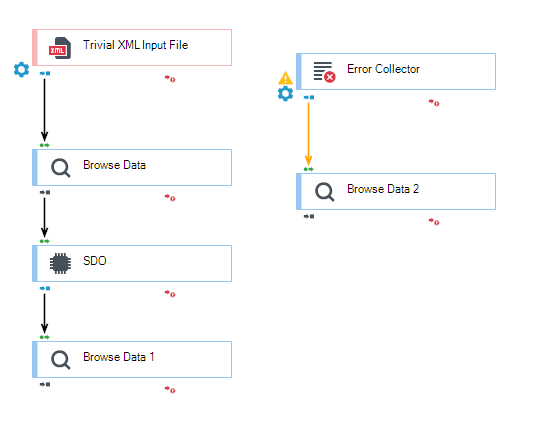
- After properly configuring the input and output data and transformations, go to the SDO block and configure it.
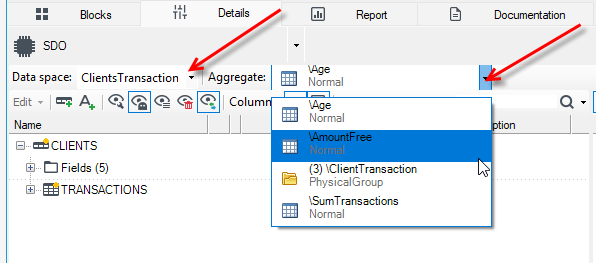
- Select the data space.
- Then select the pre-configured transformations (aggregates) that will be needed for the calculation.
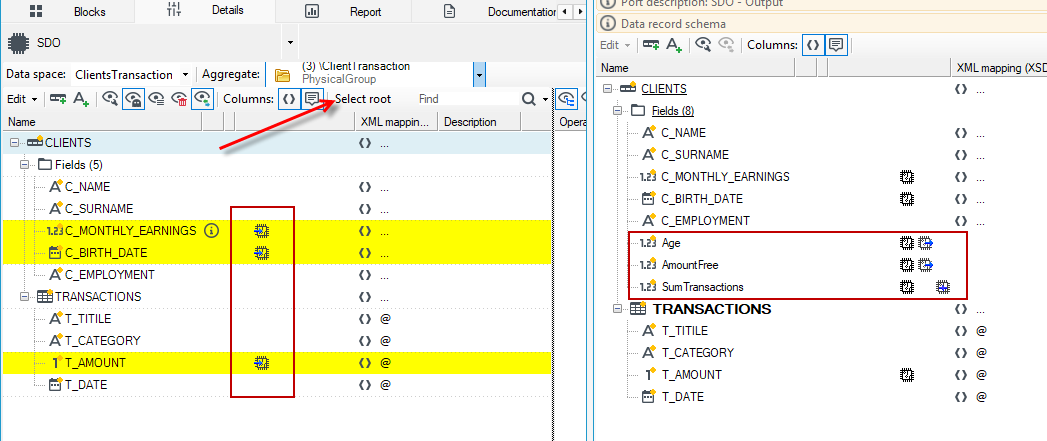
- Once the selection is made, it is worth opening the Schemas window (it opens by default on the right side of the SDO working screen). There you can find the place our transformation finds in the data tree. In addition, the transformation is marked there with an aggregate symbol.
- Next, mark the root in the data space. It will be marked in yellow.