Behavior of the form components
Asynchronicity
Some form elements have the Asynchronicity property, which allows you to set their refresh mode on the page.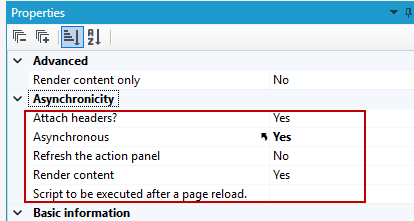
- In this way, dynamics is achieved on the form, e.g. in the dynamic recalculation of values, the appearance and disappearance of elements.
- In components that group fields, such as List, Container, Container (flow), and Tabs, enabling async allows you to reload only the fields within a single grouping component without having to refresh the entire form.
- Refreshing an asynchronous container can be triggered by any event (action calls, control events) occurring within that container.
Example of use of an async container
Asynchronous container
Events on element
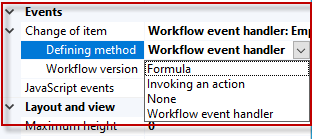
For most controls you can define an event that will be executed automatically by the system when the user selects a value in a field on the form. Depending on the control, you can assign an action or a predefined workflowto the event, as well as use a formula.
- To assign an event to a checkbox, for example, use the Change of item property, where you indicate the type of action to be performed. For more see: Event handling.