JavaScript scripts provided by archITekt
archITekt in the Forms provides a set of scripts that the form designer can use.
Global
VBP.Click(business_name or guid_action)- clicks the indicated button,VBP.ClosePopup()- close the popup window,VBP.Disable(business_name[, ...])- disable the indicated controls,VBP.DisableIf(condition, business_name[, ...])- conditional disable the indicated controls,VBP.DownloadFile(url)- download the file located at the indicated url,VBP.Enable(business_name[, ...])- enable the indicated controls,VBP.Get(business_name)- retrieve the DOM object of the control with the indicated business name,VBP.GetCurrentTab(business_name_control_tabs)- retrieve the index of the currently selected tab,VBP.GetValue(business_name[, index])- get the value of the specified control. In case of multiple controls with the same name (e.g. in a recurring list), indicate the index of the control,VBP.Hide(business_name[, ...])- hides controls with the specified business names,VBP.IsDisabled(business_name)- checks if the control is disabled,VBP.IsEmpty(business_name)- checks if the specified control is empty (value is not set),VBP.IsVisible(business_name)- checks if the indicated control is visible,VBP.SetValue(business_name, value[, index])- sets the value of the indicated control. If there are more controls with the same business name (for example, in a recurring list), indicate the index of the control,VBP.Show(business_name[, ...])- shows controls with the specified business names,VBP.ShowIf(condition, business_name[, ...])- conditionally show controls with given business names,Dialog.FireAction(id_action, data_action)- lets you execute an action with the given id and pass the given data to it,CLID(business_name)- returns all identifiers generated for the control with the given business name (if the control is on the recurring list, there will be as many such identifiers as there are instances of the given control).
Confirmation window
Dialog.Confirm(content, function_to_OK)Dialog.Confirm(content, title, function_to_OK)Dialog.Confirm(content, title, button_name_OK, function_on_OK)Dialog.Confirm(content, title, button_name_OK, button_name_Cancel, function_on_OK)
Information Window
Dialog.Ok(content)Dialog.Ok(content, title)Dialog.Ok(contents, title, button_name)
Custom Window
Dialog.Custom(content, title, {})- window without buttons,Dialog.Custom(content, title, buttons)- window with buttons, where buttons built as object:
{
"Button 1": function(e) { ... },
"Button 2": function(e) { ... }
}
Iframe window - allows you to open another page inside a popup
Dialog.ShowIFrame(arguments)- popup window arguments in the form of an object:
{
url: page address,
width: width,
height: height,
title: title
}
For recurring lists (functions called within an event on a control that is in a recurring list, example below)
VBP.List.Setup(this, control's business_name)- "informing" the script that we are going to operate on a recurring list (first argument - current control, second argument - business name of current control). Function is always called first,VBP.List.Disable(business_name[, ...])- disable specified controls,VBP.List.DisableIf(business_name[, ...])- conditionally disable the selected controls,VBP.List.Enable(business_name[, ...])- enable the selected controls, 5,VBP.List.Get(business_name)- returns the DOM object of the indicated control,VBP.List.GetValue(business_name)- returns the value of the specified control,VBP.List.Hide(business_name[, ...])- hides the controls with the specified business names,VBP.List.IsDisabled(business_name)- checks if the indicated control is disabled,VBP.List.IsEmpty(business_name)- checks if the indicated control is empty (value is not set),VBP.List.IsVisible(business_name)- checks if the indicated control is visible,VBP.List.SetValue(business_name, value)- sets the value of the specified control,VBP.List.Show(business_name[, ...])- shows the controls with the specified business names,VBP.List.ShowIf(condition, business_name[, ...])- conditionally show the controls with the given business names.
A script executed within a recurring list item
On the selection control on the OnChange event (JavaScript Events property), we define a script.

Recurring list item
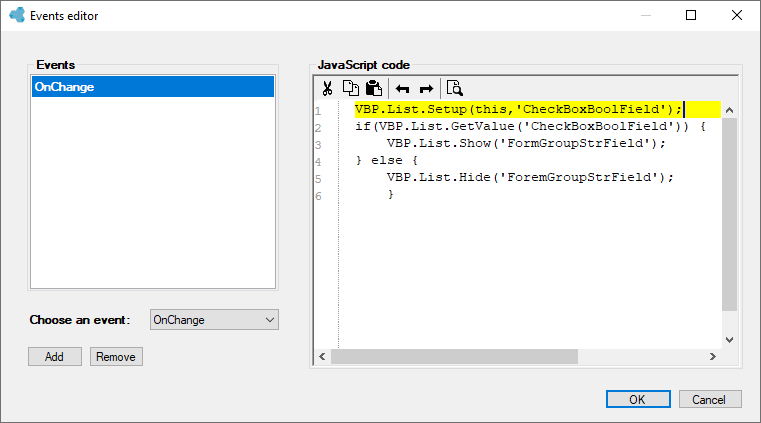
Script on the OnChange event
The above script on line 1 "informs" the list that we will perform operations on the current list element. In the argument, we pass this (the current control) and the business name of the control from which the OnChange event flew. Later we have logic where we retrieve the value of the selection control with the given name and depending on the returned value, we show or hide the control named FormGroupStrField, Everything is done within a single recurring list item.
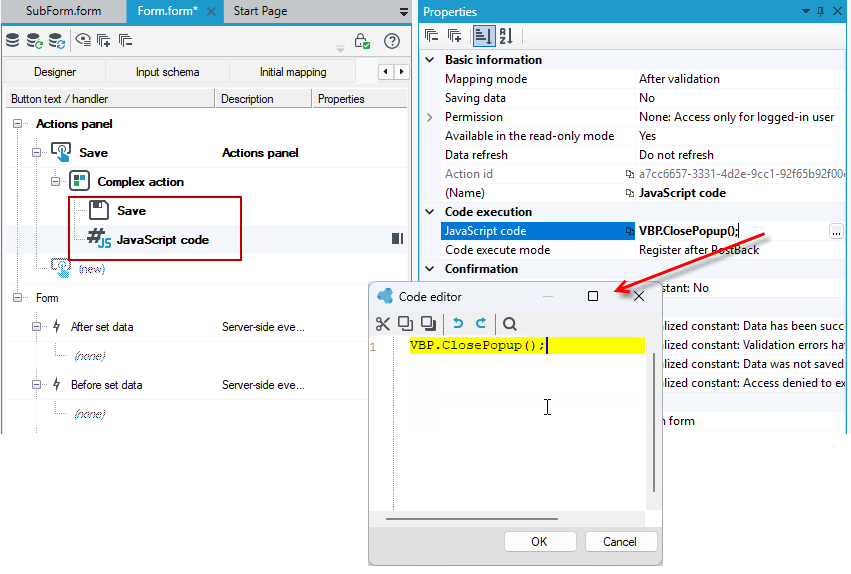
Closing a popup window
Another example of using a script is closing a popup window.
- You can define a complex action on a form.
- After the Save action, select the JavaScript code action.
- On the Properties panel, in the JavaScript code section, type a script to close the popup window:
VBP.ClosePopup() - Select the Code execution mode. Here, it is Button click.
- The window will be closed just after the Save action is executed.