Creating a document data structure
The first step in creating a document template is creating a data structure for the document.
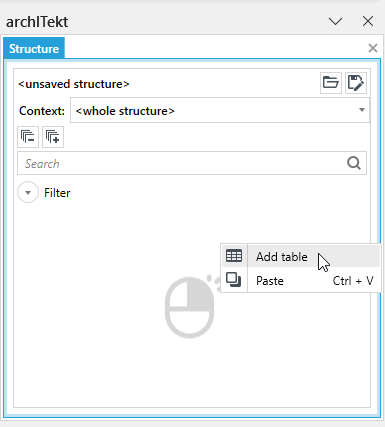
- Activate the Structure panel, then right-click on it and select the Add table button.
Field types in the data structure
Tables in the context of the data structure for a document are groups of data to which you can add fields that transmit data from an external system to a document. When you right-click on a table, you can add the following field types to the table: text field, numeric field, date field, logical value, binary value, and chart data.
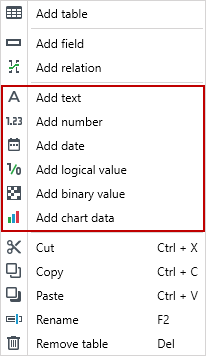
- Text fields are fields that are used to insert text values into the document (for example, client’s first and last name). They can be inserted into the document in the Value tag or used in the List tag.
- Numeric fields are fields that can be used to pass numbers into the document (eg loan amount). They can be inserted into the document in the Value tag or used in the List tag.
- Date fields are fields through which dates are passed. They can be inserted into the document in the Value tag or used in the List tag.
- Logical value is a field that takes the values True / False. These fields are used to configure the Condition and Symbol tags.
- Binary values are fields that can be used to transfer images and other documents to a document. They are used to configure the Image and Document tags.
- Chart data is a field where data for a chart can be passed to the document. The field is used to configure the Chart tag.
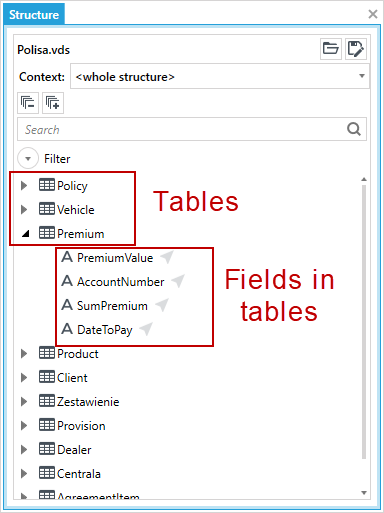
Both table names and field names in the data structure cannot start with a digit, they cannot contain the so-called white characters (e.g. spaces, tabs) or national characters (e.g. ś, ć, ź). Names can only consist of numbers and letters, and dashes or underscores (- or _).
Creating data relation
As a part of the data structure being built, links can be created between the tables. To do this, use the Add relation relational option.
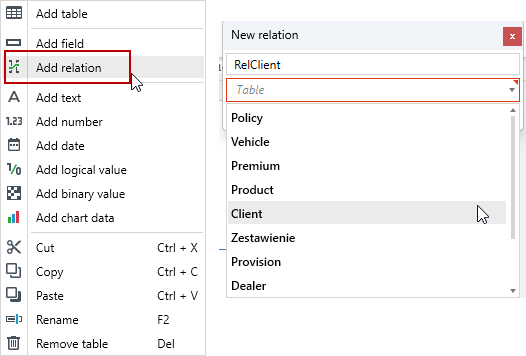
You can change the name of the table and delete it.
To delete a table, first delete all fields and relation that are added within the table. However, if the fields of the data structure have been used in tags in the document, then to be able to remove them from the structure, remove the tags in which the fields are used first.