Version Server Tree
Each of the business elements that make up the application is stored in the Version Server as an XML format file, automatically recognized and processed by the System. Each file can have multiple versions with specific validity periods, only one of them being valid at a given time. The version server files are organized in a tree structure of directories and subdirectories, based on the file type (directories are automatically created to store files of forms, lists, data structures, etc.).
Depending on the selected view, items in the version server can be displayed by type or with physical division. You can change the view in the menu panel.
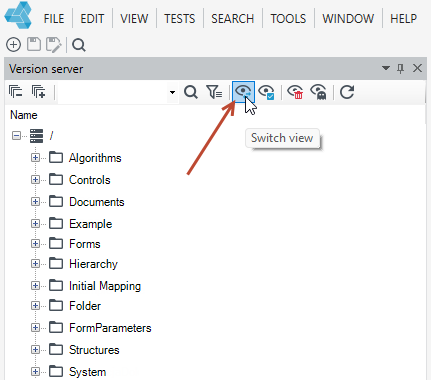
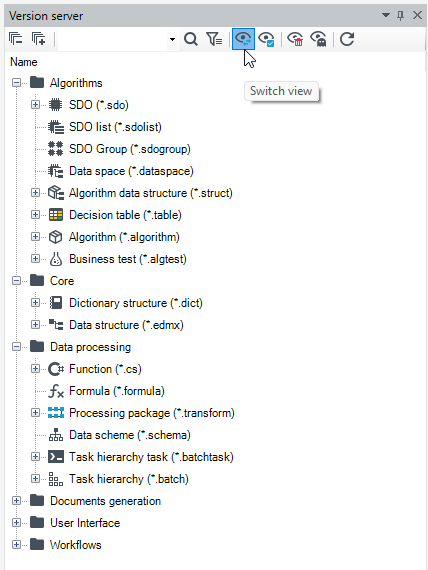
Use the simple or advanced filter to search for items.

Moreover, from the level of the menu panel it is also possible to:
 - collapse and expand the version server tree
 - refresh the tree
 - display fields to select items
 - display deleted items
 - display hidden items
Version save
Elements that you create in archITekt Studio can be saved by selecting the Save or Save as option. A version number is assigned while saving.
Save as option is available only for the database Version server.
Differences between Save and Save as:
- After selecting the Save option or button, all changes made will be saved in the edited version. The version number and name will not change.
- After selecting the Save as option or button, the edited version will be saved as a new draft. The version number will change.
- A version number is assigned when saving a version. The next version is marked with an integer that is increased when saving the next draft (using the Save as button).
User can edit a saved version, lock a version for editing, take over a version editing, unlock a version, undo changes made to a version, rename a version, delete a version, export and import a version, and clone or copy a version, and view the properties and history of the version. See Version editing, Version Properties, Performing operations on a Version.
The Version server allows you to check whether all elements of the application being built work as originally planned. See Mass Validation.