Version server file organization
The definition of the end user application is stored in a tree structure of directories and files in the Version server (depending on the configuration of the environment, this will mean physical files on disk or a dedicated database). Each form, workflow, data structure, algorithm or data processing package defined in the application is a separate file in the Version server. They can be named and grouped in directories freely, without affecting the application behavior - the appropriate arrangement of directories and files is only to help organize the project and make it easier for the application designer to quickly find the definition he is looking for.
Physical view
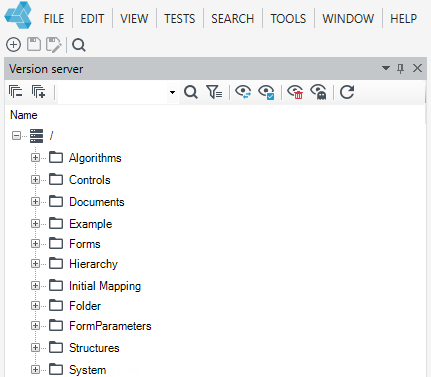
The physical view, being the default view, shows the actual file organization on the Version server.
Type view
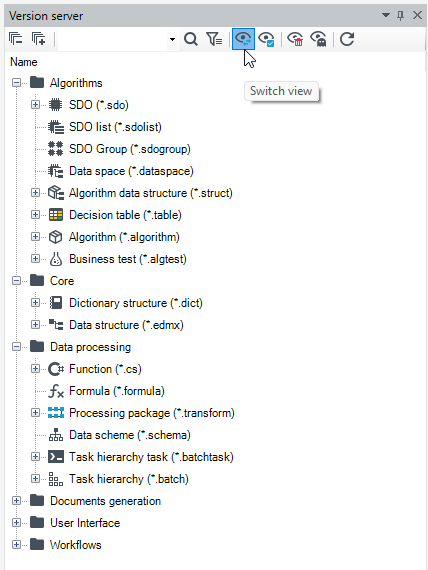
Type view is an alternative view available after selecting the option marked with a blue frame below, in which files are grouped according to the type of definition contained in them (e.g. form or workflow).
Good practices
Proper organization of files and directories is crucial when working on larger projects. Below are some suggestions that will help in organizing the project so that it is easier to keep order in the later stages of the project:
Appropriate file and directory naming
- Develop a glossary of terms - this will prevent the use of different words interchangeably to name the same concepts (business and technical).
- Specify the naming convention - we suggest using the so-called PascalCase, i.e. writing without spaces, each word with a capital letter.
- Establish naming rules:
- Names should be short, but to the extent that ensures unambiguous definition of what a given file contains.
- Names should be easily distinguishable - e.g. subsequent variants of the form for editing the subject should not be named. SubjectDetails1.form, SubjectDetails2.form, SubjectDetails3.form
- Names should not contain the file type, because it is included in the extension, i.e. instead of SubjectForm.form, just use Subject.form.
- Names should not contain any special or diacritic characters (only lowercase and uppercase Latin letters and numbers are allowed).
- Names should be pronounceable - so that they can be easily used during the conversation.
- Names representing data structures should be singular (Client.edmx instead of Clients.edmx).
- In the case of data structures, it is worth considering the use of a common business prefix for all structures that define one object (e.g. User.edmx, UserAddress.edmx, UserAccount.edmx) - these names translate directly to table names in the database by default. Using this convention makes it easier to work with SQL later.
Division into objects and functionalities
- Specify what business elements the application will be built of, the objects should correspond to the main directories.
- Subdirectories may correspond to groups of system functionalities, e.g. files that make up the definition of the entire user form along with the business logic used by it.
Decomposition
- Repetitive elements in different definitions should be placed in separate files - so that they can be used many times.
- It's also a good idea to break up complex definitions into smaller ones to get a top-down view.