Error handling workflow
An error may occur while a workflow is running, often for reasons outside the workflow itself – e.g. when a connection to an external service cannot be established. By default, a workflow in which an unhandled error occurs is interrupted.
To prevent this, you can specify an error handling workflow, i.e. a separate workflow that is started automatically when an unhandled error occurs in the main workflow. The error handling workflow can, for example, set the application status to "rejected" or "error", save information about the error or notify the user.
The error handling workflow applies to errors that have not been handled within the workflow itself. If you want to handle an error of a specific activity directly on the diagram, use the error handling output port. You can also raise an error deliberately with the Throw error activity. See: Output port for error handling and Throw error.
Specifying the error handling workflow
- Open the main workflow for editing.
- Click an empty space on the workspace and go to the Properties panel. No diagram element may be selected – otherwise the Properties panel shows the properties of the selected element instead of the whole workflow.
- In the Error handling workflow section, select the workflow to be started when an error occurs in the main workflow.
- If the error handling workflow needs data from the main workflow, define mappings in the Input variables section.
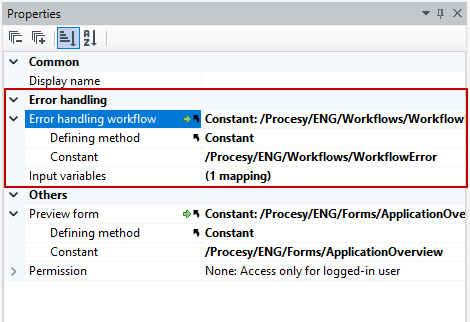
The error handling workflow does not automatically know the data the main workflow was running on. If, for example, it should set the application status to "rejected", pass it the Id of the data element on which the main workflow was started in the input parameters. This way, the error handling workflow knows for which data element it should perform the mappings.
How the error handling workflow works
When an unhandled error occurs in the main workflow:
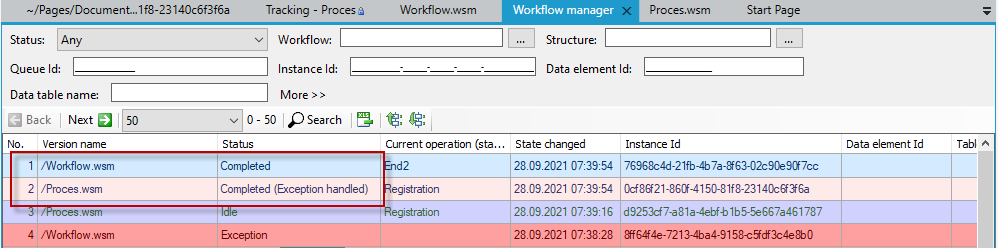
- the main workflow ends with the status Completed (exception handled),
- the error handling workflow is started with the passed input parameters,
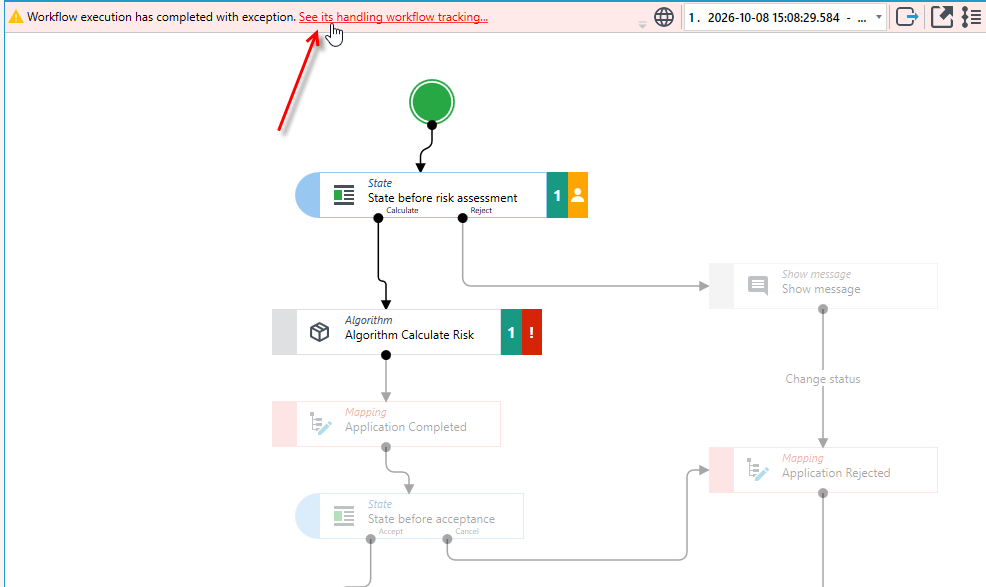
- the web application displays information on the form that the workflow execution ended with an error.
From the tracking of the main workflow, you can go to the tracking of the started error handling workflow.
The workflow manager shows both workflows: the main workflow with the status Completed (exception handled) and the error handling workflow with the status Completed.