Workflow database
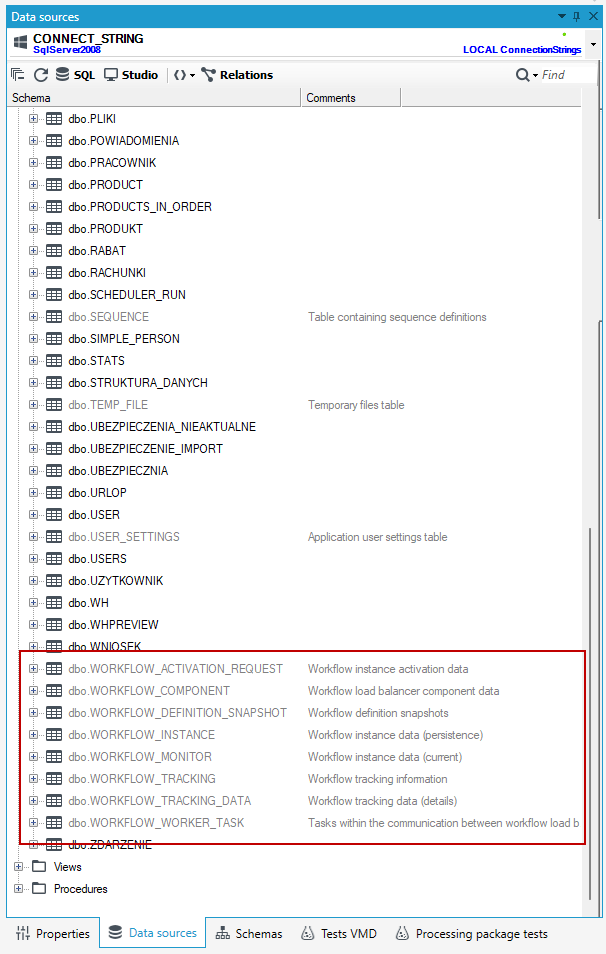
Workflows operate based on their own tables within the business database — transactions created by the state machine include both the business data processed by operations within the workflow and the persistence layer. Other workflow-related data (activation, monitoring and locking, tracking, tasks) is saved through separate transactions. Detailed information regarding the data stored in specific columns of the tables listed below can be found in the database column descriptions. Workflow instances in the database are identified using a uniqueidentifier.
Activation, Monitoring, and Locking
WORKFLOW_ACTIVATION_REQUEST– contains data related to activation (the request to create a process instance), such as the process definition version, input parameters, execution context (parent instance, owner and host, launch type: InProc/Remote, etc.)WORKFLOW_MONITOR– contains data related to the monitoring and locking of instances, such as status, lock timestamp, execution thread stamp, exception, exception operation, etc.
Persistence
WORKFLOW_INSTANCE– stores information about the process state, such as the state name, process variable values (in XML format), identifiers for related business data, actor ID, etc. Data in this table is stored within the main process transaction dedicated to the operations executed between states.WORKFLOW_DEFINITION_SNAPSHOT– stores snapshots of process definitions that have been executed.
Tracking
WORKFLOW_TRACKING– contains information about all events that occurred during process execution (process start and end, operations, exceptions, transitions, external control actions, etc.)WORKFLOW_TRACKING_DATA– contains additional detailed information logged during execution, such as input/output data, variables, and errors.
Tasks, NLB
WORKFLOW_WORKER_TASK– a table dedicated to sending tasks for execution by the Workflow.Host service.WORKFLO\_COMPONENT– a table containing a list of components in the Workflow NLB (Network Load Balancing) infrastructure.
In addition to the above tables, the database contains views that provide easier access to process-related data:
- Dictionaries (Views that present numerically stored status/type values in a human-readable form)
vwActivationStatus– activation statuses of the workflowvwComponentType– component types in the Workflow NLB infrastructurevwExecutionStatus– workflow statuses in the monitor and in the tracking operationvwInvokeType– workflow invocation typesvwTaskPriority– task prioritiesvwTaskStatus– task statusesvwTaskType– task types
- Activation, Monitoring, and Locking
vwWorkflowActivationRequest– view on the activation table with joined dictionariesvwWorkflowMonitor– view on the monitor table with joined dictionaries
- Persistence
vwWorkflowInstance– view on the persistence table with joined dictionariesvwWorkflowInstanceData- view on the persistence table with joined dictionaries and the values of persisted variables (stored in XML) shown in tabular formvwWorkflowDefinitionSnapshot– view on the snapshot table with the definition in XML form
- Tracking
vwWorkflowTracking– view on the tracking table with joined dictionariesvwWorkflowTrackingData– view on the tracking table with joined dictionaries and detailed datavwWorkflowEvents– view showing tracking events for the entire workflowvwWorkflowOperations– view showing tracking events for individual operations within the workflowvwWorkflowExecutions– view showing workflow events divided by iterations
- Tasks, NLB
vwWorkflowWorkerTask- view on the tasks table with joined dictionariesvwWorkflowComponent- view on the components table with joined dictionaries
- Statistics
vwWorkflowStatistics– view presenting quantitative workflow statistics in tabular form, broken down by workflow type, activation type, and workflow statusvwWorkflowActivationStatistics– view presenting quantitative activation statistics in tabular form, broken down by workflow type, activation type, and activation status
Database Procedures
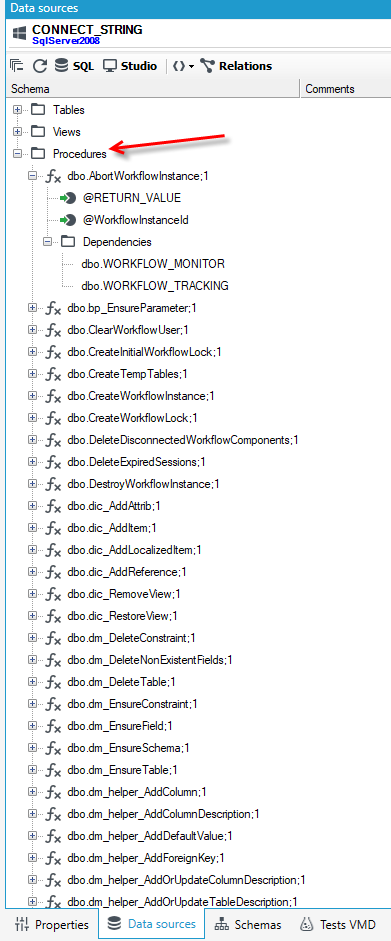
The workflows expose a set of stored procedures that make it easy to manage individual workflow instances as well as perform bulk operations on them. Procedures responsible for changing the status of a single workflow return information about the success of the action by providing the new status, or in case of failure, return the current status of the workflow (or NULL if a non-existent instance identifier was provided).
Available Procedures:
[dbo].[AbortWorkflowInstance] - Aborts the workflow (Possible in statuses: Created, Idle, Running, Stopping). The procedure returns the status of the instance after the change:
- (Created,Idle) => Aborted
- (Running, Stopping) => Aborting
- (Other) => (Other)
- Non-existent workflow => NULL
DECLARE @WorkflowInstanceId uniqueidentifier

-- TODO: Set parameter values here.

EXECUTE [dbo].[AbortWorkflowInstance]

   @WorkflowInstanceId

GO
[dbo].[StopWorkflowInstance] - Stops the workflow (Possible in statuses: Created, Idle, Running). The procedure returns the status of the instance after the change:
- (Created,Idle) => Stopped
- (Running) => Stopping
- (Other) => (Other)
- Non-existent workflow => NULL
DECLARE @WorkflowInstanceId uniqueidentifier

-- TODO: Set parameter values here.

EXECUTE [dbo].[StopWorkflowInstance]

   @WorkflowInstanceId

GO
[dbo].[DestroyWorkflowInstance] - Destroys the workflow (Possible in statuses: Completed, Exception, Stopped, Aborted). Returns:
- 1 – Workflow successfully removed
- 0 – Workflow does not exist or was not removed
DECLARE @WorkflowInstanceId uniqueidentifier

-- TODO: Set parameter values here.

EXECUTE [dbo].[DestroyWorkflowInstance]

   @WorkflowInstanceId

GO
[dbo].[RestartWorkflowInstance] - Restarts the workflow (Possible in statuses: Exception, Stopped, Aborted). The procedure returns the status of the instance after the change:
- (Exception, Stopped, Aborted) => Created
- (Other) => NULL
- Non-existent workflow => NULL
DECLARE @WorkflowInstanceId uniqueidentifier

DECLARE @Data nvarchar(max) -- workflow input parameters

-- TODO: Set parameter values here.

EXECUTE [dbo].[RestartWorkflowInstance]

   @WorkflowInstanceId

  ,@Data

GO
[dbo].[ResumeWorkflowInstance] - Resumes the workflow without changing the state. (Possible in statuses: Exception, Stopped, Aborted). The procedure returns the status of the instance after the change:
- (Exception,Stopped,Aborted) => Idle (or Created if the workflow has no state set — e.g., an exception occurred before the first transaction was committed)
- (Other) => NULL
- Non-existent workflow => NULL
DECLARE @WorkflowInstanceId uniqueidentifier

DECLARE @State varchar(8000) –- workflow state after resumption

DECLARE @WorkerStamp varchar(255)

-- TODO: Set parameter values here.

EXECUTE [dbo].[ResumeWorkflowInstance]

   @WorkflowInstanceId

  ,@State OUTPUT

  ,@WorkerStamp OUTPUT

GO
[dbo].[ResumeWorkflowInstanceAt] - Resumes the workflow and sets a new state. (Possible in statuses: Exception, Stopped, Aborted). The procedure returns the status of the instance after the change:
- (Exception, Stopped, Aborted) => Idle
- (Other) => NULL
- Non-existent workflow => NULL
DECLARE @WorkflowInstanceId uniqueidentifier

DECLARE @State varchar(8000) –- workflow state after resumption

DECLARE @Data nvarchar(max) –- variable values after resumption

DECLARE @PrimaryDataElementId int –- ID of the data element on which the workflow will operate after resumption

DECLARE @PrimaryDataElementTable varchar(128) –- business data table on which the workflow will operate after resumption

DECLARE @PrimaryDataElementVersionId uniqueidentifier –- business data structure on which the workflow will operate after resumption

DECLARE @FormId uniqueidentifier –- identifier of the form version used for workflow preview in the state after resumption

DECLARE @UserId varchar(64) –- identifier of the workflow executor after resumption (the actor who can trigger the workflow)

DECLARE @NextTimer datetime –- in case of resumption into a state with a timed exit, specifies the date and time for automatic workflow trigger

DECLARE @PreviousState varchar(8000) –- workflow state before resumption

DECLARE @WorkerStamp varchar(255) –- workflow stamp before resumption

-- TODO: Set parameter values here.

EXECUTE [dbo].[ResumeWorkflowInstanceAt]

   @WorkflowInstanceId

  ,@State

  ,@Data

  ,@PrimaryDataElementId

  ,@PrimaryDataElementTable

  ,@PrimaryDataElementVersionId

  ,@FormId

  ,@UserId

  ,@NextTimer

  ,@PreviousState OUTPUT

  ,@WorkerStamp OUTPUT

GO
[dbo].[UpdateWorkflowInstance]- Updates the definition of a running workflow. (Possible in statuses: Exception, Stopped, Aborted). Returns:
- Passed @TypeId – update successful
- NULL – workflow does not exist, has an invalid status, or has the current definition already
DECLARE @WorkflowInstanceId uniqueidentifier

DECLARE @TypeId uniqueidentifier –- target snapshot ID

-- TODO: Set parameter values here.

EXECUTE [dbo].[UpdateWorkflowInstance]

   @WorkflowInstanceId

  ,@TypeId

GO
When updating the definition of a running workflow, it is required to create a new workflow snapshot in the database. (If multiple workflows of the same type are being updated, the procedure only needs to be called once.)
The following procedure is used for this purpose.
DECLARE @VersionId uniqueidentifier

DECLARE @WorkflowDefinition nvarchar(max)

DECLARE @Id uniqueidentifier

-- TODO: Set parameter values here.

EXECUTE [dbo].[InsertWorkflowSnapshot]

   @VersionId –- workflow version ID

  ,@WorkflowDefinition –- new XML definition

  ,@Id OUTPUT –- ID of the created snapshot (or of the existing one, if the version and XML definition match)

GO
[dbo].[UpdateWorkflowUser] - Assigns a workflow executor. (Possible in status: Idle). Returns:
-
Provided @UserId – assignment successful
-
NULL – workflow does not exist, has an invalid status, already has the same executor, has a different executor and @Reassign = 0, or has no executor set and @Reassign = 1
DECLARE @WorkflowInstanceId uniqueidentifier

DECLARE @WorkerStamp varchar(255) –- current workflow snapshot

DECLARE @CurrentState varchar(8000) –- current state of the workflow

DECLARE @DecisionMakerId varchar(64) –- identifier of the user assigning the workflow executor

DECLARE @UserId varchar(64) –- identifier of the user who can become the workflow executor

DECLARE @Reassign bit –- flag indicating whether this is a reassignment (1) of a previously assigned executor or a new assignment (0)

-- TODO: Set parameter values here.

EXECUTE [dbo].[UpdateWorkflowUser]

   @WorkflowInstanceId

  ,@WorkerStamp

  ,@CurrentState

  ,@DecisionMakerId

  ,@UserId

  ,@Reassign

GO
[dbo].[ClearWorkflowUser] - Removes the workflow executor (Possible in status: Idle). Returns:
- The previously assigned executor – removal successful
- NULL – workflow does not exist, has invalid status, or no executor was set
DECLARE @WorkflowInstanceId uniqueidentifier

DECLARE @WorkerStamp varchar(255) –- current workflow snapshot

DECLARE @CurrentState varchar(8000) –- current state of the workflow

DECLARE @DecisionMakerId varchar(64) –- Identifier of the user removing the workflow executor restriction

-- TODO: Set parameter values here.

EXECUTE [dbo].[ClearWorkflowUser]

   @WorkflowInstanceId

  ,@WorkerStamp

  ,@CurrentState

  ,@DecisionMakerId

GO